Outlet Setup
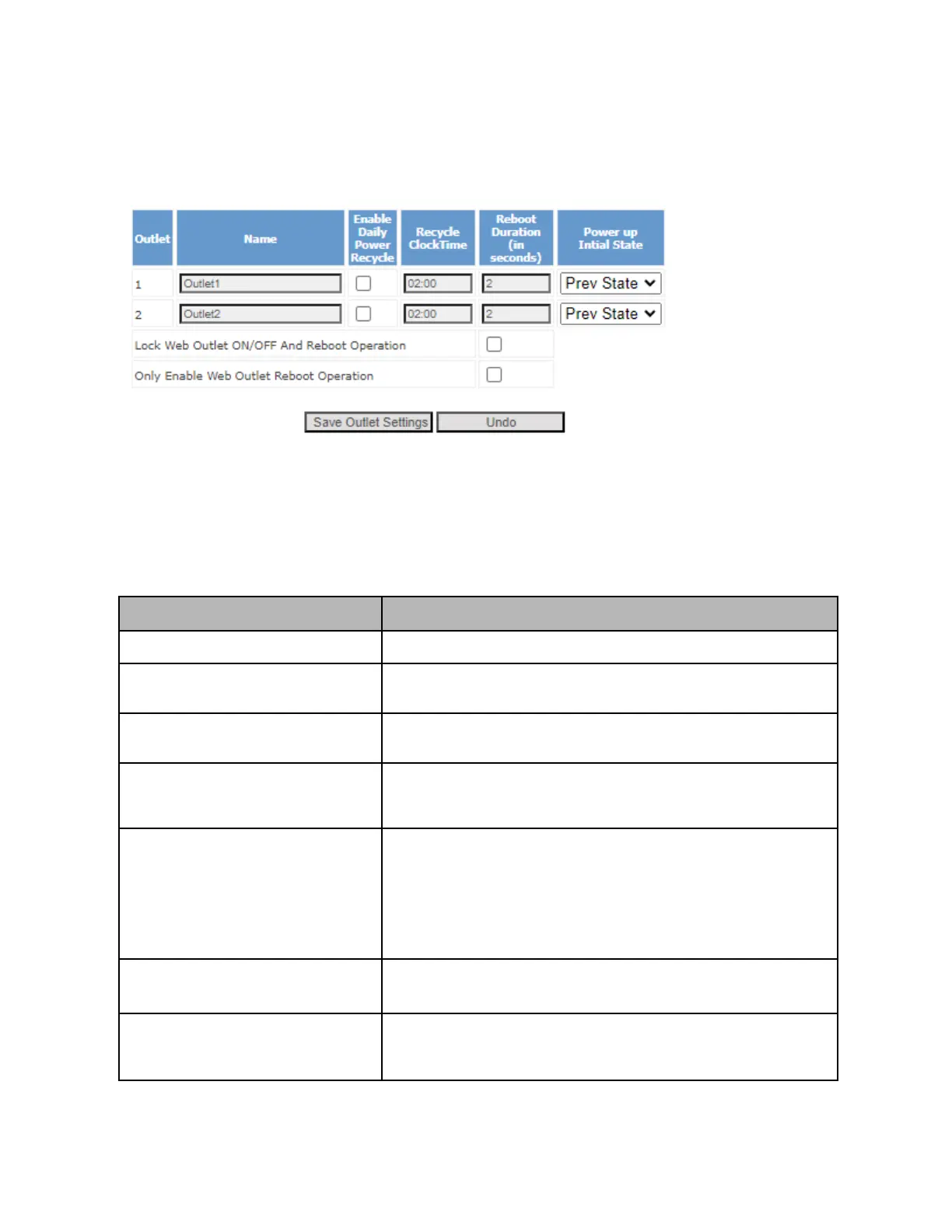
In the Web UI, you can configure various Outlet operation settings in the “Outlet Setup” section of the left
hand menu.
Please note that making a change in this section requires you to click on the “Save Outlet Settings”
button within that section (and not necessarily the Save button at the bottom of the screen.
For basic outlet operations and settings (pictured above), refer to the following table for more
information:
Configure a designed name for a given outlet
Enable Daily Power Recycle
If enabled, this will trigger a daily reboot at a specified time (see next
column “Recycle ClockTime”).
If “Daily Power Recycle” is enabled, then the daily reboot will happen
at this specified time.
When a Reboot operation is triggered for this outlet (including daily
power cycle and normal reboot operation), this setting describes how
long to wait (in seconds) between turning off and turning back on.
When the device powers on, this sets what power state to set the
outlet to.
ON: Outlet will always be turned ON when the device powers up
OFF: Outlet will always be turned OFF when the device powers up
Prev State: Outlet will be set to the last known state before device was
powered off.
Lock Web Outlet ON/OFF and Reboot
Operation
If this setting is enabled, then users will be unable to control outlets via
Web UI (only monitor).
Only Enable Web Outlet Reboot
Operation
If this setting is enabled, then Web UI users will only be able to initiate
Reboot commands for outlet control (provided the previous “Lock web
outlet ON/oFF and reboot operation” is disabled).



 To Next Page