Need help?
Do you have a question about the Synco P2T and is the answer not in the manual?
Explains the basic steps for using the transmitter and receiver.
Details the process for connecting the TX and RX, including button presses and indicator lights.
Describes how to charge the TX transmitter and the charging case itself.
Outlines how to check the remaining battery power for the TX and charging case.
Explains how to activate and switch between different sound effects on the receiver.
Details how to switch between mono and stereo audio modes on the receiver.
Lists technical details for the TX transmitter, including wireless transmission and frequency response.
Details specifications for the wireless charging case, such as battery type and charging port.
Provides technical data for the RX receiver, including wireless transmission and dimensions.
Instructions on how to charge an external phone device using the receiver's Type-C port.
Guide for setting up real-time monitoring of mic recording using headphones.
Outlines conditions under which the product warranty is voided or not applicable.
Steps for customers to follow when making a warranty claim or seeking support.
Details the warranty period and the terms for free replacement or repair service.
The SYNCO P2T is a compact and portable microphone system designed for various audio recording needs, offering a blend of functionality, ease of use, and maintenance features.
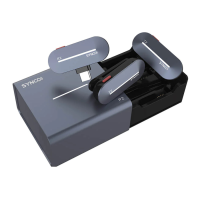
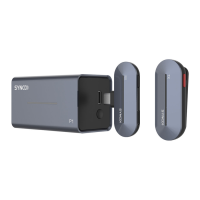
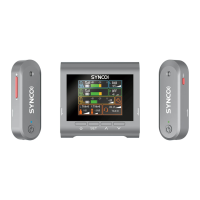
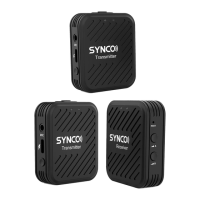
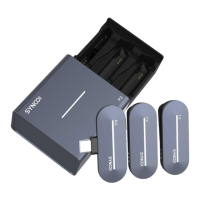
The SYNCO P2T system primarily consists of two TX Transmitters, one RX Receiver, and a Wireless Charging Case. It is designed for wireless audio transmission, allowing users to capture sound from the transmitters and receive it on the receiver, which can then be connected to a smartphone or other compatible devices. The system supports both mono and stereo recording, with various vocal effects to enhance audio quality and creativity. The wireless charging case serves as a convenient storage and charging solution for the transmitters and receiver, ensuring they are always ready for use. The system also features in-ear monitoring, allowing users to listen to their audio in real-time.
Getting Started: To begin using the SYNCO P2T, simply tap on the right side of the charging case to pop out the drawer. Take out the TX transmitters and RX receiver. The TX transmitters will automatically boot up upon removal from the case and switch off automatically when returned. The RX receiver also boots automatically when plugged into a smartphone. Forcible switching of the TX can be done by long-pressing the Power button for 3 seconds.
Pairing: For pairing, place both the TX transmitters and RX receiver into the charging case, ensuring their contacts are properly connected. Then, with the drawer open, long-press the Pairing button on the case for 3 seconds. Successful pairing is indicated by the TX and RX indicators lighting up and illuminating sequentially. The transmitters will automatically switch off if unpaired or disconnected for 5 minutes, conserving battery.
Charging: To charge the TX transmitters, place them in the case with their contacts connected. To charge the wireless charging case itself, connect it to a power supply using the provided charging cable. The system features indicators that show charging status and turn off when fully charged.
Power Check: To check the remaining power of the TX transmitters, short-press the Power button; the indicators will light up for 5 seconds according to the power level. For the charging case, short-press the Power Prompt button, and the indicators will illuminate for 5 seconds, indicating the remaining power.
Vocal Effects: The SYNCO P2T offers a range of vocal effects to customize your audio. Short-press the Vocal Effects button on the receiver to cycle through effects such as Original, Studio FX, KTV FX, Voice Amplification, EDM (Electronic Dance Music), Baby FX, Male to Female, Female to Male, and Monster FX. The default effect is "Original." It's important to note that vocal effects apply to both transmitters, but in Stereo mode, only the "Original" effect is supported, and other vocal effects are unavailable.
Mono/Stereo Mode: To switch between Mono-Original and Stereo modes, long-press the Mono/Stereo button on the RX receiver once. For other vocal effects in Mono mode, long-press the Mono/Stereo button on the RX receiver once to activate Mono-Other vocal effects.
Charging Phone Device: The RX receiver can also be used to charge a phone device. Simply plug your phone's charging cable into the Type-C Port on the receiver.
In-Ear Monitoring: For real-time audio monitoring, plug the included Type-C to 3.5mm Adapter into the Type-C Port on the receiver. Then, connect your headphones to the adapter to monitor microphone recording and device backgrounding in real-time. Note that the included Type-C to 3.5mm Adapter is exclusive to this device and not available for other devices.
Indicator Lights: The system uses various indicator lights to communicate its status:
General Care: To ensure the longevity and optimal performance of your SYNCO P2T product, it is crucial to keep it in a dry, clean, and dust-free environment. Avoid exposing the product to corrosive chemicals, liquids, or heat sources, as these can cause mechanical damage. For cleaning, use only a soft and dry cloth.
Handling Precautions: Malfunctions can occur due to dropping, impacts, or external force. It is strongly advised not to attempt to disassemble the product, as doing so will void the warranty. In case of any malfunctions, the product should be checked or repaired by authorized technicians only. Failure to follow these instructions may result in mechanical damage. The warranty does not cover human errors.
 General
| Input Connector | 3.5mm TRS |
|---|---|
| Output Connector | 3.5mm TRS |
| Polar Pattern | Omnidirectional |
| Charging Time | 2 Hours |
| Sampling Rate | 48 kHz |
| Frequency Range | 2.4 GHz |
| Transmission Distance | 50m (LOS) |
| Connectivity | Wireless |
| Operating Range | 100m (328ft) in open space |
| Max SPL | 120dB |
| Power Supply | Built-in rechargeable battery |
| Sensitivity | -38 dB ± 2dB |

 To Next Page