
 Need help?
Do you have a question about the Synology DiskStation DS3615xs and is the answer not in the manual?
The Synology DiskStation DS3615xs is a high-performance network-attached storage (NAS) device designed for demanding business environments, offering robust data management, sharing, and backup capabilities. It functions as a centralized storage solution, allowing users to store, access, and manage their data across a network. The DiskStation is powered by Synology's DiskStation Manager (DSM), a browser-based operating system that provides a rich suite of applications and services for various tasks, including file serving, backup, virtualization, and surveillance.
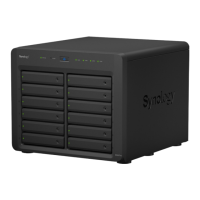
The primary function of the DS3615xs is to provide scalable and reliable storage for businesses. It supports up to 12 hard drives, offering significant storage capacity that can be further expanded with Synology Expansion Units. This makes it suitable for storing large volumes of data, such as documents, multimedia files, and database backups. The device supports various RAID configurations (Basic, JBOD, RAID 0, RAID 1, RAID 5, RAID 6, RAID 10, and Synology Hybrid RAID), allowing users to balance between data redundancy and performance based on their specific needs. RAID configurations are crucial for data protection, as they allow the system to continue operating even if one or more drives fail.
Beyond raw storage, the DS3615xs acts as a versatile server. It can serve files to multiple clients across different operating systems (Windows, Mac, Linux), facilitating seamless collaboration and data sharing within an organization. It also supports advanced network protocols, ensuring compatibility with existing IT infrastructures. The device is designed to handle demanding workloads, making it suitable for applications like virtualization storage, email servers, and web hosting. Its robust hardware, including a powerful processor and ample RAM (expandable), ensures smooth operation and efficient data processing.
Data backup is another core function of the DS3615xs. DSM offers comprehensive backup solutions, allowing users to back up data from their computers to the DiskStation, as well as backing up the DiskStation's data to external drives, other Synology NAS devices, or cloud services. This multi-layered backup strategy helps protect critical business data from various threats, including hardware failures, accidental deletions, and cyberattacks. The device also supports scheduled power on/off and HDD hibernation, contributing to energy efficiency and extending drive lifespan.
The DS3615xs is designed for ease of use, despite its powerful capabilities. The initial setup involves installing hard drives into the drive trays, connecting the device to the network, and powering it on. The drive trays are designed for tool-less installation of 3.5" drives, simplifying the process. For 2.5" drives, a screwdriver is required. Once the drives are installed, they are secured in place with fastening panels or screws, and the drive trays are locked with a key to prevent accidental removal.
The DiskStation is then configured using Synology's Web Assistant, a built-in tool that helps download and install the latest version of DSM. This web-based interface guides users through the installation process, making it accessible even for those with limited IT experience. DSM itself provides an intuitive graphical user interface (GUI) that allows users to manage all aspects of the DiskStation, from creating storage volumes and user accounts to configuring network settings and installing applications.
The front panel of the DiskStation features several LED indicators that provide real-time status updates. The Status Indicator shows the system's overall health, indicating whether the volume is normal, degraded, or not created, and if DSM is installed or if the HDDs are hibernating. The Alert Indicator warns of fan failures or high temperatures. LAN Indicators show the status of network connections, indicating Gigabit, 100 Mbps, or 10 Mbps connections, as well as network activity. Drive Status Indicators show the status of each installed drive, indicating if it is ready and idle, accessing data, or experiencing an error. These indicators allow for quick visual checks of the system's operational status.
The DS3615xs offers expandability to adapt to evolving business needs. It includes a PCI Express expansion slot that supports 10GbE or Gigabit network interface cards, allowing for increased network bandwidth and improved data transfer speeds. This is particularly beneficial for environments with high data traffic or multiple concurrent users. The process of installing a network interface card involves replacing a long bracket with a short one, then inserting the card into the expansion slot and securing it. USB 3.0 ports are also available for connecting external hard drives, USB printers, and other USB devices, further enhancing its versatility.
Maintaining the DS3615xs involves monitoring its health, performing upgrades, and replacing components when necessary. The LED indicators on the front panel provide immediate visual feedback on the system's status, helping users identify potential issues quickly. For more detailed information, DSM's Info Center provides comprehensive system details, including memory usage, which is useful after a RAM upgrade.
The device supports RAM module upgrades, allowing users to expand the system's memory for improved performance, especially when running multiple applications or virtual machines. The process of adding a RAM module involves shutting down the DiskStation, disconnecting cables, removing the top and side covers, and then carefully unplugging internal cables to access the memory slots. The new module is then inserted, ensuring the retaining clips snap into place, and the covers are reassembled. After installation, users can verify the new memory capacity in DSM.
System fan replacement is another maintenance task that the DS3615xs is designed to facilitate. If a system fan malfunctions, the DiskStation will emit a beeping sound, alerting the user to the issue. The fan module can be replaced by shutting down the device, disconnecting cables, pulling out the push pins that secure the module, and then installing a new fan module. This modular design simplifies component replacement, minimizing downtime and ensuring continuous operation.
Regular software updates are also crucial for maintaining the security and performance of the DiskStation. DSM's Web Assistant ensures that users can easily download and install the latest version of the operating system, which often includes bug fixes, security patches, and new features. Synology also provides online resources and support through its website, offering documentation, FAQs, and a community forum for users to find solutions and assistance. This comprehensive support ecosystem helps users keep their DS3615xs running optimally.
 General
| Model | DS3615xs |
|---|---|
| Drive Bays | 12 |
| Hot Swappable Drive | Yes |
| Link Aggregation | Yes |
| Wake on LAN | Yes |
| Dimensions (HxWxD) | 270 mm x 300 mm x 340 mm |
| Hardware Encryption Engine | Yes |
| Maximum Memory Capacity | 32 GB |
| Compatible Drive Type | 3.5" SATA HDD, 2.5" SATA HDD, 2.5" SATA SSD |
| LAN | 4 x Gigabit Ethernet |
| PCIe Expansion | 1 x PCIe 2.0 x8 slot |
| RAID Support | Synology Hybrid RAID, Basic, JBOD, RAID 0, RAID 1, RAID 5, RAID 6, RAID 10 |
| File System | EXT4 |









 To Next Page