5
Chapter 1: Before You Start
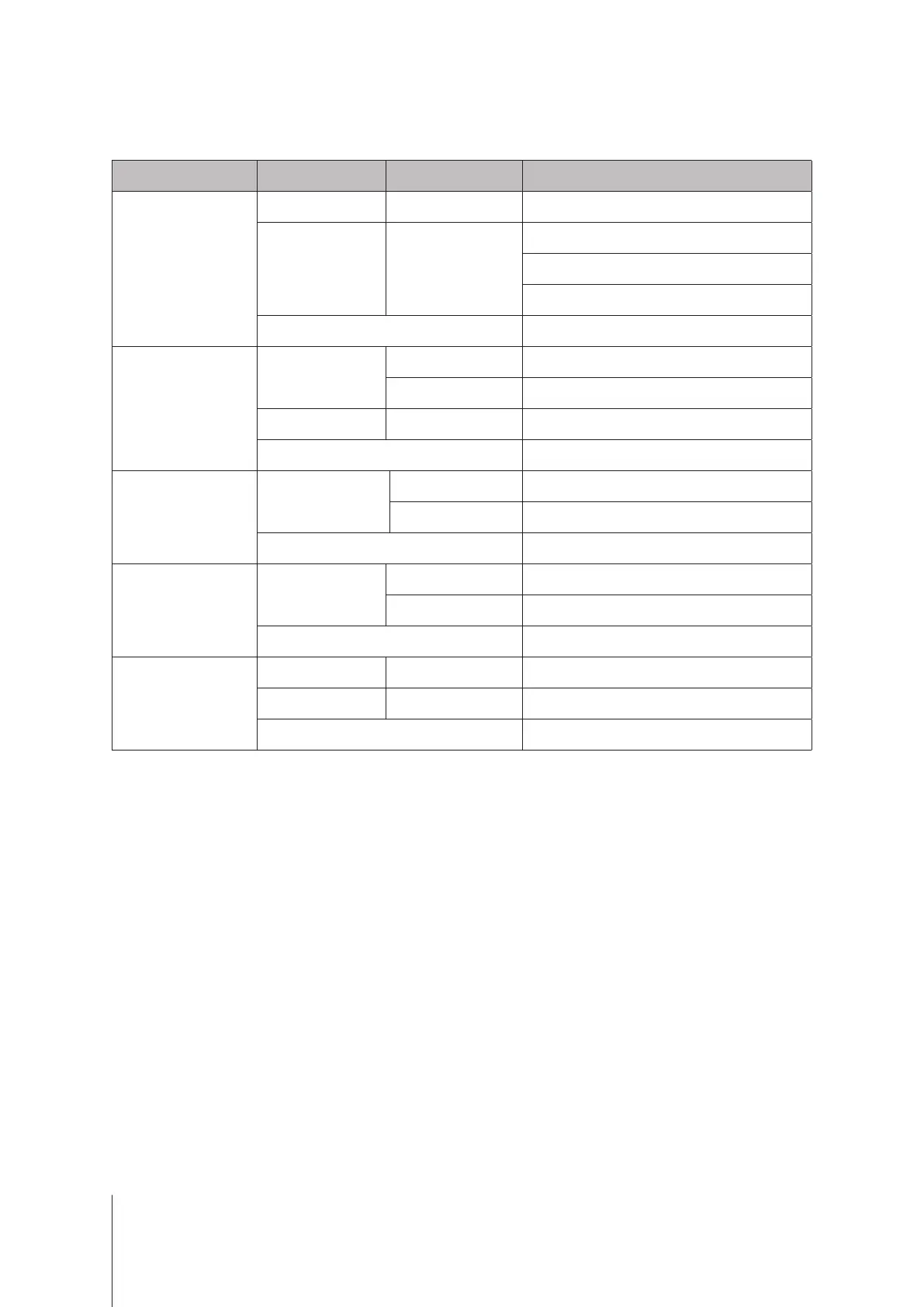
LED Indicator Color Status Description
STATUS
Green Static Volume normal
Orange Blinking
Volume degraded/Volume crashed
Volume not created
DSM not installed
O HDD hibernation
Disk 1-2
Green
Static Drive ready and idle
Blinking Accessing drive
Orange Static Drive error/Port disabled
1
O No internal drive/Advanced HDD hibernation
Power
Blue
Static Powered on
Blinking Booting up/Shutting down
O Powered o
Rear LAN
(on upper side of jack)
Green
Static Network connected
Blinking Network active
O No network
Rear LAN
(on lower side of jack)
Green Static Gigabit connection
Orange Static 100 Mbps connection
O 10 Mbps connection/No network
Note:
Model specications are subject to change without notice. Please refer to
www.synology.com
for the latest information.
LED Indicator Table
5
Appendix
1
Please try to restart your Synology NAS or re-insert the drives, then run the HDD/SSD manufacturer's diagnostic tool to check the health
status of the drives. If you can log into DSM, please run the built-in S.M.A.R.T. test to scan the drives. If the problem remains unresolved,
please contact Synology Technical Support for help.





 To Next Page