46
You can build a route from your instrument as well :
1) You first need to have some waypoints in your instrument. Create a waypoint on the
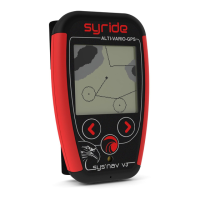
SYS’Nav, with menu “Navigation” (screen 7), then “Create waypoint”. The instrument
will ask for a waypoint name, GPS coordinate, and altitude
(optional).
If you already have a waypoint file, you can upload it to your
instrument with the SYS PC Tool (« Send a file to my instrument»
icon). The SYS PC Tool only accept OziExplorer file format.
2) Then from the SYS’Nav, go to the « Navigation » menu, then « Create route » :
- First, name your route.
- When selecting the first waypoint, you can choose between 3 modes : « Waypoint » (a
simple waypoint), « START IN » and « START OUT » where a start time must be given.
- When selecting the waypoint, you can setup a radius (set to 400m by default, according to
FAI rules), as well as a minimum altitude.
- Add several waypoints if needed
- You can select a « GOAL CYLINDER » or a « GOAL LINE » for the last waypoint.
- Or select « END ROUTE » if you want to end your route with a simple waypoint.


 To Next Page