INSTRUMENT SETUP
Sysmex KX-21 Operator’s Manual -- Revised October 1998 10-3
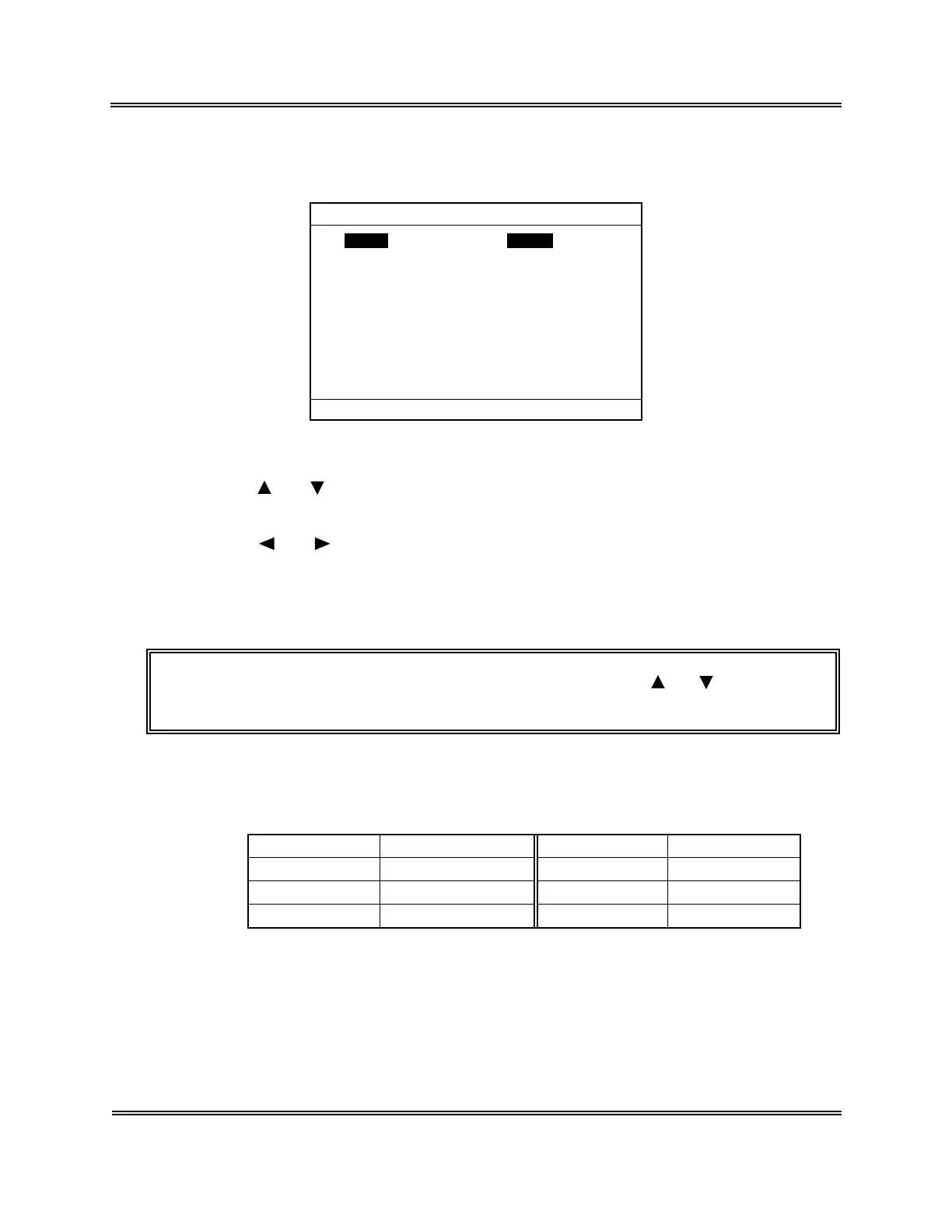
(5) Press [ENTER] key. The current setting status is displayed on the System Setup
screen.
Units Type2
RDW RDW-SD
Parameter Naming LYM%
Language English
*
System Setup
*
Press [SELECT] to exit.
Figure 10-2-2: System Setup Screen
(6) Using [ ] or [ ] key, move the cursor to select the desired set parameter.
For System Setup, four parameters can be set.
(7) Using [ ] or [ ] key, select the content of settings. Each time you press the key, the
content of settings changes.
(8) Press [ENTER] key. The content of settings is set and the cursor moves to the next set
parameter.
NOTE: • The settings can also be set when you press [ ] or [ ] key after
changing the content of settings.
1) Unit Setting
Sets the unit system for displaying analysis data. The unit can be selected from
the following six kinds:
Settings Unit System Settings Unit System
Type 1 For Japan Type 4 Dutch SI
Type 2 For General Export Type 5 Standard SI
Type 3 Canada SI Type 6 Hong Kong SI
Table 10-2-1: Unit Setting
For the detail of unit system, refer to the following table:


 To Next Page