INSTRUMENT SETUP
Sysmex KX-21 Operator’s Manual -- Revised October 1998 10-17
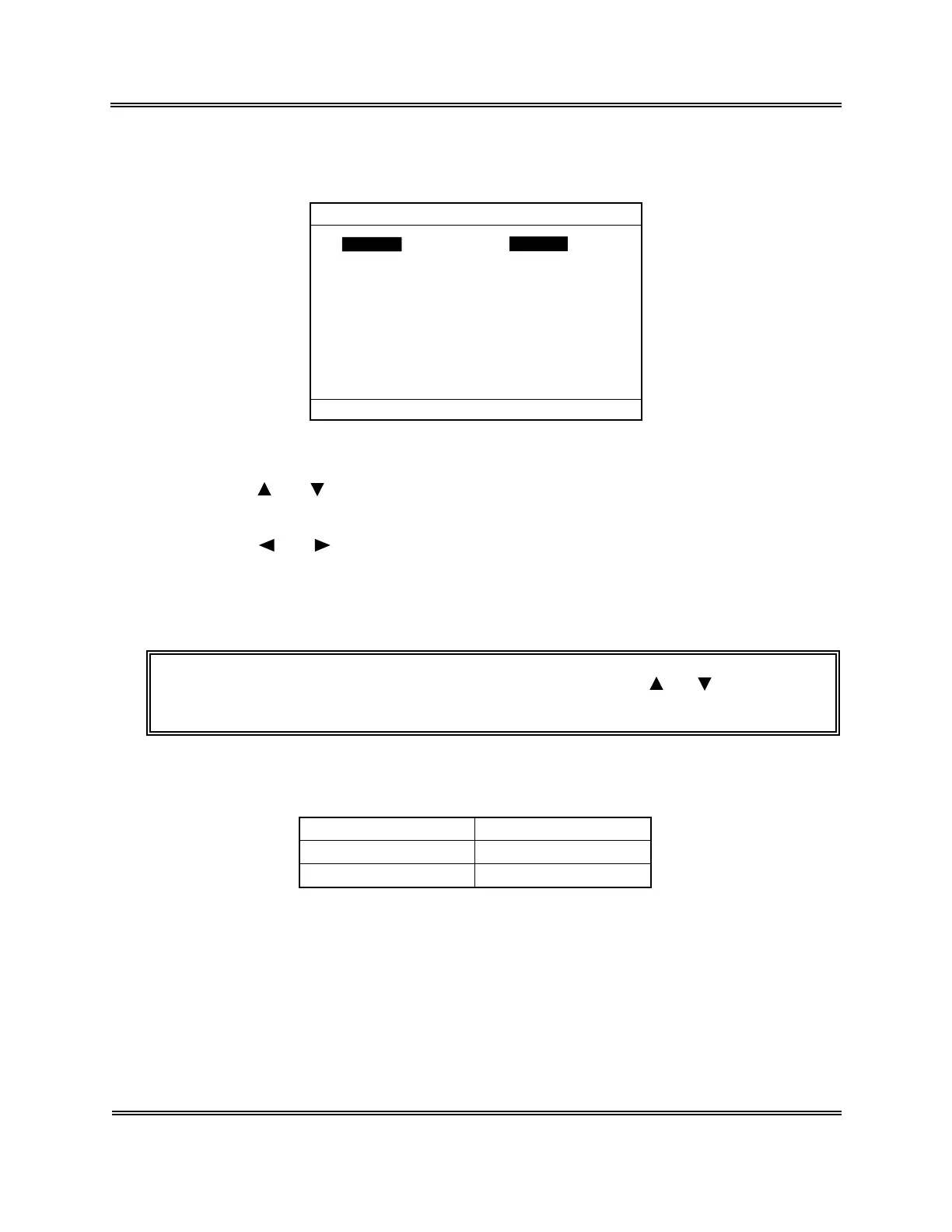
(5) Press [ENTER] key. The current setting status is displayed on the Host Settings
screen.
Auto Output On
Output Format K-1000
Data Length 7bits
Baud Rate 2400
Stop Bit 2bit
Protocol Class A
Interval 2
RTS/CTS Ignore
Parity Check Even
*
Host Settings
*
Press [SELECT] to exit.
ConnectConnect Not UseNot Use
Figure 10-6-2: Host Settings Screen
(6) Using [
] or [ ] key, move the cursor to select the desired set parameter. For Host
Settings, eight parameters can be set.
(7) Using [ ] or [ ] key, select the condition. The condition changes each time you
press the key.
(8) Press [ENTER] key. The content of settings is set and the cursor moves to the next set
parameter.
NOTE: • The settings can also be set when you press [ ] or [ ] key after
changing the content of settings.
1) Connect Settings
Set whether to connect the host computer or not.
Settings Connection
Use Connect
Not Use Not Connect
Table 10-6-1: Host Output Settings


 To Next Page