PAGE
6
INDUSTRIAL PC - COPILOT
ORDER NO. 5906510010DECEMBER 2005 - REV. 1.3
4. Power supply and
common function
control software
4.1 Power supply
In order to avoid any communication conflicts, close all
programs that use the serial or the parallel port
(especially if COPILOT Tray is running).
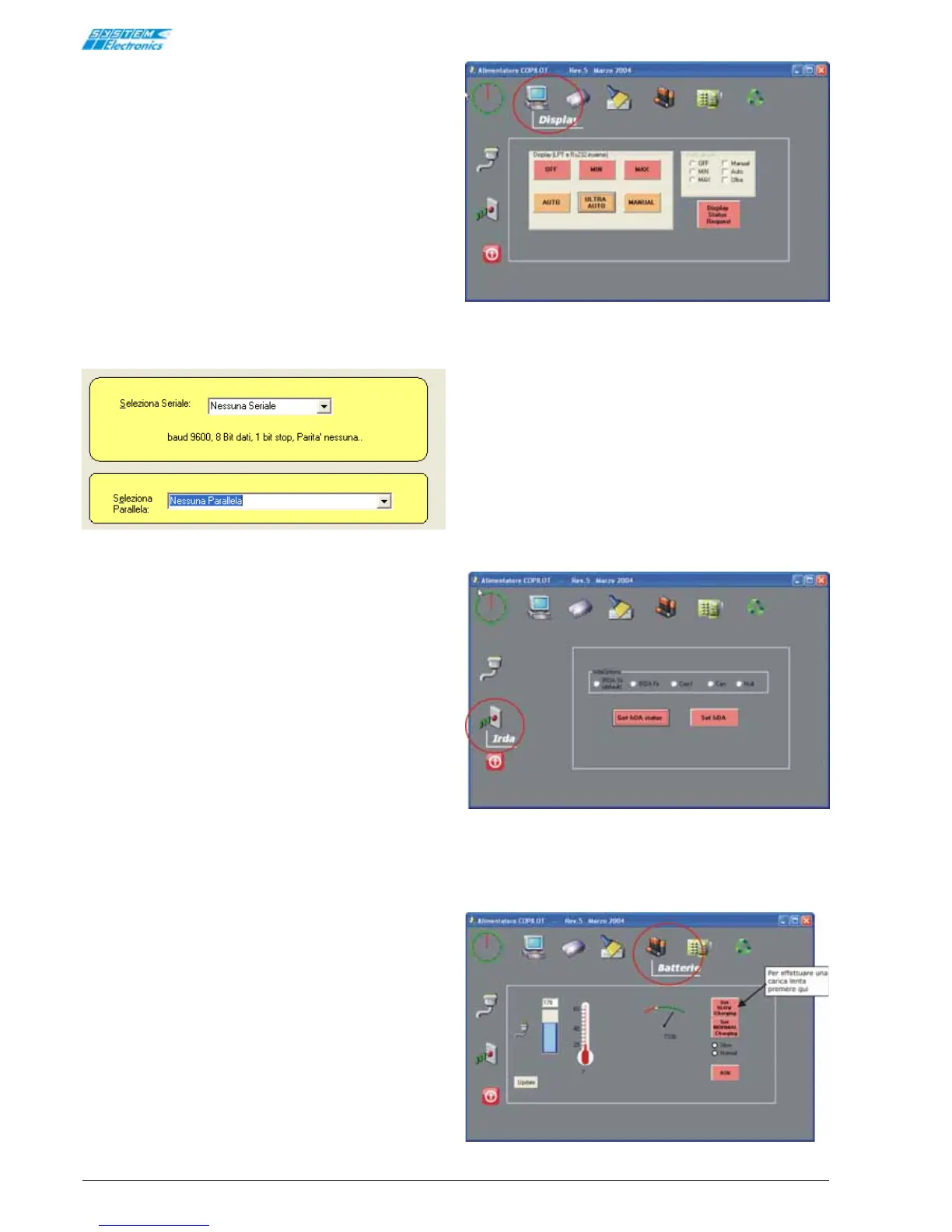
When the "COPILOT Power Supply" program is started,
a dialog window is displayed allowing the User to select
which port to use for communicating with the power
supply board.
Ideal communication conditions are achieved by
selecting the LPT1 port and "No Serial".
Figure 4.1.1
A number of windows can be called up by clicking on
the icons displayed on the screen.
Use the following buttons to regulate the display
brightness:
OFF: to switch off the display
MIN: for minimum brightness
MAX: for maximum brightness
The AUTO mode (default setting) reduces the display
brightness after a few minutes of inactivity, returning
to maximum brightness when the User touches the
screen. The display is not switched off completely in
this mode.
For improved energy saving it is possible to select the
ULTRA AUTOMATIC mode, which reduces brightness
after a few minutes, and switches off the display after
10 minutes. The display brightness when the User
touches the screen.
When in MANUAL mode the brightness remains constant
at the selected level.
Pressing Display Status Request displays the currently
stored state. Each time the system is switched on the
display reverts to the AUTO mode.
Figure 4.1.2
In order to select between IrDA, RS232 and CAN, it
may be necessary to modify the COPILOT optical
communications factory settings.
The following dialog window is used to select between
these settings.
Pressing Get IrDA status displays the current
communication mode:
IrDA Sir (standard) Com1 Null
IrDA Fir (fast) CAN
If COM1 is used for the communications channel it cannot
be used to control the power supply.
Figure 4.1.3
Pressing the battery icon displays the battery charge
level, and other important information such as battery
voltage and temperature.
Figura 4.1.4


 To Next Page