PAGE
7
INDUSTRIAL PC - COPILOT
ORDER NO. 5906510010DECEMBER 2005 - REV. 2005
4.2 Automatic background and
display management
This utility, which is normally active when COPILOT is
switched on, is used for managing the display, displaying
the battery charge level, and shutting down Windows
when the On/Off button on the rear panel has been
pressed.
COPILOT TRAY can be personalised according to the
Customer's requirements:
Æ Starting the program from the "Programs" menu Æ
"COPILOT Power Supply" Æ COPILOT TRAY
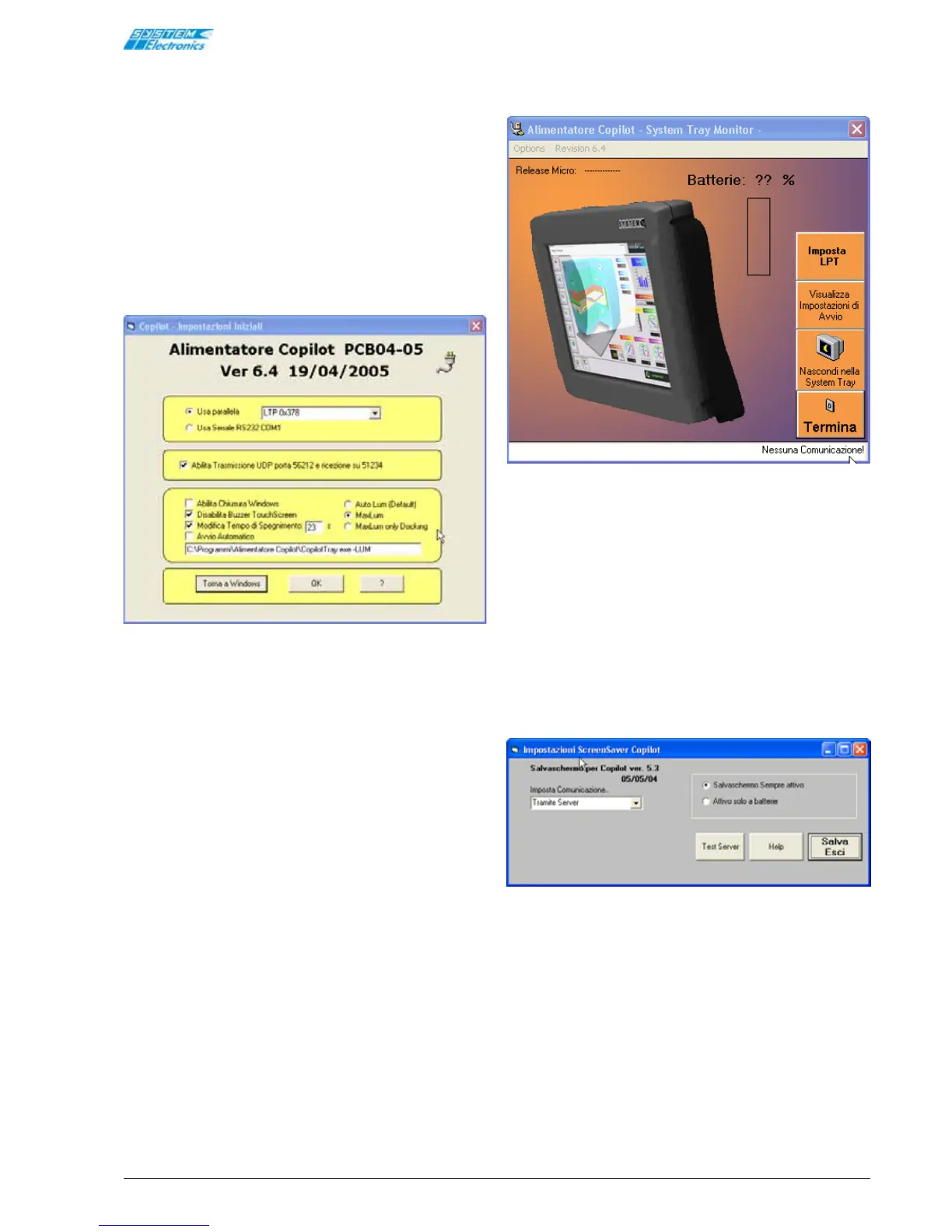
Figure 4.2.1
Enables the User to select the following Start-up options:
• Parallel port: the program is configured to use
the LPT1 port, the serial port is disabled.
• Enable Windows Shutdown: enables automatic
shutdown when the button is pressed [it is advised
that this option be enabled].
• Touch-screen Buzzer Disabled: if selected, this
option inhibits the touch-screen confirmation beep.
• Automatic Start-up: this utility is automatically
run from the command line illustrated below when
Windows is started [advised].
• Auto Lum: default display setting: in order to
save batteries and prolong display life, the
brightness is reduced after a few seconds of
inactivity. The brightness is restored to the
maximum level by touching the screen.
• Max Lum: the brightness is always set to
maximum level [not advised].
• Max Lum Only on Docking: automatic brightness
management depending on the type of operation:
when the unit is in the docking station the
brightness is always set to the maximum level,
when it is in portable mode the brightness is
controlled automatically.
• COPILOT shutdown time can be modified to enable
Windows to be shutdown correctly (release 5.20
and later).
• The program informs other applications of the
battery charge level and Windows shutdown via
UDP.
Figure 4.2.2
To avoid occupying CPU resources, the COPILOT Tray
program handles communication with the power supply
via the parallel port, at a rate of approximately once
every two seconds.
Screensaver:
The Windows screensaver may be selected so that the
display lamp can be switched off. Select
ScreenSaveCopilot from the list of screen-savers
available in the Windows menu (Control Panel - Screen).
Use the server mode to communicate with the active
COPILOT TRAY utility, which acts as the power supply
communications server.
Figure 4.2.3
To avoid interfering with other active programs, use the
"via server" communications mode only. The screensaver
can be set-up so that it is always active, or active only
in portable mode, when the unit is not inserted in the
docking station. When the screensaver is activated, after
the preset period, the display is switched off. Touch the
screen to switch the display on again.


 To Next Page