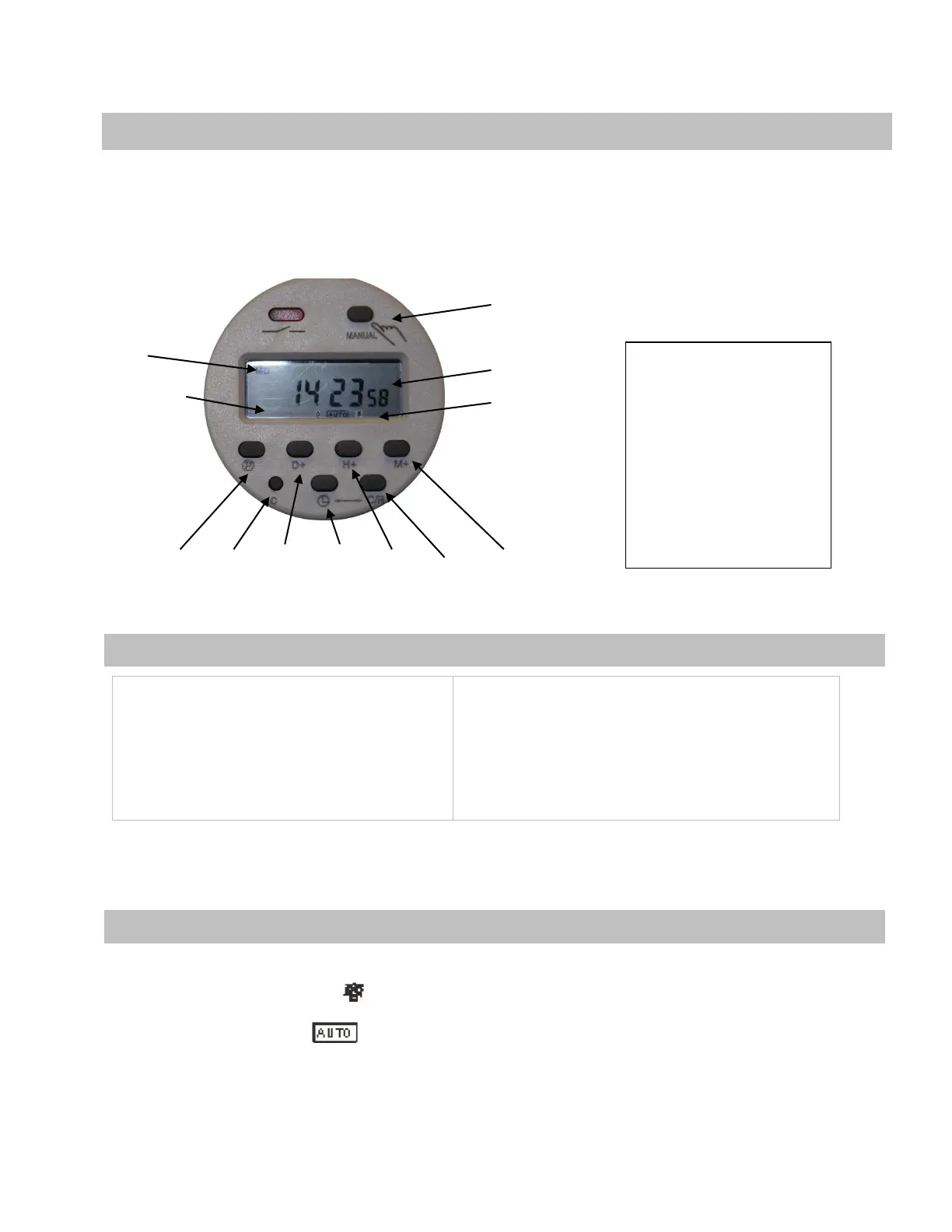
The timer is used whenever you want to automate your recycling schedule and help maintain consistently
clean fluid in your parts washer. The timer comes pre-programmed to operate on Monday, Wednesday
and Friday at 10pm Eastern Standard Time. The recycling process will operate for 12 hours on each
automatic start.
1 2 3 4 5 6 7
Set the time and/or day of the week
Press and hold the Clock Program button (4)
While you:
Press the Day button (3)
Press the Hour button (5)
Press the Minute button (7)
NOTE: The clock is in 24-hour format.
To disable the automatic timer from starting the unit, press the “MANUAL” button on the top of the timer
until the status indicator displays as the current mode status.
To enable the automatic timer function, press the “MANUAL” button again until the status indicator shows
as the current mode status.
6
Programming
Keypad
1 = Program
2 = Master Reset
3 = Day
4 = Clock Program
5 = Hour
6 = Program Clear
7 = Minute
Operation of Automatic Timer
To Program the Clock (Figure 5)
To Enable or Disable the Automatic Recycle (Figure 5)


 To Next Page