EasyManua.ls Logo

SystemAir SYS WSC 86 - User Manual

SystemAir SYS WSC 86
44 pages
Print Icon
To Next Page IconTo Next Page
Loading...
INSTALLATION & OWNER’S
MANUAL
SYS WSC 86
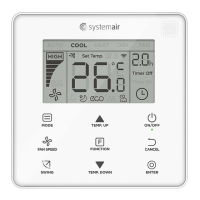
Wired Simplified Controller
Thank you for purchasing the wired controller.
This manual describes the safety precaution requirement of using this controller.

Questions and Answers

  • L
    Laura BestAug 3, 2025
    How to troubleshoot no display on SystemAir SYS WSC 86 Controller?
    • M
      Matthew SparksAug 3, 2025
      If there's no display on your SystemAir Controller, here's what you can check: * First, ensure that the IDU is powered on. If it isn't, power it on. * Next, power off the IDU and then verify the wired controller connection, ensuring it meets the wiring requirements. * If the connection is correct, the wired controller may be damaged and need replacement. * Lastly, a power supply failure of the IDU main PCB could be the cause, requiring replacement of the IDU main PCB.
  • T
    Timothy WoodAug 13, 2025
    What to do if SystemAir Controller displays error E9?
    • C
      Carol ReidAug 13, 2025
      If your SystemAir Controller displays an 'E9' error, it could indicate several issues: * A communication fault between the wired controller and the IDU. * The IDU might lack an address, or its address is duplicated. To resolve this, set a unique address for the IDU, as duplicated addresses are not permitted within the same system. * The wired controller itself may be damaged, necessitating replacement. * Alternatively, the IDU main PCB might be faulty, requiring its replacement.
  • T
    Terry BaxterAug 22, 2025
    Why some functions of SystemAir Controller do not work?
    • A
      Anthony ReynoldsAug 22, 2025
      If some functions of your SystemAir Controller's indoor unit cannot be controlled, like ON/OFF, temperature, mode, fan speed, or wired controller lock, it might be because the indoor unit has been locked by the centralized controller, indicated by the " " icon being always on.

Summary

Installation Guide

Safety Precautions for Installation

Important safety warnings and precautions for installation.

Installation Accessories

Lists required parts for installation and included accessories.

Installation Procedure Overview

Step-by-step guide for installing the wired controller, including wiring.

Operation Manual

Safety Precautions for Operation

Essential safety guidelines for operating the wired controller.

Controller Components and Display

Identifies controller parts and explains display icons.

Operation Guide

Instructions for basic operations like ON/OFF, mode, fan speed, and swing.

Function Settings

Details on advanced functions like IDU LED, Silent, ECO, Timer, and Follow Me.

Additional Functions

Information on filter reminders, locking functions, and main/secondary controller roles.

Field Setting

Restore Factory Default

Procedure to reset the wired controller to its factory default settings.

Indoor Unit Address Configuration

Guide for querying and setting the indoor unit's communication address.

Commissioning Parameter Settings

Detailed steps for configuring commissioning parameters for the unit.

Query Operations

How to check operational parameters and program versions of units.

Error Display

Troubleshooting

SystemAir SYS WSC 86 Specifications

General IconGeneral
BrandSystemAir
ModelSYS WSC 86
CategoryController
LanguageEnglish

Related product manuals