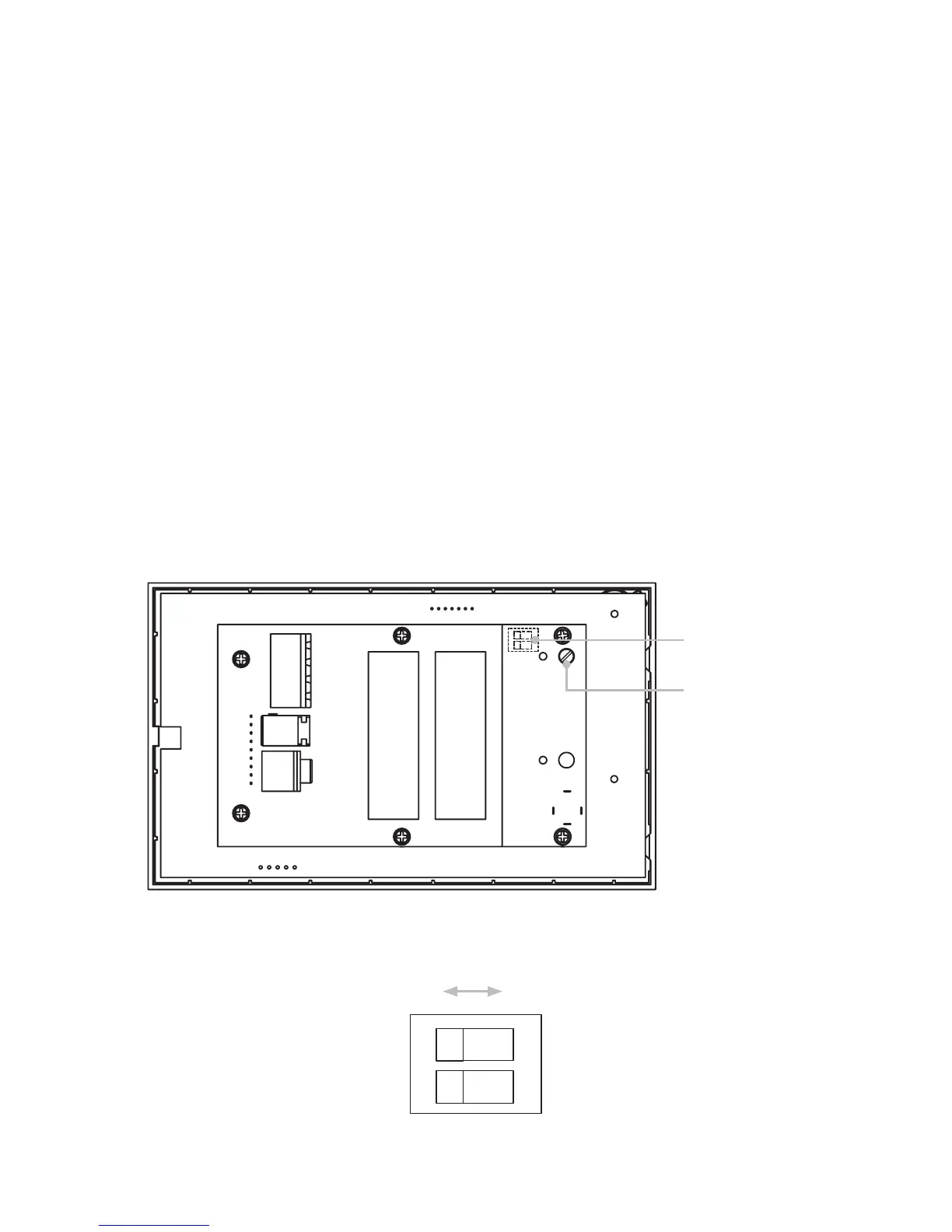
DIP switch (under)
Volume adjustment
screw (through hole)
ON
2 Flat EQ
Treble and
bass boost
Stereo
1 Mono
OFF
10
Installer Adjustments
Maximum volume setting
To restrict the maximum volume to a level anywhere from min to max, adjust the
preset screw (labelled below) with a small flat blade screw driver until the desired level
is indicated on the front panel. This adjustment must be made with the unit powered
up in order to see the indication.
Mono/Stereo setting
To set the amplifier output to mono, use a ball point pen or small screw driver to move
the DIP switch #1 (labelled below) to the OFF position. The default position for this
switch is ON (stereo).
EQ adjustment
To adjust the EQ to a flat response, use a ball point pen or small screw driver to move
the DIP switch #2 to the OFF position. The default position for this switch is ON (treble
and bass boost for Qi 65CB speakers).
Rear panel controls for installer adjustments
DIP switch detailed view


 To Next Page