9
Details of the modes and functions
of the push buttons
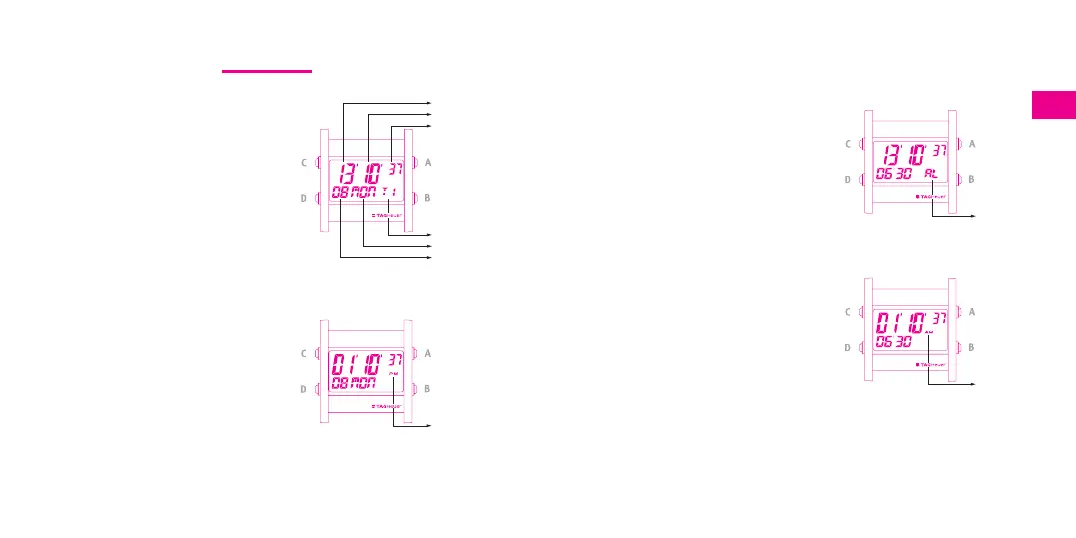
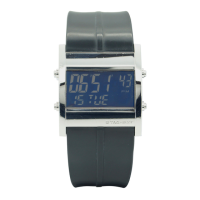
T1 mode
Displays the hour (hour-minute-second)
and main date (day of the month; day of
the week). T1 mode indication for
3 seconds then AL if the alarm function
has been activated (fig. 2).
By default, T1 is in the 24 hour mode.
If the AM/PM mode is defined, this
mode will be shown in the middle on
the right-hand side (fig. 3).
In T1 mode, the functions of the push
buttons are:
A short pressure = activation of screen
A saver (screen off)*
B = no function
C = backlight for 6 seconds
D short pressure = access to next mode
D long pressure = setting the chosen mode
* Note: pressure on one of the four
push buttons exits the screen saver.
fig. 2
fig. 3
AL mode
Main time display, alarm clock time.
AL mode indication (fig. 4) for 3
seconds followed by alarm status
(ON-OFF).
The alarm will be displayed in AM/PM
mode or 24 hour mode depending on
the main time mode. If the AM/PM
indicator lights up, it refers to the
chosen alarm time (fig. 5).
In AL mode, the functions of the push
buttons are:
A long pressure = ON/OFF alarm
setting. A sound signal denotes ON
B long pressure = activates the test alarm
clock sound
C = backlight for 6 seconds
D short pressure = access to next mode
D long pressure = setting the chosen mode
The alarm sounds for one minute and stops when push button C or D is
pressed, whatever the selected mode.
fig. 4
fig. 5
Hours
Minutes
Seconds
T1 Mode
Day of the week
Day of the month
AM/PM
Mode
Alarm
mode
AM/PM
mode





 To Next Page