17
Setting modes
The wearer can access the setting mode
with a long press on push button D in the
relevant modes (fig. 16). In setting mode,
the functions of the push buttons are:
A short pressure = increases (+) the value
that has to be set
A long pressure = increases (+) continuously
the value that has to be set
B short pressure = decreases (-) the value
that has to be set
B long pressure = decreases (-) continuously the value that has to be set
C = changes to the next values that have to be set
D short pressure = exits the setting mode
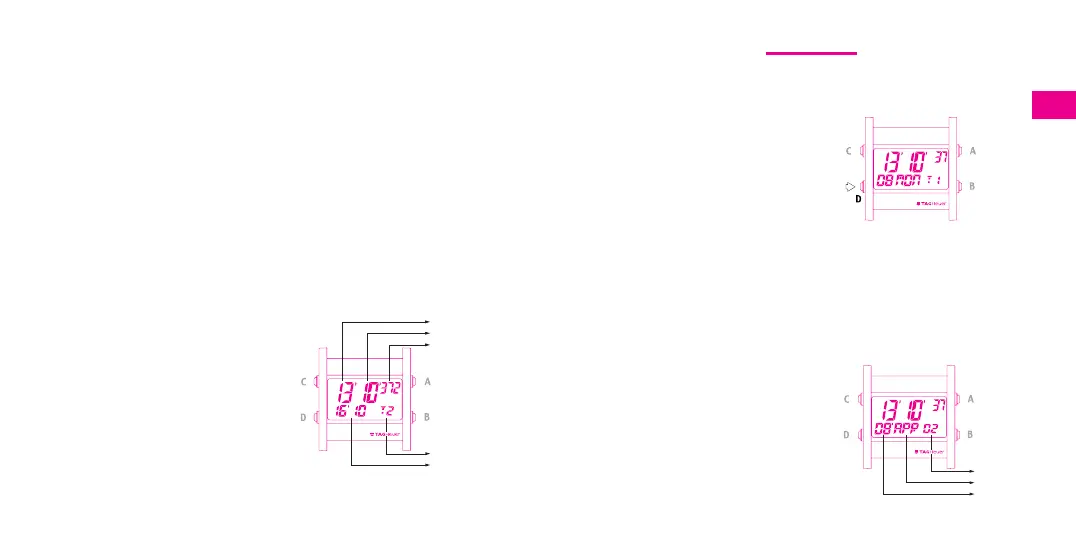
Setting the time and date T1 (fig. 17)
- Select the T1 function by pressing push
button D.
-To activate the setting mode, apply long
pressure to push button D.
- Change the first value by pressing push
button A (+) or B (-).
fig. 16
fig. 17
Total timing with intermediate times (SPLIT and catch-up),
A short pressure = START - STOP - RESTART,
B short pressure = SPLIT (display of intermediate timing), catch up,
B long pressure = timing reset when stopped.
E.g.: this functions allows, for example, the total duration of a race to be
timed and the individual times of each runner to be displayed.
Note: in SPLIT mode, the display flashes.
T2 mode
Displays the main time and the time in the
2
nd
time-zone. T2 mode is constantly
indicated. The 2
nd
time-zone will always
appear when in 24 hour mode (fig. 15).
In T2 mode, the functions of the push
buttons are:
A long pressure = changes of time-zones:
T1 T2
B = no function
C = backlight for 6 seconds
D short pressure = access to next mode
D long pressure = setting the chosen mode
fig. 15
Hours
Minutes
Seconds
Main time
T2 Mode
2
nd
time-
zone
Year
Month
Day





 To Next Page