XT-1/XT Mini Manual 13-111 05, 2015-08-14
Page 27 of 32
OSDP (RS485)
The reader supports the Open Supervised Device Protocol (OSDP) [4] for connection to access control
systems. OSDP communicates over 2-wire RS485 and can therefore be used with long cables and does
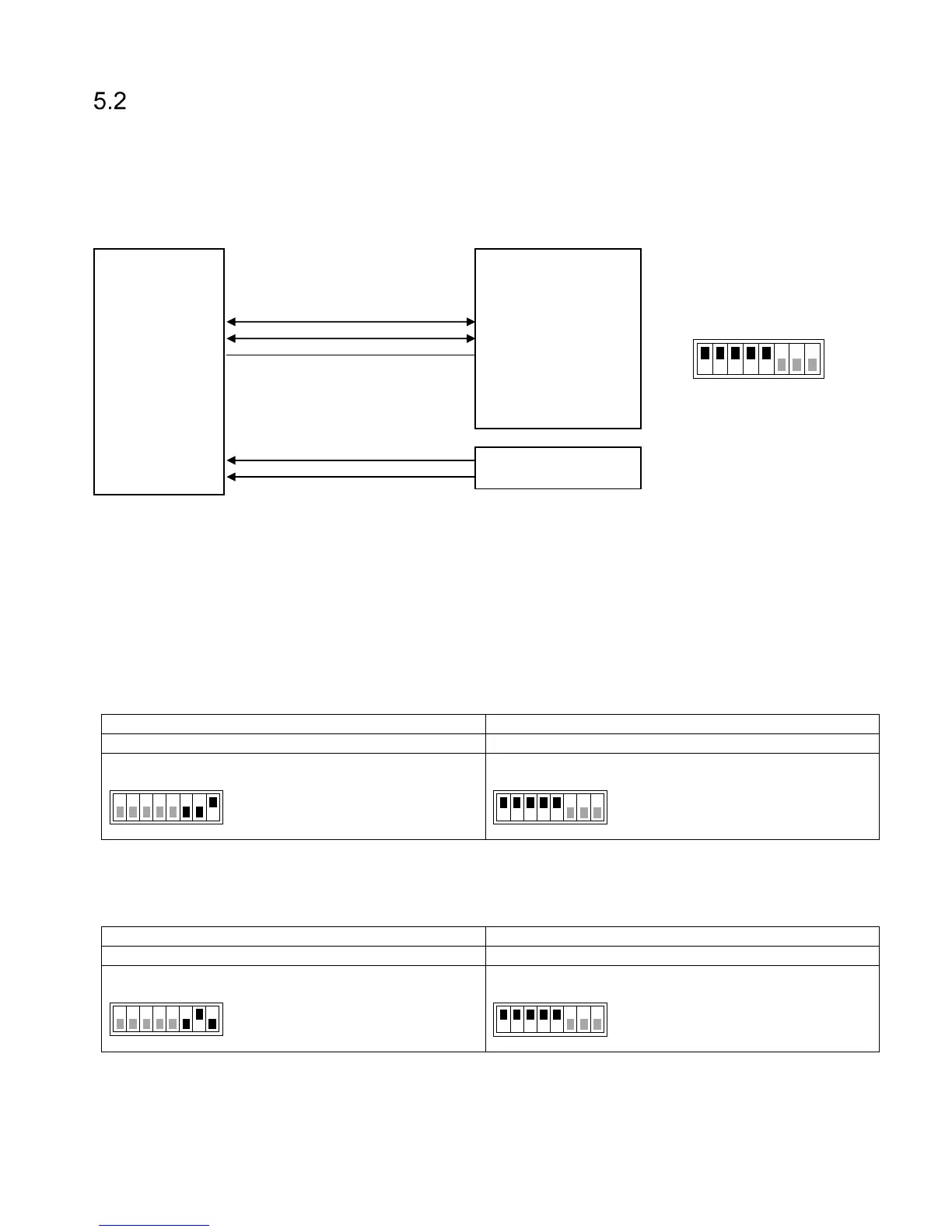
not require extra cables for LED and buzzer control. The DIP switch S301:1-2 must be set to ON to enable
2-wire mode on the reader. In most cases S301:3-5 should also be set to ON to enable biasing and
termination. Input IN3 can be connected to a presence detector such as an inductive loop. Figure 22 shows
a typical connection diagram and the most common setting for DIP switch S301.
Figure 22 Reader connected to access control system using OSDP
All OSDP settings are available under Settings…/Protocol Settings…/OSDP. For common access control
systems, OSDP can also be enabled using DIP switch S101 as described below.
5.2.1 Easy Configuration
5.2.1.1
AXIS A1001
In the A1001 software, set the reader protocol to OSDP, RS485 half duplex.
Define a new card format with name SecureMarkID and bit length 28. Set the field map like this:
Name: CardNr, Range: 1-28, Encoding: BinLE2Int*
Tested version: Firmware version 1.30.0
5.2.1.2
Vanderbilt Aliro
In the Aliro software, set reader type to "Siemens OSDP".


 To Next Page