5
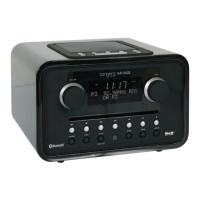
Front panel
• DISPLAY SCREEN: 2x16 character LCD featuring special icons.
• MODE: Press this button to shift between DAB/DAB+, FM, Smart Device (Bluetooth)
and AUX IN. AUX IN is only featured when a 3.5mm plug is connected.
• INFO: While receiving a broadcast signal, press this button to display queue information.
• MENU: Press this button to access the menu.
• SCAN: In DAB/DAB+ mode, press this button to make a full scan; In FM mode, press
this button to auto-scan.
• ALARM: Press this button to set alarm.
• Preset buttons 1-5 (in DAB/DAB+ and FM mode):
To store a station: press and hold one of the preset buttons 1-5, until the display states
‘Preset # stored’.
To recall a stored station: press one of the preset buttons 1-5 to load the preferred station.
Both FM and DAB/DAB+ have 5 individual presets.
• Playback buttons , and (in Smart Device (Bluetooth) mode):
Press button to skip to previous track, press and hold button to rewind current
playing track.
Press button to play/pause current playing track.
Press button to skip to next track, press and hold button to fast forward current
playing track.






 To Next Page