Need help?
Do you have a question about the Tangent Medix 24 and is the answer not in the manual?
Defines the device's purpose in healthcare settings.
Explains how the unit processes and displays data.
Highlights key performance aspects and adjustability.
Provides company address and website.
Safety warnings regarding electrical connections and power sources.
Procedures for forced shutdown and accessing technical support.
Conditions to avoid for safe device operation and longevity.
Guidelines for safe and compliant battery disposal and recycling.
Statement on FCC limits for Class B digital devices and interference prevention.
Details on meeting government requirements for radio wave exposure.
Lists standards and regulations the device complies with.
Lists items included in the product package.
Details the key features of the Medix 24 All-in-One PC.
Details webcam function and touchscreen capabilities.
Describes touch caps for brightness/power and RFID detection.
Illustrates and describes the webcam security cover.
Details audio, power, network, and various USB/serial ports.
Describes USB 2.0 ports, label cap, and optical disc drive.
Explains the use of the eject pin hole for manual disk ejection.
Details ventilation slots and VESA mounting holes.
Covers cable management features and the service door.
Step-by-step guide for connecting power and turning the device on.
Details screen size, resolution, and physical dimensions.
Lists processor, memory, graphics, and storage specifications.
Details network, wireless, audio, webcam, and I/O ports.
Covers touch buttons, light bar, and safety certifications.
Provides detailed technical drawings with product measurements.
Specifies ambient air temperature, humidity, and pressure for transport.
Describes rotation angle and fixing capabilities on mobile devices.
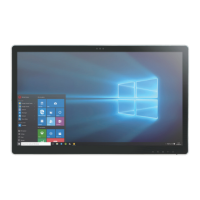
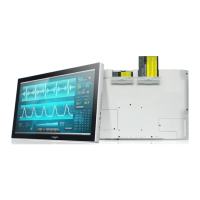
The Tangent Medix 24 is an All-in-One PC designed for use as a computing unit in healthcare institutions. Its primary function is to translate inputs into meaningful data and information, which is then displayed on the screen for easy user access. Users can proactively input feedback through the touch screen or connected peripherals. The device is versatile, suitable for mounting on a wall, placing on a nursing cart, or any other flat surface, ensuring easy access and control in various healthcare settings. It can also connect with relative devices as a supplementary unit to the main frame for enhanced efficiency.
The Medix 24 boasts a fanless all-in-one design, contributing to a quiet and clean environment, crucial for medical settings. Its front panel is rated IP54, offering protection against dust and splashing water, while the rear is IPX1. The device features a 10-point projected capacitive (PCAP) multi-touch display, which supports dual layers of glove use, allowing healthcare professionals to operate it without removing their gloves.
For visual communication, the Medix 24 includes a webcam with a security cover and an integrated microphone, facilitating video conferences and image/video capture. Stereo speakers provide audio output. The device also incorporates a reading light to illuminate work areas, which can be toggled on or off via a dedicated switch.
Input/output versatility is a key aspect, with multiple USB 3.0 and USB 2.0 ports, two LAN ports for network connectivity, and an HDMI out port for auxiliary video monitor output. It also includes four serial ports (RJ45 type) for connecting RS-232 compatible devices and an audio combo jack for external audio. An optical disc drive (DVDRW SATA) is available for data storage and retrieval.
The device features a Radio-Frequency Identification (RFID) reader that supports RFID card tapping, enhancing security and user authentication. A touch cap button serves as the power key, allowing the device to be powered on or off with a specific press sequence (5 seconds for power on, 2 seconds for LCD off). Volume control is also integrated into the touch cap buttons. A physical power button is also present for on/off functionality. The device supports standard VESA mounts (75x75mm and 100x100mm), making it compatible with various mounting solutions, including arm heads. The VESA mounting holes are designed with M4-type blind fasteners, allowing for secure attachment of VESA mounting plates, with specific screw length guidelines provided to accommodate different plate and washer thicknesses. The device can be rotated 90 degrees, offering flexibility in display orientation, and can be fixed on mobile devices for easy transport within a facility.
Maintenance of the Medix 24 is designed to be straightforward. The device's internal components, such as the battery and SSD board, are accessible via a service door, simplifying maintenance procedures. The cable management cover can be removed to access the bottom ports, and a cable guide is provided to secure the AC adapter cable, ensuring a tidy and organized setup. Ventilation slots are strategically placed to allow proper airflow and prevent overheating, with a clear warning not to block them. For cleaning, the device should be turned off and unplugged from the power outlet. A PDI detergent wipe or similar product is recommended for cleaning the screen/panel, and the use of acids or cleaning alkali liquids should be avoided to prevent cosmetic damage.
The device's battery, a rechargeable lithium polymer type, is classified as non-hazardous waste and can be disposed of in accordance with normal urban waste disposal procedures. Recycling of batteries is encouraged where laws require it, and terminals should be protected during transport to prevent contact with other metals and potential fire. The device also includes a camera privacy latch, allowing users to cover or uncover the webcam lens for privacy.
 General
| Processor | Intel® Core™ i5-10210U |
|---|---|
| RAM | 8GB |
| Storage | 256GB SSD |
| Operating System | Windows 10 IoT Enterprise |
| Fanless | Yes |
| Graphics | Intel UHD Graphics |
| Connectivity | Wi-Fi, Bluetooth |
| Ports | 1 x HDMI, 1 x DisplayPort |


 To Next Page