191 Airport Blvd. Burlingame, CA 94010
Package Contents
Precautions
T22B / T24B v3 BASIC OPERATION GUIDE
Introduction
Thank you for acquiring the Tangent T22B/T24B Medical AIO. With a 22-inch or 24-
inch TFT display and powered by the Intel® processor, the T22B/T24B series offers
optimal combinations of performance and power savings. With fully-integrated
point-of-care modules within an elegant, space-saving design, the T22B/T24B series
is the optimum solution to enhance workflow and service.
Please take a few moments to review the contents of this document to ensure that
the setup and startup proceed smoothly. The T22B/T24B is ready for use, out of the
box, in its default configuration when powered by the power source provided. The
following documentation offers guidance on the hardware elements and features of
the computer. Please refer to your device provider for information pertaining to the
software operating system or software applications.
• One T22B or T24B
• Three TC202 Li-ion batteries (optional)
• AC-DC power adapter with power cord
• Desktop stand (optional)
• Always exercise care when operating and handling the T22B/T24B.
• Never disassemble any portion of the enclosure, as this will void any product
warranty on the T22B/T24B.
• Do not use any AC/DC adapter other than the one provided with the device
or a replacement acquired from the manufacturer.
• In the unlikely event that smoke, abnormal noise or strange odor is present,
immediately power down the T22B/T24B and disconnect all power sources.
Please report the problem to your device provider immediately.
Basic Features
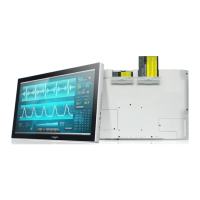
The T22B/T24B integrates a bright 22”, or 24” display with a high performance
system, USB ports, and integrated options such as capacitive touch, hot-swappable
batteries, NFC/ RFID reader, and smart card reader for a comprehensive point-of-
healthcare solution
Powering ON and OFF
If your T22B/T24B comes with the battery packs, please open the battery slot caps and
then put in the battery packs one by one. If not, please use the AC-DC adapter with the
T22B/T24B for the power supply. To activate the T22B/T24B, push and quickly release
the Power Button and the display will come on in a few seconds. To put in Standby
mode, push and quickly release the Power Button. To turn off for extended storage,
power off the device safely using any software function that “shuts down computer”
provided in the software operating system.
The T22B/T24B has a comprehensive set of I/O ports. The following ports are
located along the lower rear edge of the unit.
I/O Ports
• A screen cleaning solution that is non-alcohol and non-abrasive can be used to
clean the touch screen.
• We suggest cleaning with a micro-fiber cloth.
• Please spread the solution onto the cloth and then clean the touch screen..
Cleaning the Screen

 Need help?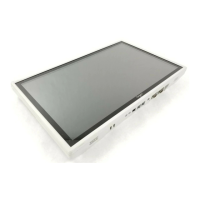

 To Next Page
 General