RCA Connecting to External Systems
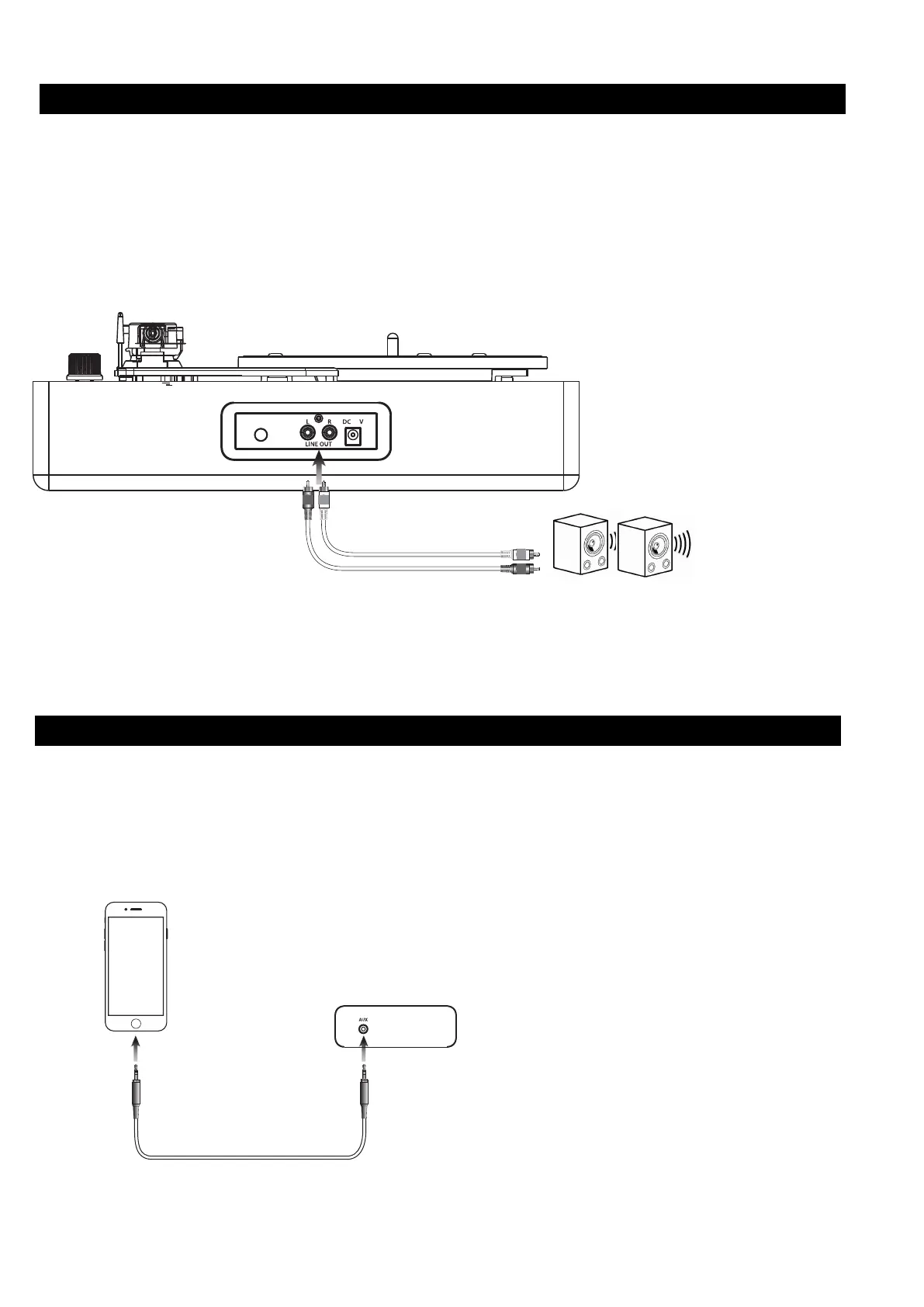
Requires RCA audio cables (red/white, not included). Use to connect the turntable to an external stereo, or other source.
1. C
onnect RCA audio cables to the RCA Audio Output
on the back of the turntable, and to the audio input of an
external stereo system.
2.
Adjust the external s
t
ereo system to accept input from the turntable.
3.
Audio played through the turntable will now be heard through the connected stereo system.
To Audio Inputs on
external system
5
RCA cable not
included
1. Turn on the unit and turn the mode selection knob aim to "AUX" on the control panel.
2. Plug a
line-in cable into the Aux jack on the unit and the other side into an MP3 Player or other audio source.
3. Use the controls on your connected music player to select and play audio.
AUX cable is not included
AUX Connecting to External Devices
Requires AUX cables (not included). Use to connect the turntable to an external devices like phone, tablets, mp3 player.



 To Next Page