9
HOW TO OPERATE INSTALLER MODE
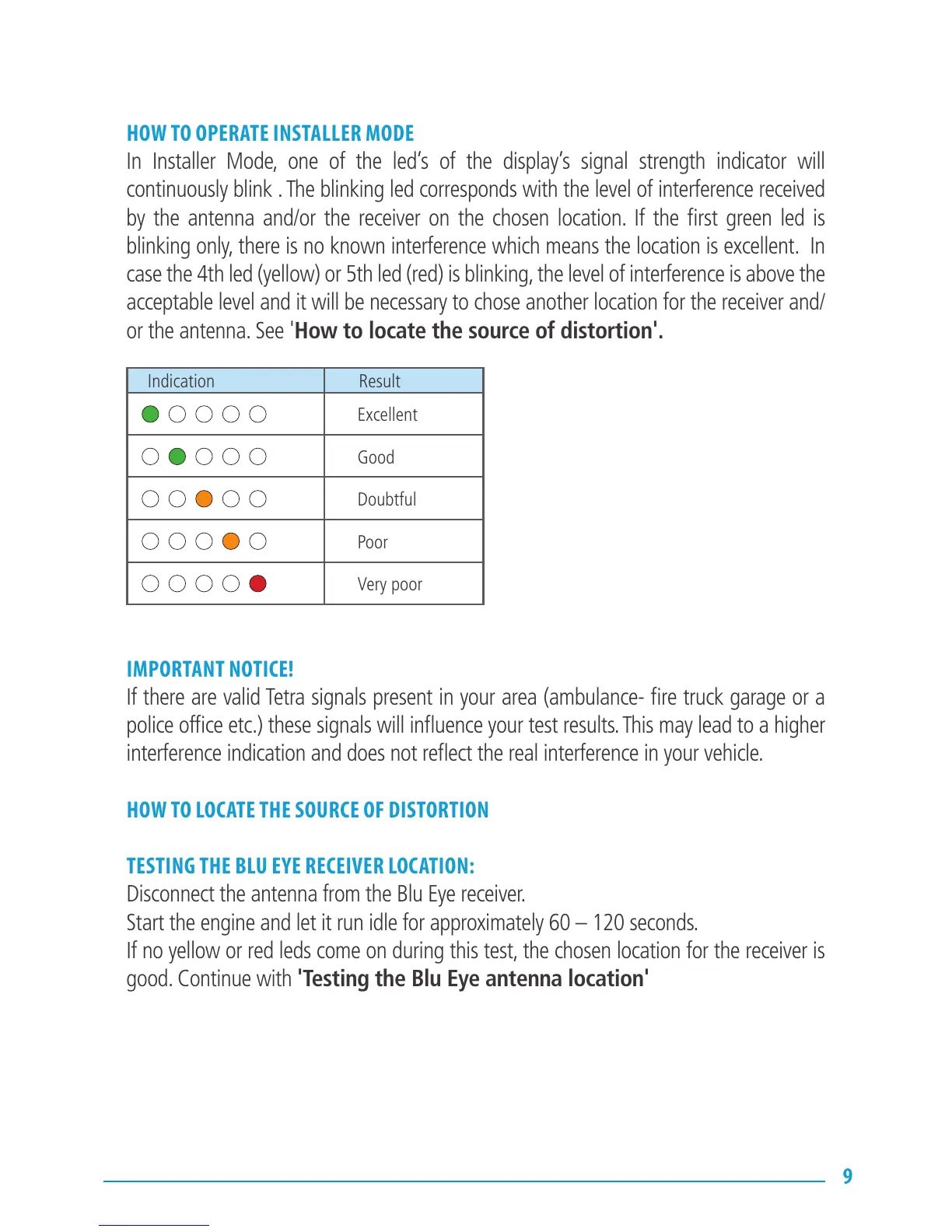
In Installer Mode, one of the led’s of the display’s signal strength indicator will
continuously blink . The blinking led corresponds with the level of interference received
by the antenna and/or the receiver on the chosen location. If the first green led is
blinking only, there is no known interference which means the location is excellent. In
case the 4th led (yellow) or 5th led (red) is blinking, the level of interference is above the
acceptable level and it will be necessary to chose another location for the receiver and/
or the antenna. See 'How to locate the source of distortion'.
IMPORTANT NOTICE!
If there are valid Tetra signals present in your area (ambulance- fire truck garage or a
police office etc.) these signals will influence your test results. This may lead to a higher
interference indication and does not reflect the real interference in your vehicle.
HOW TO LOCATE THE SOURCE OF DISTORTION
TESTING THE BLU EYE RECEIVER LOCATION:
Disconnect the antenna from the Blu Eye receiver.
Start the engine and let it run idle for approximately 60 – 120 seconds.
If no yellow or red leds come on during this test, the chosen location for the receiver is
good. Continue with 'Testing the Blu Eye antenna location'
Indication Result
Excellent
Good
Doubtful
Poor
Very poor


 To Next Page