EasyManua.ls Logo

Tascam DA-30 - Page 19

Tascam DA-30
63 pages
Print Icon
To Next Page IconTo Next Page
To Previous Page IconTo Previous Page
Loading...
@
@
Load
the
tape
travel
adjustment
tape
(TY-7251
manu-
factured
by
SONY),
then
let
it
run
in
the
PLAY
mode.
From
the
position
where
the
heads
of
the
P1
and
P2
posts
are
coarse-adjusted
using
the
hexagonal
wrench
described
in
3-1
(back
tension
torque
adjustment),
rotate
these
by
one
turn
clockwise
to
disengage
lower
adjustment.
Connect
CH1
of
the
oscilloscope
to
TP412
(ENV)
on
the
digital
PCB
and
CH2
to
TP407
(SWH)
(Fig.
4-1),
then
adjust
the
height
of
the
guide
roller
while
observ-
ing
the
envelope
of
the
RF
signal.
Adjustment
methods
{.
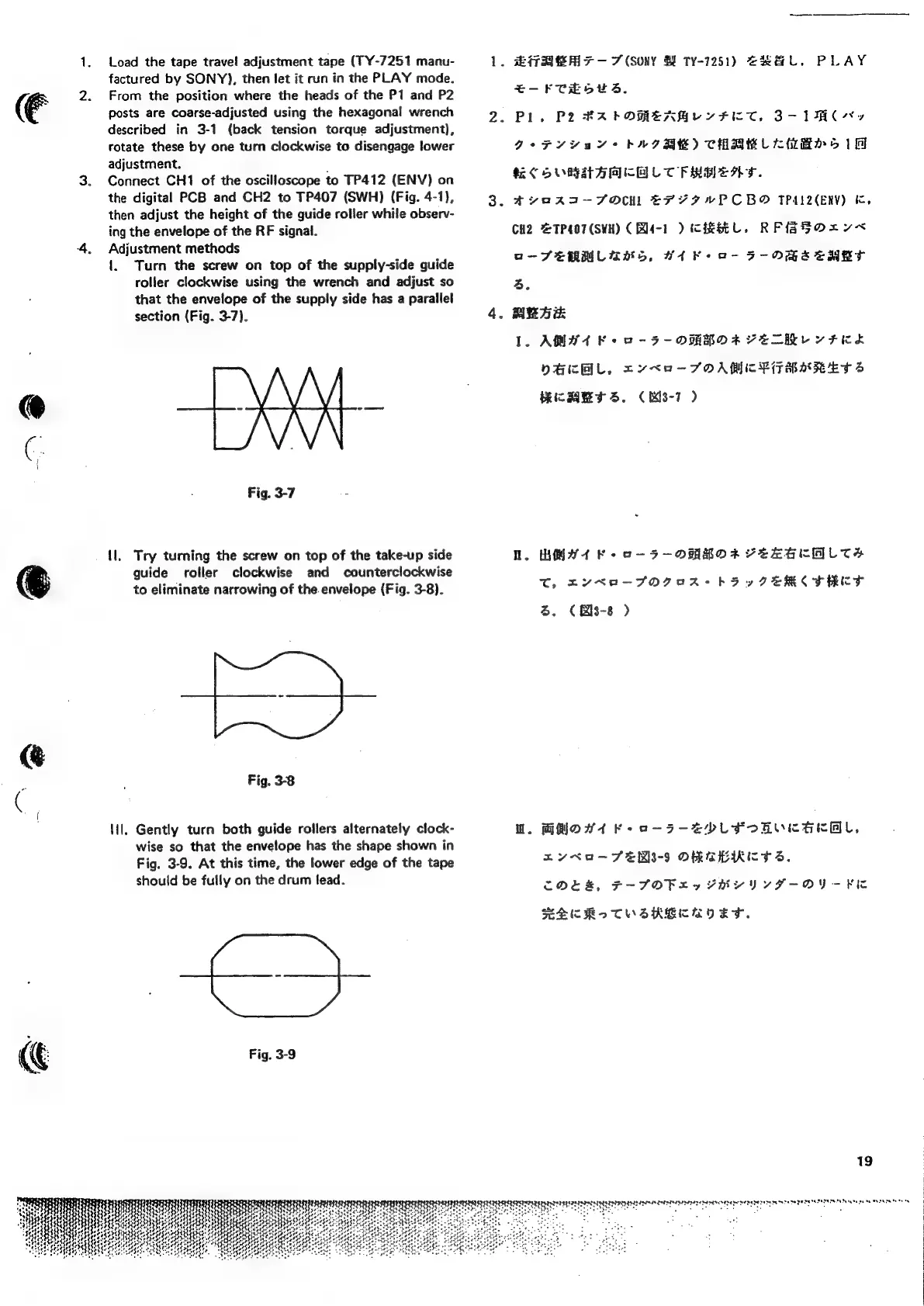
Turn
the
screw
on
top
of
the
supply-side
guide
roller
clockwise
using
the
wrench
and
adjust
so
that
the
envelope
of
the
supply
side
has
a
parallel
section
(Fig.
3-7).
Fig.
3-7
tl.
Try
turning
the
screw
on
top
of
the
take-up
side
guide
roller
clockwise
and
counterclockwise
to
eliminate
narrowing
of
the.envelope
(Fig.
3-8).
Fig.
3-8
Hil.
Gently
turn
both
guide
rollers
alternately
clock-
wise
so
that
the
envelope
has the
shape
shown
in
Fig.
3-9.
At
this
time,
the
lower
edge
of
the
tape
should
be
fully
on
the
drum
lead.
Fig.
3-9
.
EAS
7
(Sony
H
Ty-1251)
GS
L.
PLAY
E-F
CH
SUS.
2.
Pl.
P2
#AROMEAGLY
FIT.
2-1
92°F
74a
Y*+
AGRE)
CHBEL
CHB
51
KC
SUBRAAGCE
LT
FRSA.
3.
Aer
aeRa-TFOCH
EHLYIWPCBO
PACER)
K,
CH2
@TP407(SWH)
(
Rl4-1
)
CIESEL.
RFFOrV<
o-SEMMCUANS,
WA Ke
ao-
F-OGBACHKT
4.
4.
ABA
.
AMA
K+
oO
-5-OMROA
VELHE
YF
KEL
DECAL,
cx¥KO-JFOAMTRPITBARET
S
RICHIE
ST
S.C
MS-7
D.
WAY
4
Feo
-5-ORROK
VELGEAL
TSH
T,
DYNA-SFOGAR
ha
eV
AERC
FRET
S.
(
Bis-8
)
WU.
GMOW4
Fe
o-5S-2YPLFORVCEKAL,
nyu
—SER3-9
OMGBIKIE
TS.
CODER,
F-TFOPL
ea
PRYVYVVYVIF-OY-K¥FU
SMEKReTOSZKECROES.
19
TURUNEN
BEIEDENEEEDISIN
CUE
DTNEN
ENED
ESI
NCD
DEDEDE
TEE
ETE
PEREINSUN
Tate
ge
me
MNT
TR
ES
8

Related product manuals