IMPORTANT SAFETY INSTRUCTIONS
TASCAM US-1641 9
2 – Features of the US-1641
TASCAM US-1641 9
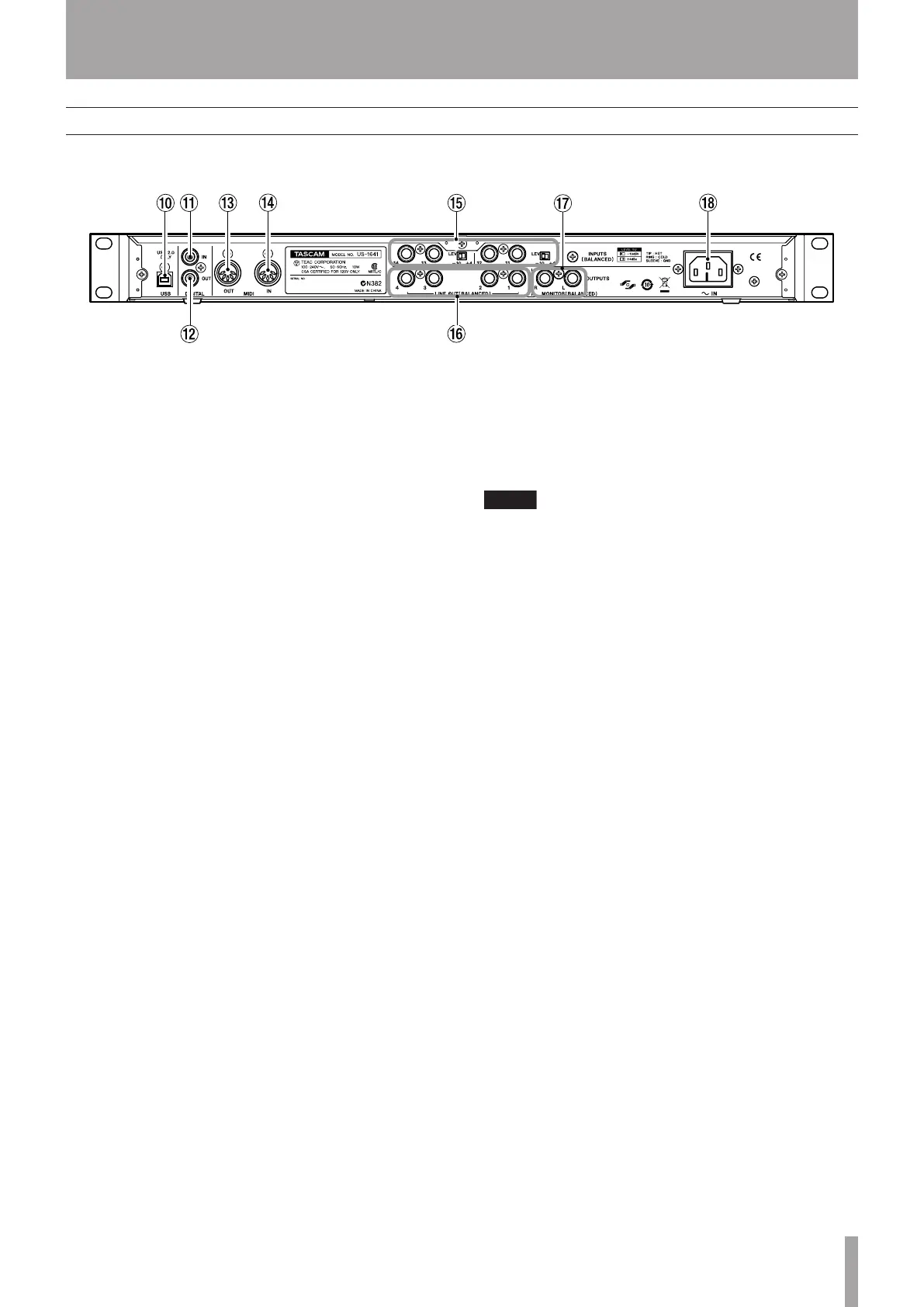
Rear Panel
0 USB connector Use a USB cable to connect this to
the host computer. (Please note that this connector supports
only USB 2.0 connection.)
A DIGITAL IN jack This is an RCA connector that
inputs a stereo S/PDIF digital signal.
B DIGITAL OUT jack This is an RCA connector that
outputs a stereo digital signal. Signals output from the
LINE OUT [1/2] or [3/4] jacks can be output digitally from
this jack (as set in the Control Panel). You can also select
S/PDIF or AES/EBU as the digital signal format in the
Control Panel.
C MIDI OUT connector Transmits MIDI messages
received from the computer.
D MIDI IN connector Receives MIDI messages.
The received MIDI messages will be transmitted to the
computer.
E INPUTS [11-14] jacks and LEVEL switches These
are TRS 1/4" phone, balanced line input jacks. Use the
LEVEL switches to set the nominal level to –10dBV or
+4dBu.
You cannot adjust the gain level for these inputs.
F LINE OUT [1-4] jacks These are stereo TRS 1/4"
phone, balanced line output jacks (sleeve = ground, tip =
hot, ring = cold). The nominal output level is +4dBu. These
jacks output signals received from the computer. Use DAW
software to switch between LINE OUT [1/2] and LINE
OUT [3/4].
G MONITOR OUTPUTS [L/R] jacks These are stereo
TRS 1/4" phone, balanced output jacks (sleeve = ground,
tip = hot, ring = cold). These jacks enable you to monitor
monaural mix input (1-14) signals and/or output signals
received from the computer. Use the MONITOR knob on
the front panel to adjust the output level.
H AC IN connector Connect the supplied power cable
to this connector and an AC outlet.


 To Next Page