34
4.4.4 User-dened programs
You can create your own workout with a customized program. Up to 50 individual
prole sections (SE01 to SE50) are available for design, which you can individually set
with the time, speed and incline settings. Through the + and - buttons and the direct
buttons, you can enter your desired information for the respective prole sections.
With the ENTER button, you can conrm your settings and change to the next prole
section. After you have created your individual training program, you can begin the
training with the START button. Of course, you do not have to program all 50 sections,
but rather only your desired number. You can start your personally created program
with the START button. Any changes that you make to the USER training program are
saved by the equipment and thereby remain even after training is over.
Example for creating a customized program
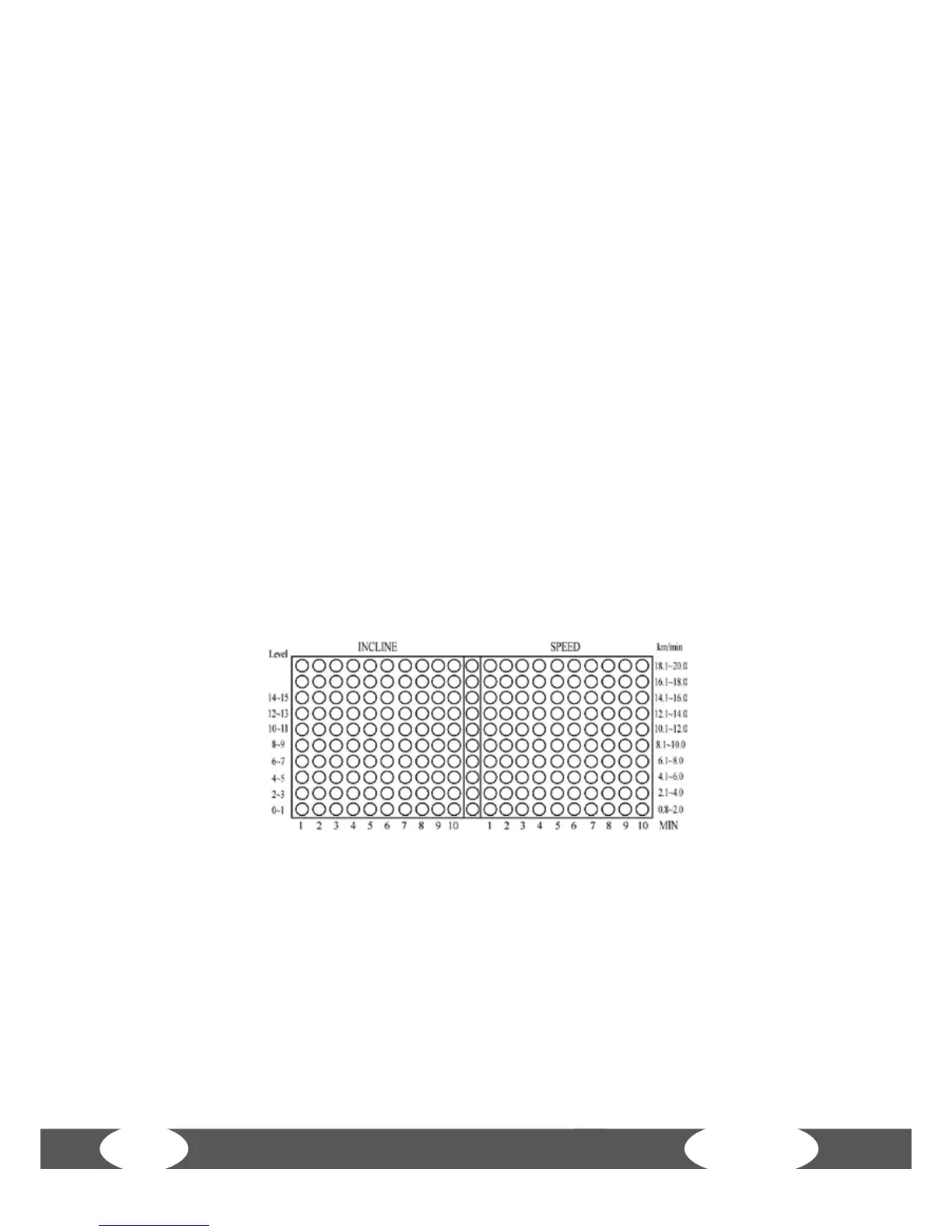
10 x 21 LED lighting points are located in the matrix. The middle of the matrix is not
illuminated in order to be able to dierentiate between the lights from the incline
and speed. The 10 lighting points on the left side of the division indicate the change
in incline and duration. The 10 lighting points on the right side of the division indicate
the change in speed and duration.
1. START/READY mode: Select a USER program.
2. First enter your weight with the corresponding buttons and conrm this with
ENTER.
3. SE01: First press the arrow buttons to set the incline to 0%. Conrm the + and -
buttons in order to set the speed to 0.8 km/h. Use these buttons in order to set the
duration to a minute. The dot matrix then shows the following status:


 To Next Page