57
THE BLOCKS
Drive*
The Drive parameter simulates the Input gain of a distortion
device. The extra Input gain is automatically compensated on
the Output level to avoid any clipping internally.
Brightness*
Brightness is used to reduce the amount of high frequency
content in the distorted signal. The Brightness control is flat
when set to 100%.
Body*
Body is used to reduce the amount of low frequency content
in the distorted signal. At heavy distortion the Drive will
emphasize a lot of low frequencies, which can be somewhat
annoying. These problems can be reduced by the Body
parameter. A number of preamps and pedals on the market
combine a lowcut filter with their Input gain to compensate
for the exact same problem.
Smasher*
The Smasher is used to change the character of the distortion
by emphasizing even order harmonics. Setting this parameter
to a high value, will smash your signal. Try experimenting
with the character of your distortion.
Out Drive*
Out Drive is simulating the kind of distortion that you would
get from the output stage of an amplifier.
Mix*
Mixes between direct sound and effect.
In Level*
Controls the input level of the block.
Out Level*
Controls the output level of the Drive block.
Cruncher
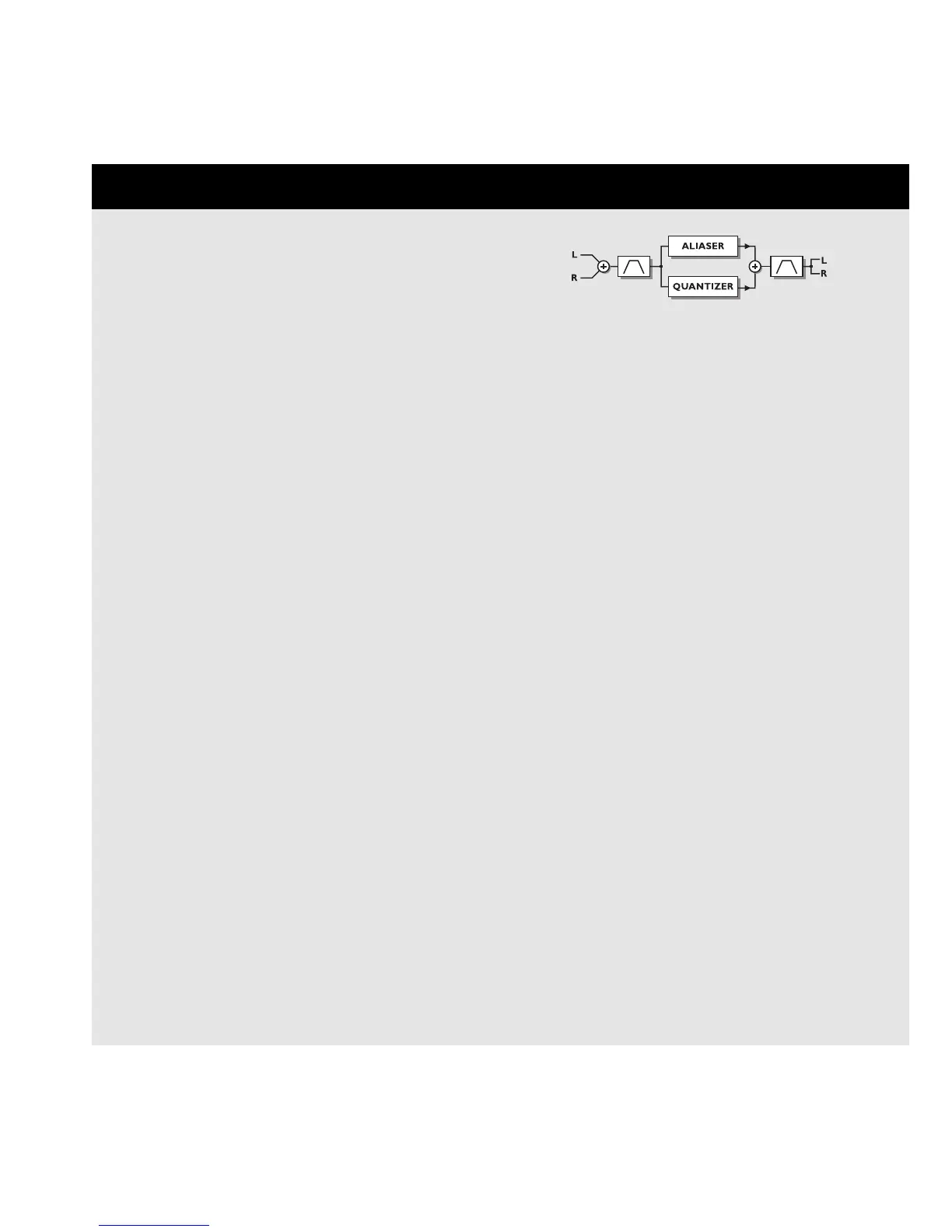
The Cruncher performs both Aliasing and Quantizing
simultaneously.
Aliasing is a residual artifact of digital conversion that was
common in the early days of the digital world. In the
FireworX this artifact is magified into an effect. Sound-wise,
the Aliasing appears as an unharmonic, fairly high frequency
distortion.
The Quantizer produces an artificial noise floor as if the
signal had been sampled at a lower bit resolution.
The parameters available in the Modifier Matrix are marked
with an asterisk*.
CRUNCHER
Aliaser Factor*
Sets the sample rate reducing-factor, and thereby enhances
the Aliasing artifacts.
Aliaser level*
The level of the Aliaser signal
Quantize grain size*
Sets the grain size or reduces the bit resolution that is used
to quantize the signal.
Quantize level*
The level of the Quantized signal.
In Locut*
Cuts off frequencies lower than the selected frequency on
the input. The slope of the filter is 12dB/octave.
Range: 10Hz-16kHz.
In Hicut*
Cuts off frequencies higher than the selected frequency on
the input. The slope of the filter is 12dB/octave.
Range: 10Hz-16kHz.
Out Locut*
Cuts off frequencies lower than the selected frequency on
the output. The slope of the filter is 12dB/octave.
Range: 10Hz-16kHz.
Out Hicut*
Cuts off frequencies higher than the selected frequency on
the output. The slope of the filter is 12dB/octave.
Range: 10Hz-16kHz.
Mix*
Mixes between direct sound and effect.
In Level*
Controls the input level of the block.
Out Level*
Controls the output level of the Drive block.
Vocoder
Number of blocks: 1
Processing power: 33-46% per block
The Vocoder block contains two different types of effects:
Vocoder and Ring Modulator. Both of these effects are Dual





 To Next Page