
 Need help?
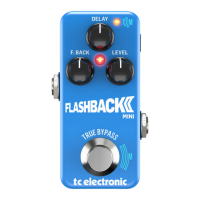
Do you have a question about the TC Electronic Flashback Mini Delay and is the answer not in the manual?
Explains how to understand and operate the TC product, and where to find the manual.
Provides contact information for TC Support if users have further questions after reading the manual.
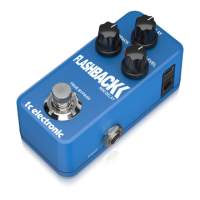
Details the product as a modern twist on the legendary TC Electronic 2290 delay, with seven seconds of delay.
Explains the True Bypass feature, ensuring the dry signal remains unaffected when the pedal is bypassed.
Explains that TonePrints are custom sounds created by artists and available for TC pedals.
Guides users on how to transfer TonePrints to their pedal using the free TonePrint app on smartphones.
Introduces the TonePrint Editor, allowing users to create their own custom pedal sounds and tweak parameters.
Instructs users on how to download the TonePrint Editor software for computers and iPads.
Lists the items included in the TC Electronic effect pedal box and advises inspection for transit damage.
Details connecting the 9V power supply and audio cables for instrument and amplifier connection.
Indicates the final step after setup, implying the pedal is ready for use.
Explains how to power the pedal using a 9V DC supply and how to turn the effect on/off via the footswitch.
Describes the function of the footswitch for turning the effect on and off, and for tempo tapping.
Details the standard 1/4" jack inputs and outputs for connecting instruments and other devices.
Explains the use of the Mini-B USB port for loading TonePrints and updating firmware.
Describes the function of the DELAY, FEEDBACK, and FX LEVEL knobs for controlling delay parameters.
Instructs users on how to choose different delay types available on the pedal.
Details various classic delay types like Tape, Lo-Fi, Dynamic, 2290, Analog, Ping-pong, Slap, and Reverse.
Provides instructions on how to download and install firmware updates for the pedal.
Answers common questions regarding the analog/digital nature, inputs/outputs, and effects loop compatibility of TonePrint pedals.
Lists web resources for TonePrint, TonePrint products, the TonePrint app, and the TonePrint Editor.
Provides links to TC Electronic Support, software downloads, product manuals, and the user forum.
Lists TC Electronic's official web presence, including social media links like Facebook, Google Plus, Twitter, and YouTube.
 General
| Type | Delay |
|---|---|
| Technology | Digital |
| Analog Dry Through | Yes |
| Delay Time | Up to 7 seconds |
| Feedback | Yes |
| TonePrint Enabled | Yes |
| Tap Tempo | Yes |
| Bypass | True Bypass |
| Input Impedance | 1 MΩ |
| Output Impedance | 100 Ω |
| Current Draw | 100 mA |
| Delay Types | Tape, Analog, Lo-Fi |
| Power Supply | 9V DC |
| Input(s) | 1 x 1/4" |
| Output(s) | 1 x 1/4" Mono |
| Controls | Delay, Feedback, Level |
| Special Features | TonePrint |






 To Next Page