
 Need help?
Do you have a question about the TC Electronic Flashback 2 and is the answer not in the manual?
Essential safety guidelines for operating and maintaining the TC Electronic effect pedal.
Covers legal disclaimers and applicable warranty terms for the product.
Provides an overview and important information about the user manual.
Covers pedal contents, bypass mode, and connection instructions.
Explains how TonePrints customize pedal sounds.
Step-by-step guide for transferring TonePrints using the mobile app.
Learn to create custom pedal sounds using the TonePrint Editor software.
Details on power supply and USB port usage for connectivity.
Explains footswitch operations for effect on/off and MASH engagement.
Guide for connecting audio sources and outputs to the pedal.
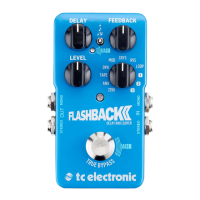
Details on effect knobs, switches, and available delay modes.
Explains how to position the pedal in a signal chain for optimal sound.
Details the MASH footswitch functionality and customization options.
Guide to recording, overdubbing, and managing loops for practice and performance.
Explains the difference between True and Buffered Bypass modes for signal integrity.
Instructions for changing the pedal's bypass mode via internal DIP switches.
How to enable/disable the Kill-dry feature for parallel effects loops.
Steps for preparing and applying firmware updates to the pedal.
Instructions for replacing the pedal's internal battery.
Links to TC Electronic support, online resources, and social media.
Lists key technical details like bypass mode, connectors, impedance, and dimensions.
Information regarding FCC compliance for Class B digital devices and interference.
 General
| Effects | Delay, Looper |
|---|---|
| Technology | Digital |
| Bypass Switching | True Bypass, Buffered Bypass |
| Delay Time | Up to 7 seconds |
| Input Impedance | 1 MΩ |
| Current Draw | 100 mA |
| Type | Delay |
| Inputs | 1 x 1/4" |
| Outputs | 1 x 1/4" |
| Power Source | 9V DC power supply |
| Controls | Delay, Feedback, Level, Mode selector |
| Special Features | MASH footswitch, TonePrint |
| Presets | 3 TonePrint slots |




 To Next Page