19
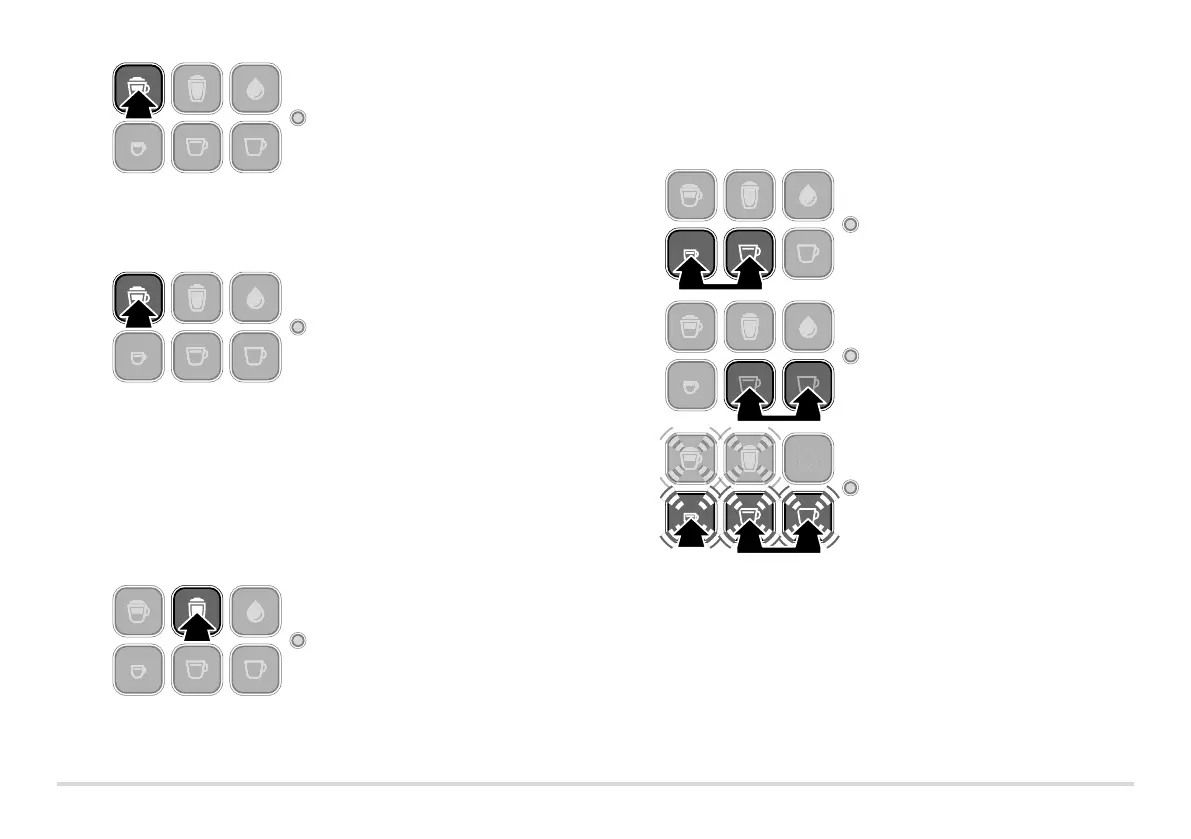
2. Press and hold the cappuccino
button. You will hear a beep after
approx. 2 seconds. Release the
button as soon as the desired
quantity of milk froth has been
dispensed into the cup. The set-
ting has been saved.
3. Wait until coffee starts being
made.
4. Press and hold the cappuccino
button once again. You will hear
a beep after approx. 2 seconds.
Release the button as soon as
the desired quantity of coffee
has been dispensed into the
cup. The setting has been saved.
If the settings are not to your taste, simply repeat the procedure to change
them again.
Milk froth
1. Proceed as described in the section titled “Making a beverage with milk”:
Fill the water container and milk container and place a cup underneath
the milk spout.
2. Press and hold the make milk
froth button. You will hear a
beep after approx. 2 seconds.
Release the button as soon as
the desired quantity of milk
froth has been dispensed into
the cup. The setting has been
saved.
If the settings are not to your taste, simply repeat the procedure to change
them again.
Restoring the factory settings
To reset to the original amounts of beverage and milk froth, proceed as follows:
1. Switch the machine off: To do
so, briefly press the espresso
button and the caffè crema
button at the same time.
2. Then press and hold the
caffè crema button and
the black coffee button
at the same time.
3. In addition, briefly press the
espresso button once until you
hear three beeps as confirma-
tion and the 5 beverage buttons
start flashing.
4. Release all buttons.
The default settings for beverage and milk froth quantities have now been restored.



 To Next Page