26
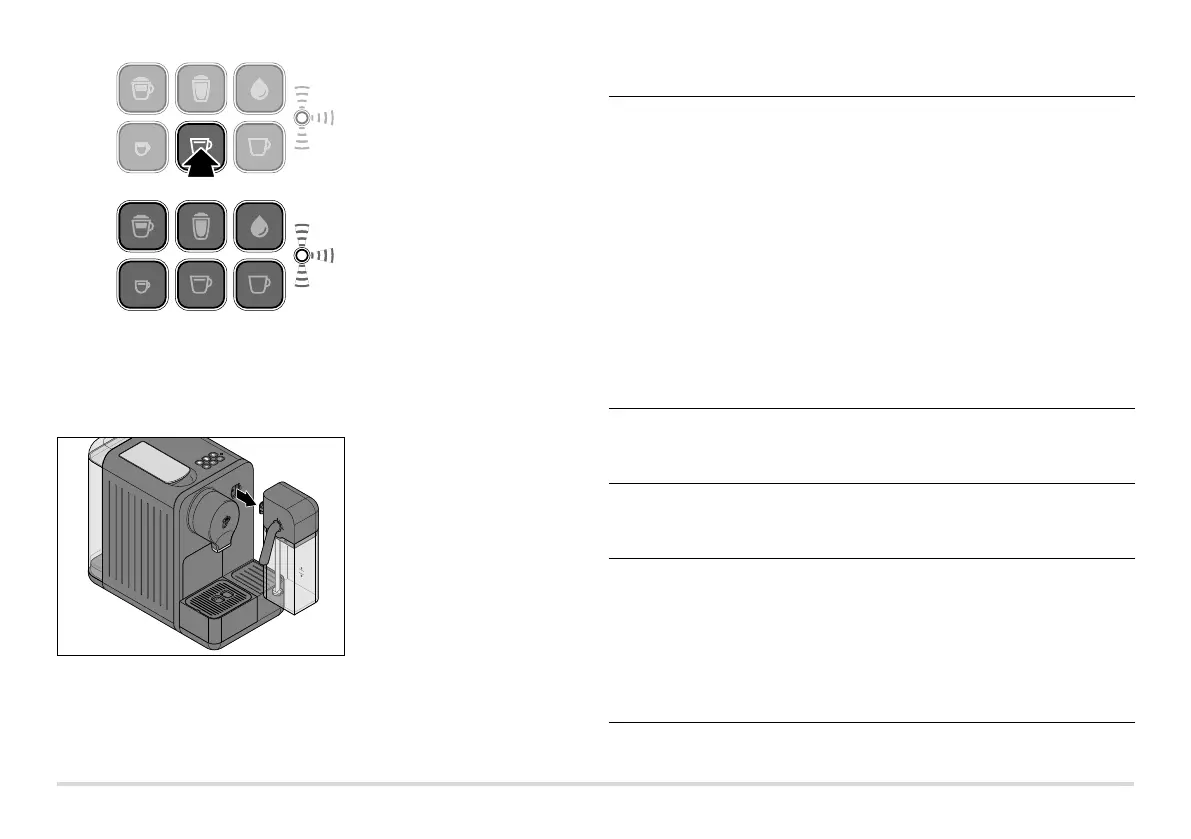
14. Press the caffè crema button
to start the rinsing process.
The rinsing process will begin.
The caffè crema button will fade
and the indicator light will flash
yellow. The procedure takes
approx. 2 minutes.
15. Approx. 600 ml of water will be rinsed through the system.
Keep an eye on the container and empty it before it overflows.
16. The machine automatically switches to standby once it is finished.
The indicator light goes out. The descaling process is complete.
17. Pull the milk container straight
out towards you to remove it
from the machine.
18. Clean the milk container as
described in the section titled
“Cleaning”.
Problems / solutions
The indicator light
is flashing red and
there are several
beeping sounds.
Is the water container empty?
Fill the water container with fresh water. m
Press one of the beverage buttons. The pump startsm
to operate. As soon as the pipes are filled with water,
the pump stops automatically. When the beverage
buttons remain permanently lit, the machine is ready
for use again.
Was the lever for opening and closing the capsule
opening opened while the machine was making
a beverage?
Close the lever. Press any button. Once the buttonsm
remain permanently lit, the machine is ready for
use again.
There are coffee
grounds in the cup.
A small residue of coffee grounds always remains at the
bottom of the cup. This is a feature of the system and is
not a fault.
Water is dripping
from the coffee
spout.
The water in the system expands as the machine heats
up. This causes a little water to drip from the coffee
spout. This is a feature of the system and is not a fault.
The indicator light
stays yellow.
The machine needs to be descaled.
Do this within the next couple of days. Do not wait
any longer, otherwise so much limescale may build up
that a descaling agent will no longer have any effect.
A self-induced defect of this kind will not be covered
by the warranty.
Proceed as described in the section titled “Descaling”.



 To Next Page