8
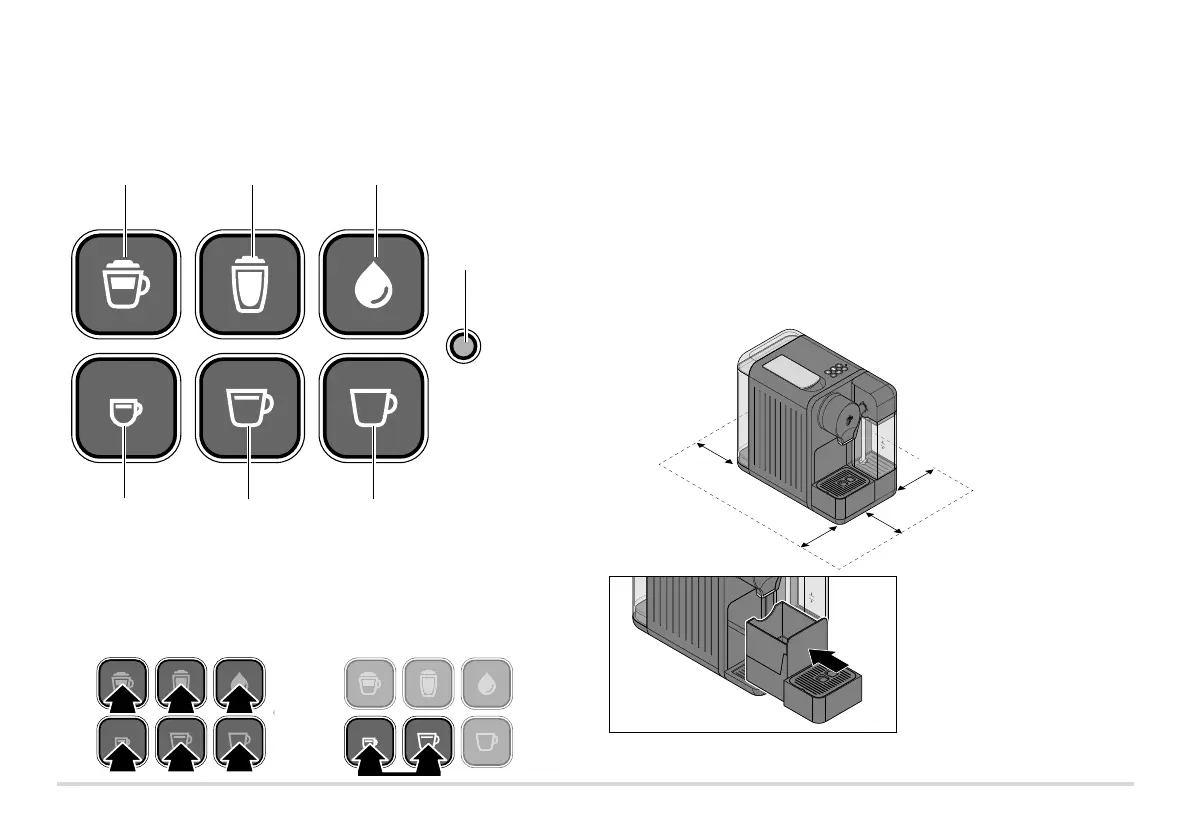
Control panel — button functions
Make
cappuccino
Indicator light
• Flashes red
(water container
empty)
• Lights up yellow
(machine needs
to be descaled)
Make
milk froth
Milk system
rinse
Make
espresso
Make
caffè crema
Make
black coffee
Initial operation – prior to first use
Take the machine out of the packaging.1.
Remove all protective films from the machine. Remove all packaging materials2.
and all adhesive protection strips used for transport.
Set up the machine...3.
... on a level worktop or surface that is not sensitive to moisture.
... close to a wall socket. The length of the connection cable is approx. 80 cm.
... at a distance of at least 1 m away from hot, flammable surfaces
(hobs, ovens, radiators, etc.).
... 15 cm away from walls.
4. Make sure that the used
capsule container is correctly
inserted into the front drawer.
The front drawer needs to be
pushed in all the way and the
drip tray inserted correctly.
Switch on machine
(press any button)
Switch off machine
(press espresso + caffè crema
buttons simultaneously)



 To Next Page