EasyManua.ls Logo

TCL 30 - User Manual

TCL 30
21 pages
Print Icon
To Next Page IconTo Next Page
Loading...
Service Manual TCL Communication Technology Holdings Ltd.
Rev.: 1.0
TCL 30 & TCL 30+ Service Manual V1.0
Page: 1/21
Confidential and proprietary information contained in this repair guide is subject to change without notice.
Distribution, transfer, copy of any content or data in this document without the written permission of TCL is strictly prohibited.
TCL 30 & TCL 30+
T676H/K
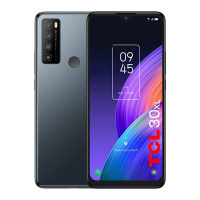
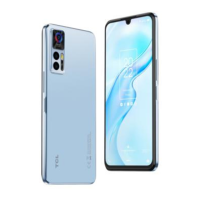
Techno Black Muse Blue
Warning:
All features, functions, specifications, and other product information provided in this document,
including but not limited to the advantages, aesthetics, price, components, performance, availability
and capacity of the product are subject to change without notice.
TCL will not be responsible for any damage to the product, injury or other safety issue caused by the
result of repair by an unauthorized service provider, user repair or unprofessional product repair.
Any damage to the product resulted from an attempt to repair the product by any person or 3
rd
party
other than TCL authorized service provider will not be covered by warranty.

Questions and Answers

  • D
    daniel45Jul 29, 2025
    What to do if my TCL 30 Cell Phone cannot charge or charges slowly?
    • J
      Jacob ChandlerJul 29, 2025
      If your TCL Cell Phone is not charging or charges slowly, and there's visible damage to the charger USB, the charger itself, or the charging port, back up your data and take your device and proof of purchase to our repair center for assistance. Otherwise, charge the device with a TCL official charger for at least 30 minutes. Also, verify whether there are any third-party power management software apps downloaded.
  • I
    iwilsonAug 7, 2025
    Why does my TCL Cell Phone lag or freeze?
    • J
      joseph30Aug 7, 2025
      If your TCL Cell Phone system lags or freezes, start by restarting it and ensuring the battery is at least 20% charged. If many apps run in the background, tap the Menu key and "Clear all" to close them. Also, uninstall unused apps to free up storage space and remove any suspicious third-party apps. For poor network connections, enable Airplane mode for a few minutes, then disable it. As a last resort, try resetting or updating your device.
  • M
    Michael Singleton MDAug 18, 2025
    Why does my TCL 30 Cell Phone keep rebooting itself?
    • S
      Savannah Garcia MDAug 18, 2025
      If your TCL Cell Phone reboots by itself, and this is caused by anomalies in a file, it is recommended that you continue to use the device normally. Otherwise, try the official charger and data cable. Make sure the app is compatible with your device and Android version. Try uninstalling the third-party app. Try to reset or update your device.

Summary

Precautions for Repair

Essential Safety Procedures

Handle batteries with care, avoid ESD, ensure device is off, and use a safe environment for repairs.

Device Factory Reset Procedures

Software Update Methods

Functional Testing with Support Centre

Troubleshooting Common Issues

Resolving Unexpected Reboots

Solutions for the device rebooting on its own, checking apps and device status.

Fixing System Lag and Freezing

Troubleshooting steps for slow performance or device freezing issues, including cache clearing.

Addressing Charging Problems

Advice for problems with device charging or slow charging, checking cables and software.

Troubleshooting Fingerprint Unlock

How to fix slow or failing fingerprint unlock function, checking sensor and settings.

Preventing Rapid Battery Drain

Tips to prevent or fix rapid battery drain during normal use, managing background apps.

TCL Support Contact Information

TCL 30 Specifications

General IconGeneral
Color nameTech Black
Form factorBar
Product colorBlack
PlatformAndroid
Operating system installedAndroid 12
Talk time (3G)- h
Battery capacity5010 mAh
Battery recharge time3 h
Panel typeAMOLED
Screen shapeFlat
Pixel density395 ppi
Display diagonal6.7 \
Touchscreen typeCapacitive
Display brightness650 cd/m²
Display resolution1080 x 2400 pixels
Native aspect ratio20:9
Maximum refresh rate60 Hz
Contrast ratio (typical)100000:1
High Dynamic Range (HDR) supportedYes
RefurbishedNo
Graphics cardIMG GE8320
Processor cores4
Processor modelHelio G37
Processor familyMediaTek
Processor frequency2.3 GHz
Coprocessor frequency1.8 GHz
Processor architectureARM Cortex-A53
Speakersstereo
Audio formats supportedAAC, AAC+, AMR, APE, AWB, FLAC, MP3, PCM, Vorbis, eAAC+
Video formats supportedAVC, H.263, H.264, H.265, HEVC, MPEG4, VP8, VP9
RAM typeLPDDR4X
User memory44 GB
RAM capacity4 GB
Compatible memory cardsMicroSD (TransFlash), MicroSDHC, MicroSDXC
Maximum memory card size1000 GB
Internal storage capacity64 GB
Rear camera typeTriple camera
Front camera typeSingle camera
Video recording modes1080p
Rear camera pixel size0.64 µm
Front camera pixel size1.12 µm
Rear camera sensor size1/2.76 \
Front camera sensor size1/4 \
Rear camera aperture number1.85
Front camera aperture number2
Second rear camera pixel size1.75 µm
Second rear camera sensor size1/5 \
Rear camera resolution (numeric)50 MP
Front camera resolution (numeric)8 MP
Macro camera resolution (numeric)2 MP
Second rear camera aperture number2.4
Rear camera field of view (FOV) angle74.4 °
Front camera field of view (FOV) angle78 °
Third rear camera field of view (FOV) angle88.8 °
Second rear camera field of view (FOV) angle85 °
Cables includedUSB Type-C
4G standardLTE
3G standardsHSPA+
SIM card typeNanoSIM
Bluetooth version5.0
SIM card capabilityDual SIM
Mobile network generation4G
Subscription typeNo subscription
USB version2.0
Headphone connectivity3.5 mm
Weight and Dimensions IconWeight and Dimensions
Depth7.74 mm
Width75.24 mm
Height164.54 mm
Weight184 g

Related product manuals