EasyManua.ls Logo

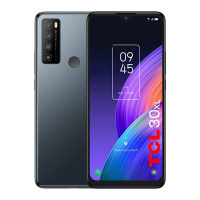
TCL 30Z - User Manual

TCL 30Z
101 pages
Print Icon
To Next Page IconTo Next Page
Loading...
User Guide

Table of Contents

Other manuals for TCL 30Z

Questions and Answers

  • E
    Eric TrujilloAug 19, 2025
    What to do if my TCL 30Z Cell Phone has echo or noise during calls?
    • C
      Casey WilliamsAug 19, 2025
      If you experience echo or noise during calls on your TCL Cell Phone, the issue might be due to poor network link quality or poor local telephone line quality. End the call and dial again to see if you are switched to a better-quality connection.
  • C
    Charles WilliamsAug 21, 2025
    What to do if my TCL Cell Phone battery is not charging?
    • M
      Michael MercadoAug 22, 2025
      If your TCL Cell Phone battery is not charging, the battery or charger may be damaged. Contact the dealer. The phone's temperature could also be too low (below 32°F) or too high (above 113°F). Adjust the environment to avoid temperature extremes. Also, check the connectors to ensure they are properly connected.
  • W
    wgreenAug 25, 2025
    What to do if my TCL Cell Phone can't make outgoing calls?
    • H
      Heather Cannon DDSAug 25, 2025
      If your TCL Cell Phone cannot make outgoing calls, you may have activated Fixed Dialing Numbers. Go to Fixed Dialing Numbers in your phone's settings and disable it.
  • A
    Andrew ThomasAug 26, 2025
    What to do if my TCL 30Z Cell Phone is slow?
    • L
      Leslie BrockAug 26, 2025
      If your TCL Cell Phone is running slowly, it might be because applications are running in the background. Exit any applications that you are not actively using.
  • R
    Renee MahoneyAug 28, 2025
    What to do if my TCL Cell Phone won't turn on?
    • P
      Paul JonesAug 28, 2025
      If your TCL Cell Phone won't turn on, the battery may be completely drained. Recharge the phone's battery.
  • A
    Ariel PeckAug 30, 2025
    What to do if my TCL Cell Phone says NANO SIM card error?
    • L
      Linda RamirezAug 30, 2025
      If your TCL Cell Phone displays a NANO SIM card error, the card may be malfunctioning or damaged. Take the NANO SIM card to your service provider for testing. Alternatively, the card may be inserted improperly; ensure it is correctly inserted. Also, check for debris on the NANO SIM card contacts and clean them with a soft, dry cloth.
  • R
    Regina JohnsonSep 1, 2025
    Why is my TCL Cell Phone battery draining so fast?
    • R
      rachelperezSep 1, 2025
      Several factors can shorten your TCL Cell Phone's standby time. The screen brightness might be set too high, or features like Wi-Fi, Bluetooth, or GPS may be enabled when not in use. Adjust the screen brightness, and disable these features when you don't need them. Also, close any applications running in the background. If your phone struggles to connect to the network, it will continuously search for a signal, which drains the battery. Move to an area with better network coverage, or temporarily turn off your phone.
  • C
    Cody NelsonSep 3, 2025
    What to do if my TCL 30Z Cell Phone has poor reception?
    • A
      Amy LopezSep 3, 2025
      If your TCL Cell Phone has poor reception, the network signal at your location might be weak, especially in a basement or near tall buildings. Move to a location where the signal is stronger. The network may also be busy during peak times; try again later. Finally, you might be too far from your service provider's base station. You can request a service area map from them.
  • D
    David CastanedaSep 5, 2025
    Why can't my TCL 30Z connect to the network?
    • T
      Tiffany MckeeSep 5, 2025
      If your TCL Cell Phone cannot connect to the network, the NANO SIM card might be invalid. Contact your service provider. You may also be outside the network's service area; check with your provider. A poor signal can also prevent connection; move to an open space or closer to a window.
  • P
    Pamela EricksonSep 7, 2025
    What to do if my TCL 30Z freezes?
    • G
      gordonmarkSep 7, 2025
      If your TCL Cell Phone crashes, reboots, freezes, or cannot be powered on, some third-party software might be incompatible with your phone. Uninstall any software that may be causing the problem. You can also try upgrading the phone software. Another option is to reset the phone to factory status by pressing the Power key and Volume Up key at the same time when powering off the phone.

Summary

Getting Started

Phone Setup and Initial Configuration

Initial setup of the phone, including SIM/microSD insertion, charging, powering on/off.

Navigating the Phone Interface

Understanding phone layout, key functions, and tap gestures for basic operation.

Core Phone Operations

Phone Calls Management

Guides on making, receiving, and adjusting phone call settings.

Messaging and Email

Instructions for sending, replying, forwarding messages, and managing email accounts.

Contact Management

Adding, sharing, linking, and organizing contacts for efficient communication.

Internet and Connectivity

Wi-Fi and Internet Access

Connecting to Wi-Fi, browsing the web, and managing mobile data and hotspots.

Bluetooth Connectivity

Enabling Bluetooth, pairing devices, and managing connections for wireless communication.

Applications and Customization

Camera and Media Management

Using the camera, capturing photos/videos, and managing media files.

Phone Settings and Customization

Configuring display, sound, security, system, and accessibility options.

Safety, Specifications, and Support

Safety and Regulatory Information

Covers general safety, FCC compliance, SAR exposure, and specific warnings.

Phone Specifications and Warranty

Technical specifications of the device and details of the 1-year limited warranty.

Customer Support and Recycling

Contact information for customer care and guidance on recycling programs.

TCL 30Z Specifications

General IconGeneral
Resolution720 x 1560 pixels
ProcessorMediaTek Helio A22
RAM3 GB
Storage32 GB
Front Camera5 MP
Battery Capacity4000 mAh
Operating SystemAndroid 12
Network4G LTE

Related product manuals