EN-2 EN-3
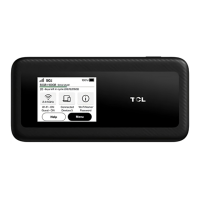
About your TCL LINKZONE 5G UW
1. Touch screen
Navigate the screen using your finger.
2. Power button
• To turn on, press and hold until screen welcome
message appears.
• To turn off, press and hold until Shutdown screen
appears. Then tap 'shutdown'.
• Press and release to wake up the display.
3. USB-C port
• Connect to a power supply using the included
USB-C cable and wall adapter.
• Connect to "On the Go" (OTG) Cable (sold
separately) to recharge other accessories such as a
smartphone or bluetooth headset.
4. LAN port
Connect an Ethernet cable to a computer which
provides secure connection to connected devices.
5. Reset button
If your device does not respond or needs to be reset,
insert a sharp object, such as a paper clip into this
hole for 3 seconds.
NOTE: All passwords will be reset to default settings.



 To Next Page