TCNet Boiler Controller
User and Service Manual
10
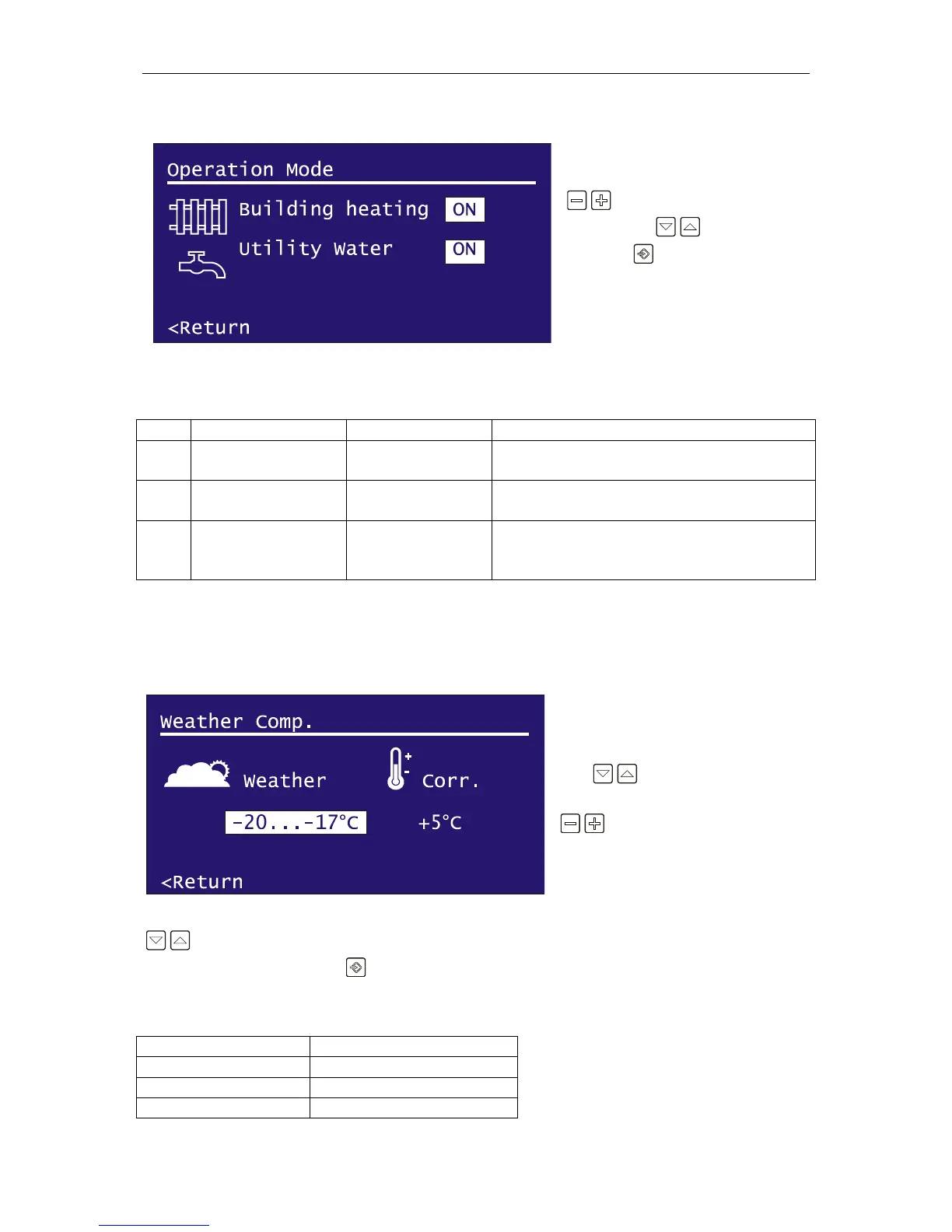
Operation Mode
To change the operation mode press
adjust keys. Navigate to
<Return with navigation keys
and press Input key to return the
User Preferences menu.
There are three operation modes of your boiler.
Only the building heating circuit’s circulation
pump will operate. (Utility water is not
necessary or not available in the boiler system)
Weather Compensation
Your boiler is able to adjust the temperature setpoint according to the weather temperature.
To setup the weather compensation,
first navigate to temperature range
with navigation keys and
select the temperature range with
adjust keys. After selecting
the temperature range, navigate to
Correction value and set the offset
temperature of your boiler for this
temperature range. To adjust another temperature range, navigate back to temperature range with
navigation keys and select the range that you want. After all settings have been completed,
navigate to <Return and press Input key to return to the User Preferences Menu.
There are eleven temperature ranges for adjusting.


 To Next Page