31 32
3.3.1 View your contacts
To access People app, touch the Application tab on the Home
screen, then select People.
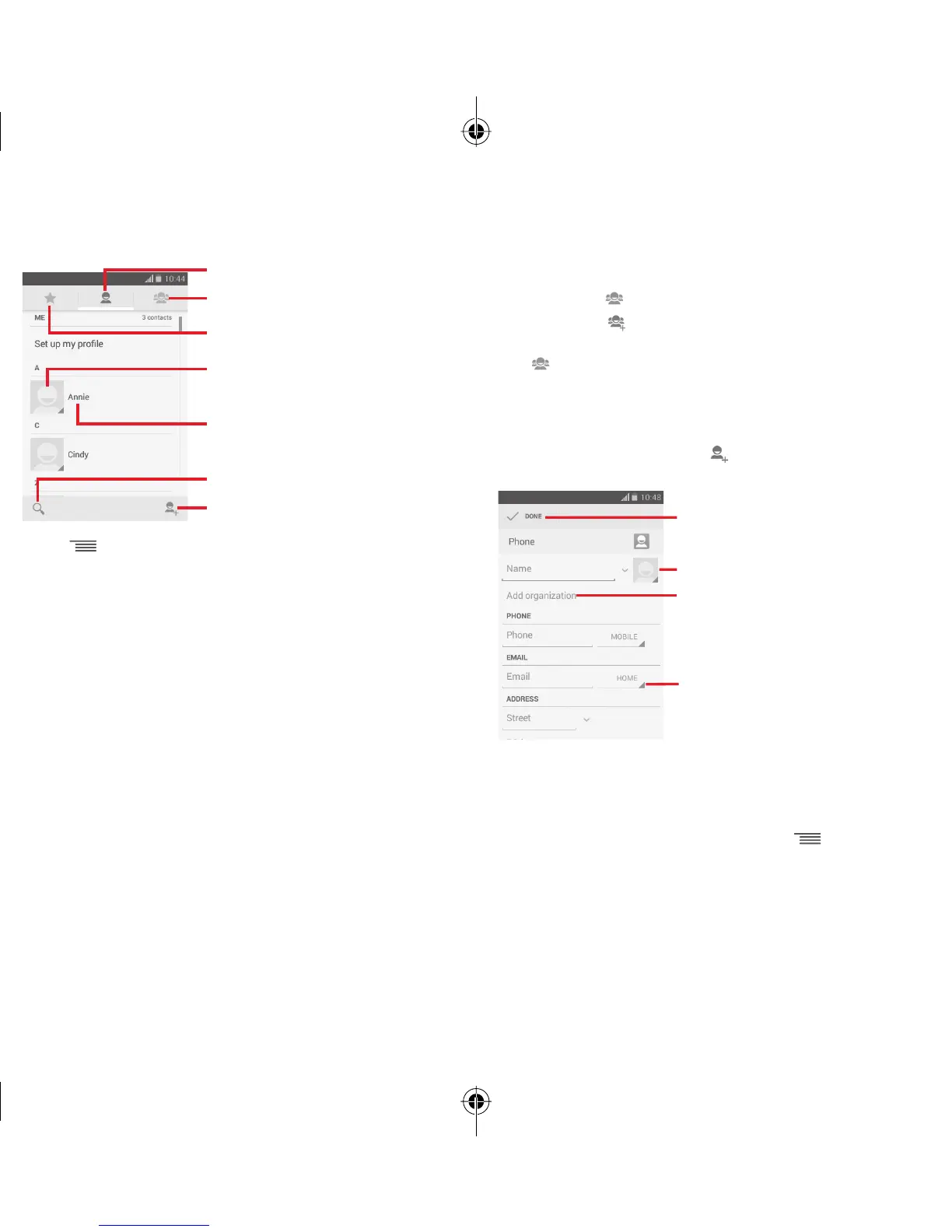
Touch icon to open Quick Contact panel
Touch to view the contact’s detailed
information
Touch to view your favourite contacts
Touch to view your contact groups
Contact list
Touch to search in Contacts
Touch to add a new contact
Touch key to display contacts list option menu.
Following actions are enabled:
• Delete contact
Select and delete unwanted contacts.
• Contacts to
display
Choose contacts to display.
• Import/Export
Import or export contacts between
phone, SIM card, and microSD card, or
share contacts.
• Accounts
Manage the synchronisation settings for
different accounts.
• Settings
Access to contact display settings.
• Share visible
contacts
Share contacts with others by sending
the contact’s vCard to them via Bluetooth,
Email, SMS, etc.
3.3.2 Managing contact groups
The contact group helps you to improve the organisation of
your contacts. You can add, remove and view groups in the
Contact group screen.
Touch the icon
to view local groups. To create a new group,
touch the icon , enter the new name and touch DONE to
confirm. If you have added accounts to your phone, touch the
icon to view groups in accounts.
3.3.3 Adding a contact
Touch the Application tab on the Home screen, select the
People, then touch the icon
in the contact list to create
a new contact.
Touch to take a photo or select a picture
for the contact
Touch to open other available labels
Touch to save
Touch to add a new label
If you want to add more information, touch Add another field
to add a new category.
When finished, touch DONE to save.
To exit without saving, you can touch
key and then
Discard.
IP5032_VF685_UM_Eng_GB_08_140901.indd Sec2:31-Sec2:32IP5032_VF685_UM_Eng_GB_08_140901.indd Sec2:31-Sec2:32 2014-9-1 16:05:412014-9-1 16:05:41


 To Next Page