78
1 Your phone
1.1 Keys and connectors
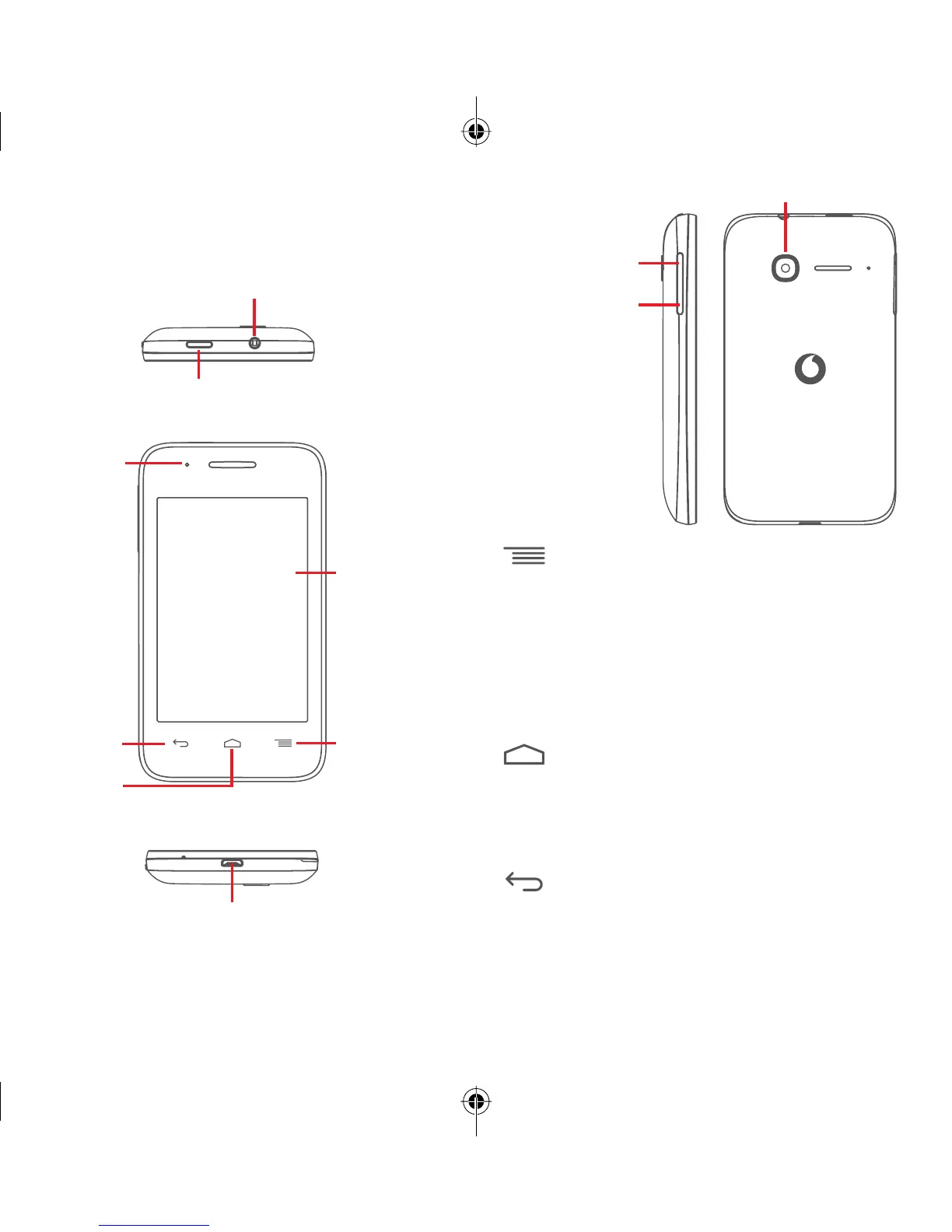
Power key
Micro-USB connector
Back key
Home key
Menu key
Touch screen
LED light
Headset connector
Volume up
Volume down
Camera
Menu key
• Touch: display menu options. On the Home
screen, touch to access Wallpapers, Widgets
and Settings.
• Touch & hold: this shows you images of your most
recently-used apps. Touch an image to open the
associated app, or swipe it left or right to remove
it from the list.
Home key
• While on any app or screen, touch the Home key
to return to the main Home screen.
• Touch & hold this key to access Google Now &
Voice Search.
Back key
• Touch to go back to the previous screen,
or to close a dialogue box, options menu, the
Notification panel, etc.
IP5032_VF685_UM_Eng_GB_08_140901.indd Sec2:7-Sec2:8IP5032_VF685_UM_Eng_GB_08_140901.indd Sec2:7-Sec2:8 2014-9-1 16:05:372014-9-1 16:05:37


 To Next Page