EasyManua.ls Logo

Teac A-100 - Page 4

Teac A-100
9 pages
Print Icon
To Next Page IconTo Next Page
To Previous Page IconTo Previous Page
Loading...
Connections
and
Procedures
Fig.
A
rT'i'H'i
-L
c
s
Fig.
E
Fig.
D
Fig.
B
Fig.C
ft
ft
Tape
Deck
REC
Out
3
®R
Open
Keel
Deck
O
Pin
Plug
Cords
Spkr
Spkr
ft
o-
Record
Player
Cassette
Deck
Spkr
Tuner
Stereo
Amplifier
Spkr
—
4
—
—
3
—
7
—
Playback
Procedure
Recording
Procedure
1.
Open
the
Cassette
Holder
Protective
Door.
2.
Depress
the
EJECT
key
to
raise
the
Cassette
Holder
Tray.
Slide
the
pre

recorded
tape
into
the
Cassette
Holder
Tray
as
shown
until
it
drops
into
place.
Keep
the
side
of
the
tape
you
wish
to
play
facing
up.
1.
Insert
the
cassette
tape
as
shown,
with
the
side
you
wish
to
record
facing
up.
Close
the
cover.
OUT
PUT
®
®®
peso
0
®
®
0
0
0
______
Stereo
Amplifier
»
I
-55-
®
9
9
8
s
9
6
-
8
~
3.
Depress
the
Key
to
rewind
the
tape
to
the
beginning.
4.
Depress
the
Counter
Reset
Button
to
reset
the
Counter
to
000.
5.
Set
the
EQ
Switch
to
match
the
type
of
tape
you
are
using
according
to
the
chart
on
page
6.
(The
BIAS
Switch
has
no
affect
on
the
tape
during
playback.
6.
Set
the
DOLBY
NR
Switch
to
IN
posi

tion
if
the
tape
was
Dolby
encoded
(recorded
using
Dolby
noise
reduction
circuitry).
Set
the
Switch
to
OUT
posi

tion
if
the
tape
was
recorded
without
Dolby
circuitry.
7.
Connect
the
headphones
to
the
PHONES
Jack
for
private
listening.
8.
Depress
the
Play
Key
â–º
to
begin
play

back.
9.
Set
the
control
on
the
stereo
amplifier
or
receiver
(if
used)
to
obtain
the
sound
loudness
you
desire.
IN
Jacks
at
the
rear
of
the
deck.
Set
this
switch
to
MIC/DIN
if
you
wish
to
record
using
either
microphones
at
the
front
panel
MIC
jacks
or
the
DIN
IN/OUT
connector
at
the
rear
panel
of
the
deck.
5.
Depress
the
pause
key
and
lock
it
in
the
down
position.
Then
depress
the
REC
key
and
while
holding
it
down,
depress
the
Play
key.
6.
Begin
the
source
music,
i.e.,
tune
in
the
FM
station,
begin
playing
the
record
or
sing
into
the
microphones
to
obtain
a
source
for
initial
setting
of
the
RECORD
Level
Controls.
7.
Increase
the
RECORD
level
controls
until
the
VU
meters
read
0
VU
for
the
loudest
portions
of
the
song.
8.
Depress
the
Pause
key
again
and
release
it.
This
begins
the
actual
recording.
9.
Depress
the
Stop
key
when
the
recording
is
finished.
If
you
wish
to
record
another
selection
depress
the
Pause
key
instead
of
the
Stop
key.
To
begin
the
next
recording
depress
and
release
the
Pause
key.
2.
Set
the
BIAS
and
EQ
switches
to
match
the
type
of
tape
you
are
using
according
to
the
chart
on
page
6.
3.
Set
the
Oolby
NR
switch
to
the
IN
position
to
Dolby
encode
your
tape
to
reduce
noise
during
playback.
For
re

cording
without
Dolby,
set
the
Dolby
NR
switch
to
OUT.
4.
Set
the
INPUT
selector
to
LINE
position
if
you
wish
to
record
music
via
the
LINE
s
O
O
o
o
o
o
©
0
0
1
®
o
O
O
o
o
o
©
!
o|»«|ooo|
|oe]vni
—
b
8
w
HI
11
=r°l
Tape
Deck
Monitor
IN/OUT(DIN)
or
REC/PB
OUTPUT
LINE
IN
L
®IN/OUT(DIN)®
L
©R®°@°
OUTPUT
LINE
IN
L
©IN/DUT(CHN)®
L
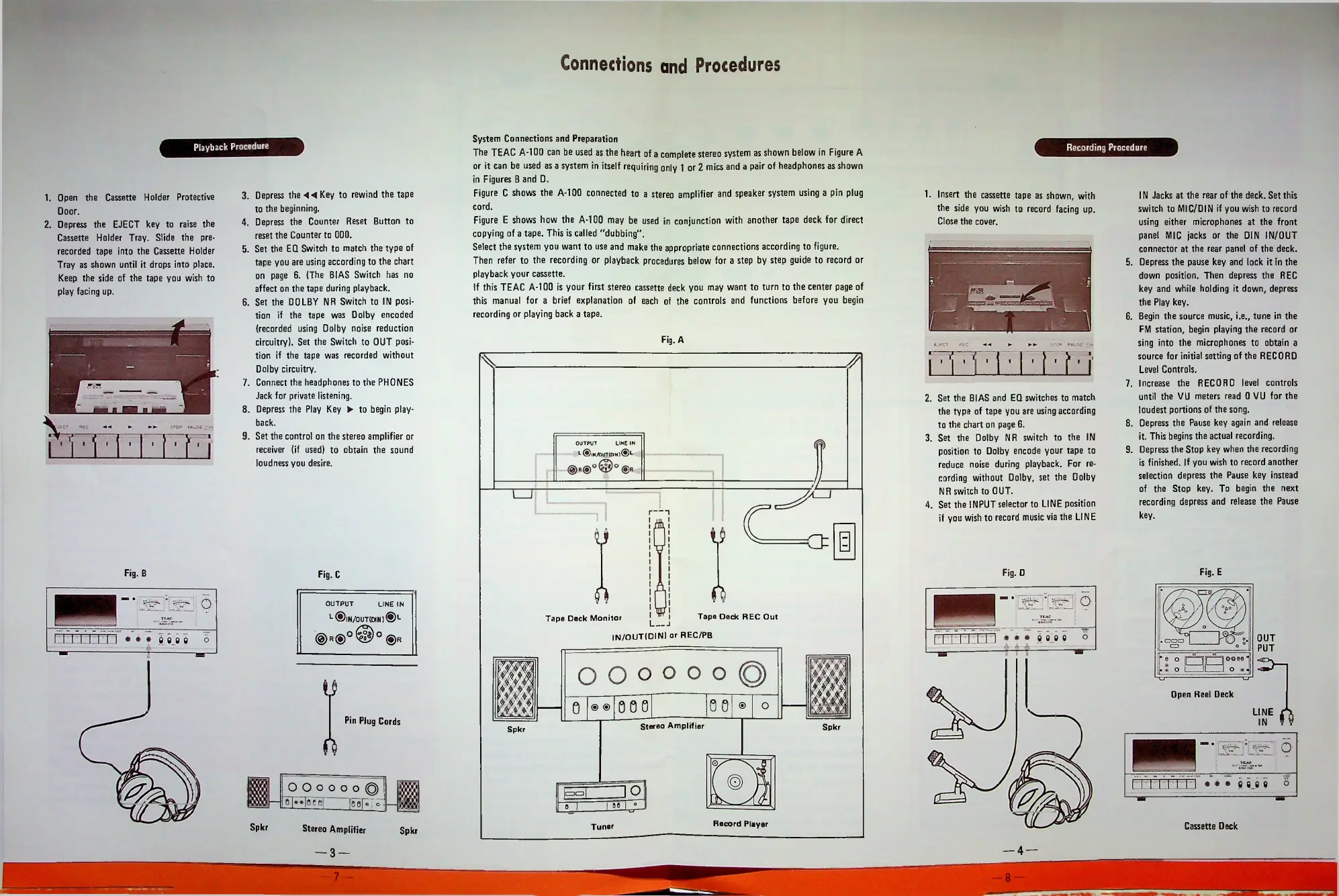
System
Connections
and
Preparation
The
TEAC
A-1
00
can
be
used
as
the
heart
of
a
complete
stereo
system
as
shown
below
in
Figure
A
or
it
can
be
used
as
a
system
in
itself
requiring
only
1
or
2
mics
and
a
pair
of
headphones
as
shown
in
Figures
B
and
D.
Figure
C
shows
the
A-1
00
connected
to
a
stereo
amplifier
and
speaker
system
using
a
pin
plug
cord.
Figure
E
shows
how
the
A-1
00
may
be
used
in
conjunction
with
another
tape
deck
for
direct
copying
of
a
tape.
This
is
called
"dubbing".
Select
the
system
you
want
to
use
and
make
the
appropriate
connections
according
to
figure.
Then
refer
to
the
recording
or
playback
procedures
below
for
a
step
by
step
guide
to
record
or
playback
your
cassette.
If
this
TEAC
A-1
00
is
your
first
stereo
cassette
deck
you
may
want
to
turn
to
the
center
page
of
this
manual
for
a
brief
explanation
of
each
of
the
controls
and
functions
before
you
begin
recording
or
playing
back
a
tape.
l
!
n
e
ft

Related product manuals