EasyManua.ls Logo

Teac A-100 - Page 5

Teac A-100
9 pages
Print Icon
To Next Page IconTo Next Page
To Previous Page IconTo Previous Page
Loading...
5
-6
Fe@tyr®s
and
Controls
1.
2
Tape
Brand
BIAS
EQ
1
CrO
2
CrO
2
BASF
3.
CrO
2
MAXELL
I
k.
RECORD
J
I
REC
■«
EJECT
MIC
PHONES
CO
TT
TT
TT
IT
TT
T
!
Rewind
Key
-4
STOP
Key
The
second
purpose
of
the
key
is
to
set
the
jl.T
H;1
|
Q
0
0
Q
You
may
now
proceed
with
the
recording
or
playback
procedures
explained
on
pages
3
and
4.
s
POWER
Switch
Depress
POWER
Switch
to
apply
power
to
the
deck.
Lamps
in
VU
Meters
and
"spot
light"
in
Cassette
Holder
will
light
to
indi
cate
power
is
ON.
Depress
and
release
switch
to
turn
OFF
power.
NOR
MAL
NOR
MAL
NOR
MAL
I
Cassette
Holder
Protective
Door
I;
The
smoothly
rotating
door
can
be
opened
by
gently
pulling
out
on
the
bottom
edge
of
the
door.
Open
the
door
for
insertion
or
removal
of
the
cassette
tape
or
for
cleaning
and
demagnetizing
of
the
heads
and
tape
path.
Keep
the
door
closed
to
protect
the
heads
and
tape
transport
from
dust
and
foreign
matter.
REC
TEAC
A-IOO
Stereo
Cassette
Deck
mloOLBr
SYSTEM)
POWER
VU
Meters
Wide
expanded
scale
VU
Meters
make
set
ting
the
RECORD
Levels
easy
and
accurate.
For
normal
recording
set
the
recording
level
for
about
0
VU
for
the
loudest
passages
of
the
song
or
music.
During
playback
these
meters
will
indicate
the
level
of
the
signal
coming
off
the
tape
to
help
you
visually
determine
the
presence
of
a
signal.
If
you
are
listening
to
the
tape
playback
using
your
stereo
amplifier
and
speaker
system,
adjust
the
listening
volume
level
at
the
stereo
amplifier.
TDK
SONY
MAXELL
MEMOREX
AGFA-
GEVAERT
SONY
SCOTCH
TDK
SONY
FUJI
FILM
BASF
SCOTCH
QUAD
______
CLASSIC
SA,
D,
SD,
AUDUA,
M
C-60,
C-90
UDXL,
UD,
LN
C-60,
C-90,
HF
FX,
FXJr.
C-60,
C-90,
LH
LH,
MASTER
CASSETTE
BIAS
and
EQ
Switch
Setting
Chart
Tape
Designation
SA
C-60,
C-90
CR
C-60,
C-90
CR
C-60,
C-90
Chromium
dioxide
C-60,
C-90
Chromdioxid
C-60,
C-90
Chromdioxid
Cassette
Holder
Open
the
Cassette
Holder
Protective
Door
and
note
these
points
about
the
cassette
Holder:
a.
A
miniature
"spotlight"
is
provided
which
lights
when
power
is
applied
to
illuminate
the
Cassette
Holder
Tray
and
head
area.
The
convenient
"spotlight"
allows
you
to
see
the
loaded
cassette
tape
through
the
closed
transparent
protective
door.
It
also
makes
it
easy
to
see
the
heads
and
tape
path
when
the
door
is
open
and
the
cassette
tape
removed
during
cleaning
and
inspection.
b.
The
unique,
guide
ramp
which
allows
you
to
slide
the
cassette
tape
into
place
at
the
summit
of
the
transport
mechanism.
The
EJECT
Key
must
be
depressed
to
raise
the
cassette
tray
for
insertion
or
removal
of
the
cassette
tape.
Do
not
force
the
tape
against
the
closed
cassette
tray.
Prior
to
transport
or
shipping
the
cassette
tray
should
be
depressed
by
hand
to
protect
the
transport
mechaoism
from
unnecessary
shock
or
vibration.
But,
be
sure
to
depress
the
EJECT
Key
prior
to
loading
a
cassette
tape.
Slide
the
Cassette
Tape
up
the
Guide
Ramp
until
the
tape
drops
into
place
at
the
top
of
the
ramp
and
gently
press
down
on
the
tape
to
insure
proper
positioning
of
the
tape.
EQ
(Equalization)
Tape
decks
do
not
record
and
reproduce
all
audio
frequencies
at
the
same
level.
Various
tapes
also
produce
different
output
levels
for
different
frequencies.
To
compensate
for
these
factors
manufacturers
have
added
cir
cuitry
to
try
to
restore
the
"flatness"
of
the
original
music.
This
circuitry
is
called
equali
zation
and
is
standardized
throughout
the
audio
industry
to
provide
compatibility
between
tape
decks
made
by
various
manu
facturers.
The
A-100
incorporates
a
2-
position
EQ
switch
that
allows
you
to
select
the
equalization
that
best
matches
the
tape
you
will
be
using.
Select
Cr0
2
position
for
70
microsecond
equalization
for
the
tapes
listed
in
the
upper
and
middle
sections
of
the
chart
below
as
well
as
most
other
Cr0
2
and
FeCr
type
tape.
Select
NORMAL
position
for
120
micro
second
equalization
to
match
the
tapes
listed
in
the
lower
section
of
the
chart
below
and
for
most
other
Hi
Fi
or
Low
noise
types
of
tape.
BIAS
During
recording
the
amount
of
bias
in
cluded
with
the
recorded
signal
affects
the
sensitivity,
distortion,
signal-to-noise
ratio
and
frequency
response
of
the
tape.
To
get
the
maximum
performance
out
of
any
tape
To
Load
the
Cassette
Tape
Open
the
Cassette
Holder
Protective
Door
by
hand.
Depress
the
EJECT
Key
to
raise
the
Cassette
Holder
Tray.
Insert
the
Cassette
Tape
in
the
Guide
Ramp
with
the
side
you
wish
to
record
or
play
facing
up
and
the
exposed
tape
facing
the
front
of
the
deck.
REC
Indicator
Lamp
The
red
REC
Indicator
Lamp
located
be
tween
the
VU
Meters
lights
when
the
deck
is
I
\
in
the
REC
or
REC/PAUSE
mode.
...
_
,
_
™~
it
is
very
important
to
match
the
amount
of
bias
supplied
by
the
tape
deck
to
the
tape.
Cr0
2
position
of
the
Bias
switch
provides
the
higher
level
of
bias
that
is
required
by
Cr0
2
tapes.
NORMAL
position
of
the
Bias
switch
provides
a
lower
level
of
bias
that
is
suitable
for
most
other
types
of
tapes.
RECORD
Input
Level
Controls
Use
the
RECORD
Input
Level
Controls
to
adjust
the
recording
level
of
the
signals
connected
to
the
MIC,
DIN
or
LINE
Inputs
as
selected
by
the
INPUT
Selector
Switch.
-
.
_____________________________________________
_________________________________
..
\
EJECT
Key
Index
Counter
When
the
Play
key
>
or
Fast
Forward
key
>
r>
is
depressed
the
tape
moves
to
the
right
and
the
Index
Counter
counts
up
to
indicate
the
relative
position
of
the
tape.
When
the
Rewind
key
<<
is
depressed
the
tape
moves
to
the
left
and
the
counter
counts
down.
When
you
begin
recording,
reset
the
counter
by
depressing
the
counter
reset
button
which
is
located
just
to
the
right
of
the
counter.
As
you
record,
log
the
counter
indication
at
the
start
of
each
song
or
recording.
Then,
any
time
you
play
this
tape
you
can
reset
the
counter
at
the
start
of
the
tape
and
quickly
locate
the
beginning
of
the
special
songs
you
want
to
hear
without
listening
to
each
song
on
the
tape.
You
can
also
log
the
location
of
songs
on
a
pre-recorded
tape
by
listening
to
the
entire
tape
once.
Then
you
can
select
Fast
For
ward
or
Rewind
mode
to
locate
the
section
of
the
tape
you
want
to
hear.
STOP
PA
USE
We
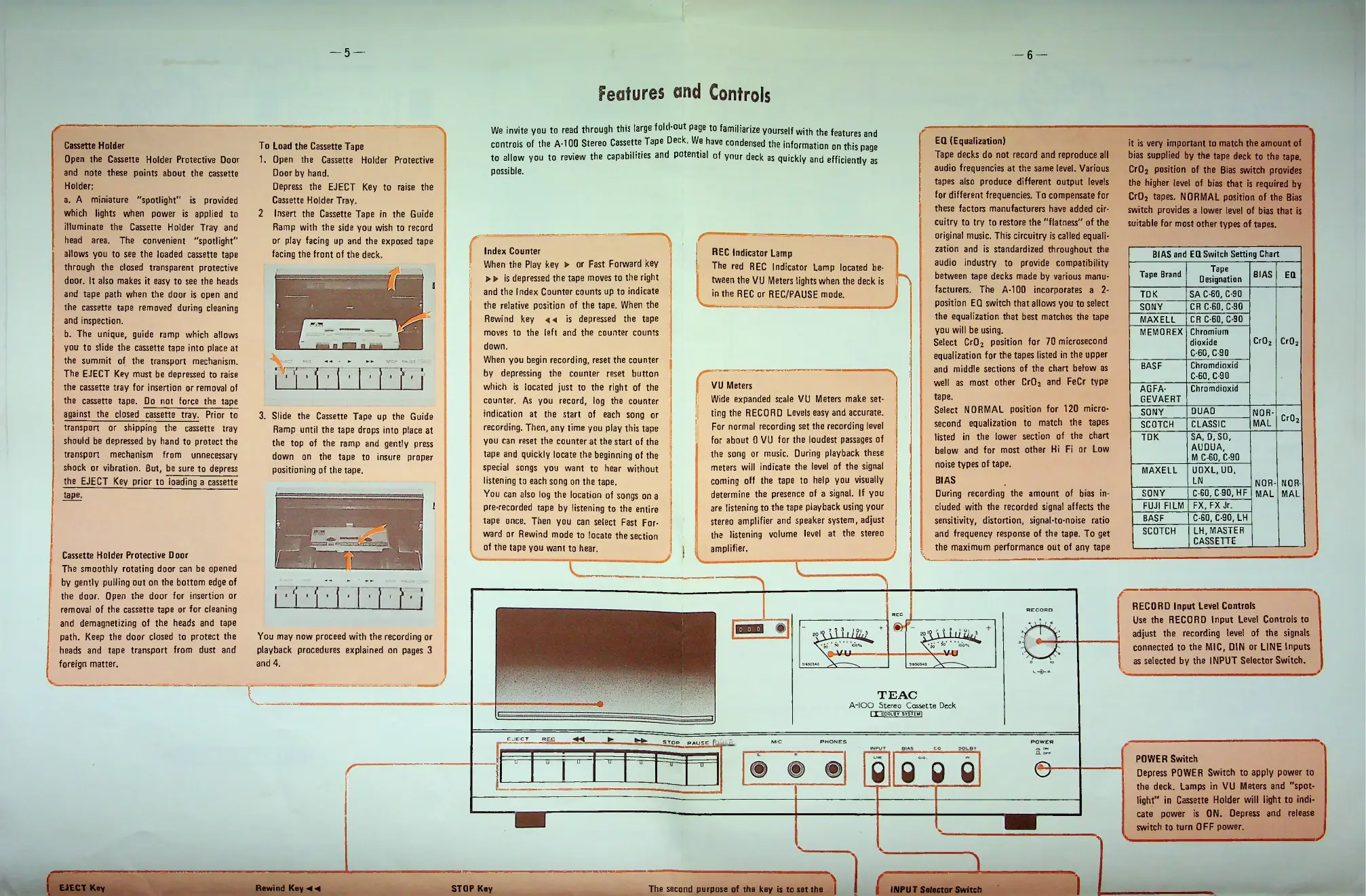
invite
you
to
read
through
this
large
fold-out
page
to
familiarize
yourself
with
the
features
and
controls
of
the
A-100
Stereo
Cassette
Tape
Deck.
We
have
condensed
the
information
on
this
page
to
allow
you
to
review
the
capabilities
and
potential
of
your
deck
as
quickly
and
efficiently
as
possible.
j
|
INPUT
Selector
Switch

Related product manuals