EasyManua.ls Logo

Teac A-1250S - Page 14

Teac A-1250S
24 pages
Print Icon
To Next Page IconTo Next Page
To Previous Page IconTo Previous Page
Loading...
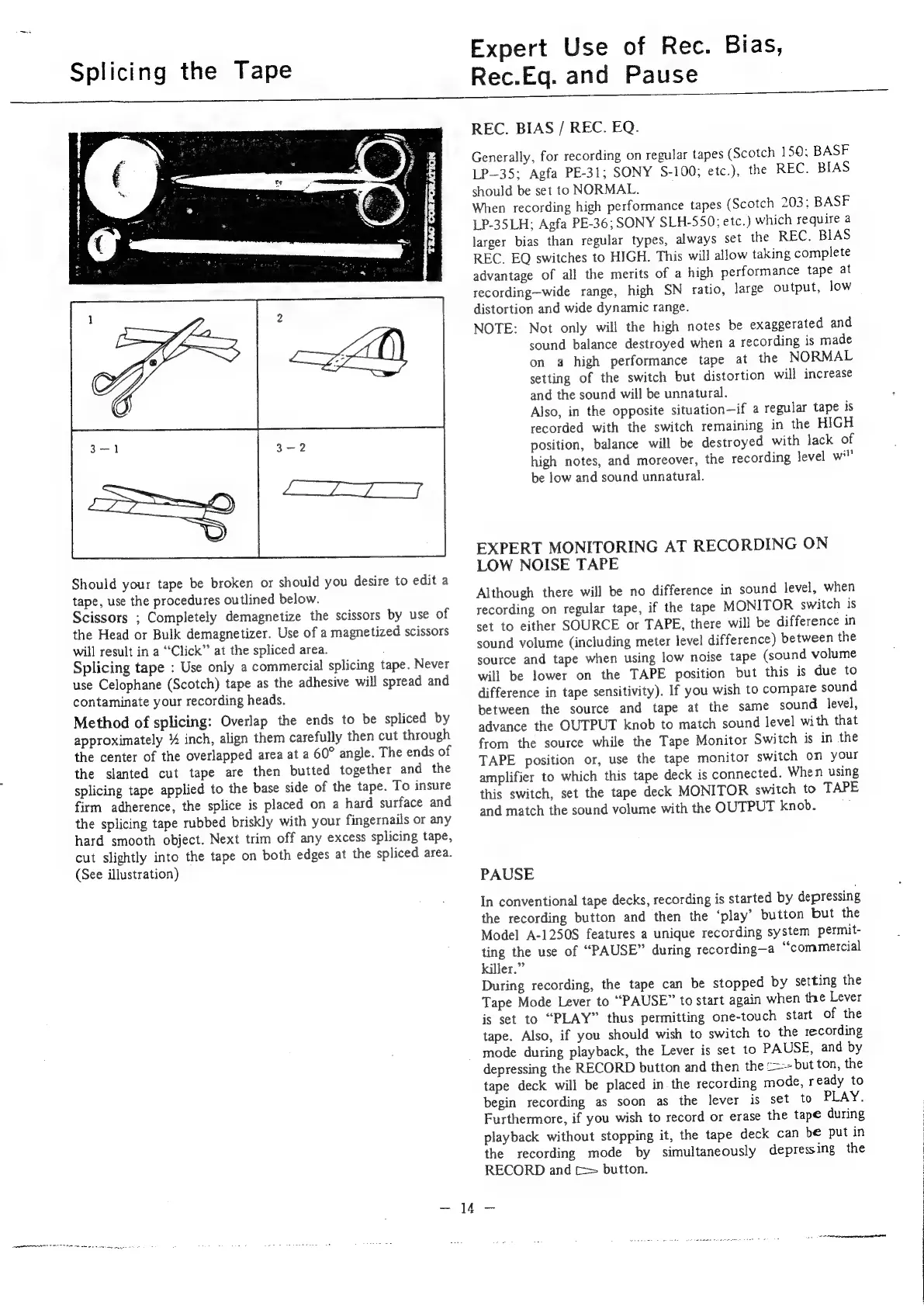
Splicing
the
Tape
Should
your
tape
be
broken
or
should
you
desire
to
edit
a
tape,
use
the
procedures
outlined
below.
Scissors
;
Completely
demagnetize
the
scissors
by
use
of
the
Head
or
Bulk
demagnetizer.
Use
of
a
magnetized
scissors
will
result
in
a
“‘Click”
at
the
spliced
area.
Splicing
tape
:
Use
only
a
commercial
splicing
tape.
Never
use
Celophane
(Scotch)
tape
as
the
adhesive
will
spread
and
contaminate
your
recording
heads.
Method
of
splicing:
Overlap
the
ends
to
be
spliced
by
approximately
%
inch,
align
them
carefully
then
cut
through
the
center
of
the
overlapped
area
at
a
60°
angle.
The
ends
of
the
slanted
cut
tape
are
then
butted
together
and
the
splicing
tape
applied
to
the
base
side
of
the
tape.
To
insure
firm
adherence,
the
splice
is
placed
on
a
hard
surface
and
the
splicing
tape
rubbed
briskly
with
your
fingernails
or
any
hard
smooth
object.
Next
trim
off
any
excess
splicing
tape,
cut
slightly
into
the
tape
on
both
edges
at
the
spliced
area.
(See
illustration)
Expert
Use
of
Rec.
Bias,
Rec.Eq.
and
Pause
REC.
BIAS
/
REC.
EQ.
Generally,
for
recording
on
regular
tapes
(Scotch
150;
BASF
LP—35;
Agfa
PE-31;
SONY
S-100;
etc.),
the
REC.
BIAS
should
be
set
to
NORMAL.
When
recording
high
performance
tapes
(Scotch
203;
BASF
LP-35LH;
Agfa
PE-36;
SONY
SLH-550;
etc.)
which
require
a
larger
bias
than
regular
types,
always
set
the
REC.
BIAS
REC.
EQ
switches
to
HIGH.
This
will
allow
taking
complete
advantage
of
all
the
merits
of
a
high
performance
tape
at
recording—wide
range,
high
SN
ratio,
large
output,
low
distortion
and
wide
dynamic
range.
NOTE:
Not
only
will
the
high
notes
be
exaggerated
and
sound
balance
destroyed
when
a
recording
is
made
on
a
high
performance
tape
at
the
NORMAL
setting
of
the
switch
but
distortion
will
increase
and
the
sound
will
be
unnatural.
Also,
in
the
opposite
situation—if
a
regular
tape
is
recorded
with
the
switch
remaining
in
the
HIGH
position,
balance
will
be
destroyed
with
lack
of
high
notes,
and
moreover,
the
recording
level
wi!’
be
low
and
sound
unnatural.
EXPERT
MONITORING
AT
RECORDING
ON
LOW
NOISE
TAPE
Although
there
will
be
no
difference
in
sound
level,
when
recording
on
regular
tape,
if
the
tape
MONITOR
switch
is
set
to
either
SOURCE
or
TAPE,
there
will
be
difference
in
sound
volume
(including
meter
level
difference)
between
the
source
and
tape
when
using
low
noise
tape
(sound
volume
will
be
lower
on
the
TAPE
position
but
this
is
due
to
difference
in
tape
sensitivity).
If
you
wish
to
compare
sound
between
the
source
and
tape
at
the
same
sound
level,
advance
the
OUTPUT
knob
to
match
sound
level
with
that
from
the
source
while
the
Tape
Monitor
Switch
is
in
the
TAPE
position
or,
use
the
tape
monitor
switch
on
your
amplifier
to
which
this
tape
deck
is
connected.
When
using
this
switch,
set
the
tape
deck
MONITOR
switch
to
TAPE
and
match
the
sound
volume
with
the
OUTPUT
knob.
PAUSE
In
conventional
tape
decks,
recording
is
started
by
depressing
the
recording
button
and
then
the
‘play’
button
but
the
Model
A-1250S
features
a
unique
recording
system
permit-
ting
the
use
of
“PAUSE”
during
recording—a
“commercial
killer.”
During
recording,
the
tape
can
be
stopped
by
setting
the
Tape
Mode
Lever
to
“PAUSE”
to
start
again
when
the
Lever
is
set
to
“PLAY”
thus
permitting
one-touch
start
of
the
tape.
Also,
if
you
should
wish
to
switch
to
the
recording
mode
during
playback,
the
Lever
is
set
to
PAUSE,
and
by
depressing
the
RECORD
button
and
then
the
=~
but
ton,
the
tape
deck
will
be
placed
in
the
recording
mode,
ready
to
begin
recording
as
soon
as
the
lever
is
set
to
PLAY.
Furthermore,
if
you
wish
to
record
or
erase
the
tape
during
playback
without
stopping
it,
the
tape
deck
can
be
put
in
the
recording
mode
by
simultaneously
depressing
the
RECORD
and
c=
button.

Related product manuals