EasyManua.ls Logo

Teac A-2300SD - Tape Speed; Flutter; Voltage and Frequency Conversion

Teac A-2300SD
50 pages
Print Icon
To Next Page IconTo Next Page
To Previous Page IconTo Previous Page
Loading...
7-6
TAPE
SPEED
The
tape
speed
should
be
measured
using
TEAC
flutter
free
tape,
Model
YTT-2003
(7-1/2
ips),
YTT-2002
(3-3/4
ips).
These
tapes
contain
a
highly
accurate
3
kHz
tone.
Connect
a
digital
frequency
counter
to
either
line
OUTPUT
jack.
The
indicated
frequency
should
be
3
kHz
(±30
Hz
or
less)
for
both
speeds.
-
VOLTAGE
CONVERSION
-
The
A-2300SD
(EX)
model
may
be
set
for
100,
117,
200,
220,
or
240
volts.
To
change
the
voltage,
unscrew
the
fuse
in
the
center
of
the
voltage
selector
plug.
Pull
out
the
plug
and
reinsert
it
so
the
desired
voltage
shows
in
the
cut-out.
Reinstall
the
fuse.
7-7
FLUTTER
Flutter
should
be
measured
in
playback
mode
using
a
TEAC
flutter
free
tape
YTT-2003,
2002
and
Meguro
Denpa
Co.,
IV1K668A
flutter
meter.
Values
obtained
with
different
standard
or
equipment
cannot
be
compared.
Flutter
should
not
exceed
value
shown.
0.08%
(WRMS),
0.18%
(RMS)
at
7-1/2
ips
0.10%
(WRMS),
0.20%
(RMS)
at
3-3/4
ips
These
figures
apply
to
any
tape
position
(such
as
full
take-up
reel,
full
supply
reel
or
about
mid
point).
If
there
is
excessive
wow
and
flutter,
examine
the
pinch
roller,
belt,
motors,
capstan
shaft,
and
reel
rest
for
“grease”,
“oil”,
“dirt”
and/or
“wear”.
Also
examine
the
tape
counter
ass’y
for
evenness
of
operation.
7-8
VOLTAGE
AND
FREQUENCY
CONVERSION
Unit
must
be
set
to
the
power
line
frequency
available.
Improper
frequency
setting
will
result
in
a
20%
error
for
the
Tape
speed.
(US
model
is
preset
to
117V
AC
and
60
Hz
frequency
and
voltage
conversion
is
not
required).
If
it
should
be
necessary
to
convert
the
A-2300SD
deck
to
operate
from
a
power
source
of
different
voltage
of
fre¬
quency,
it
may
be
easily
accomplished
as
follows;
Fig.
7-7
Voltage
Conversion
-
FREQUENCY
CONVERSION
-
1.
Remove
the
power
cord
and
all
connecting
cables.
2.
Take
off
tape
deck
rear
cover
by
removing
the
6
screws
holding
it.
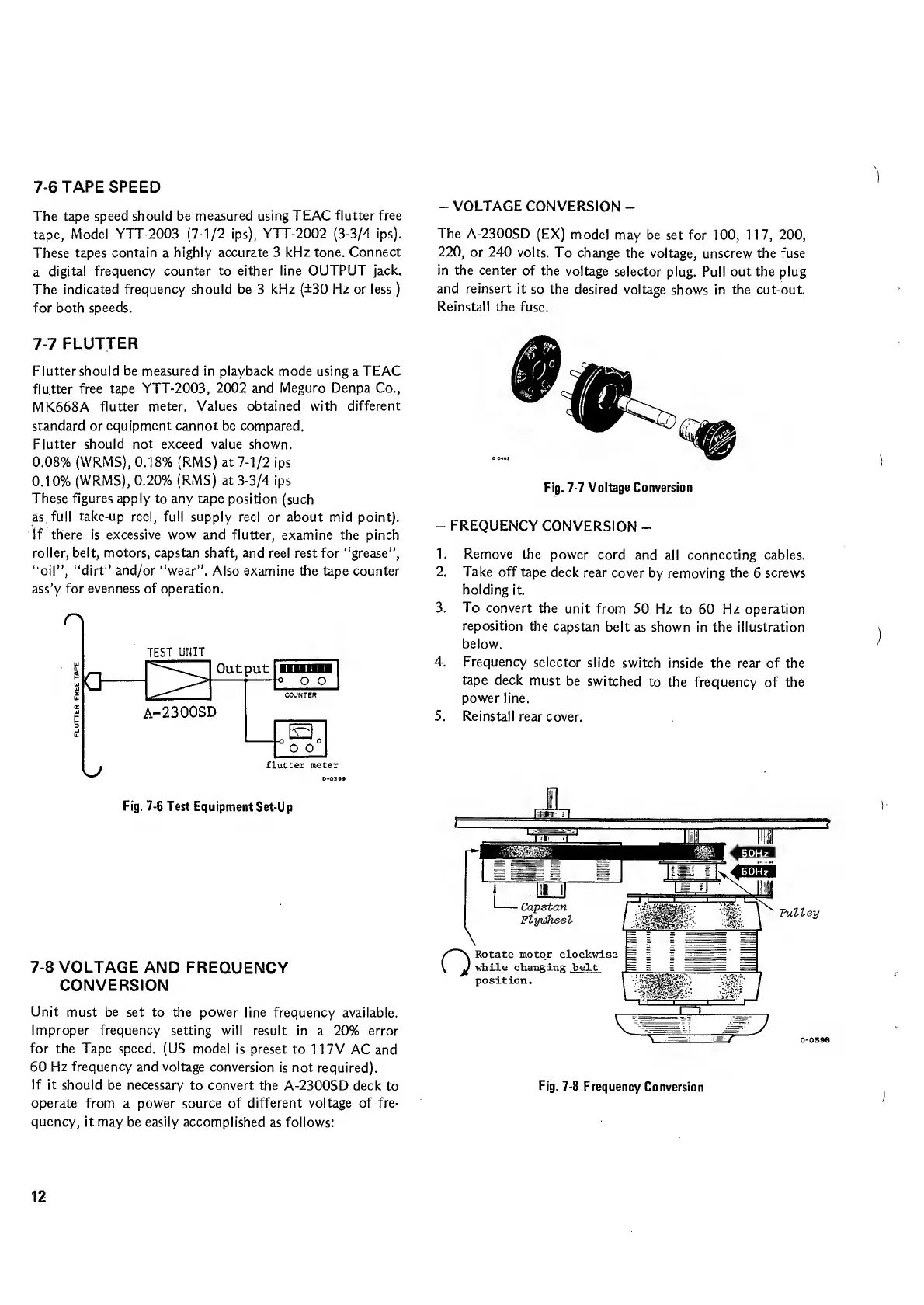
3.
To
convert
the
unit
from
50
Hz
to
60
Hz
operation
reposition
the
capstan
belt
as
shown
in
the
illustration
below.
4.
Frequency
selector
slide
switch
inside
the
rear
of
the
tape
deck
must
be
switched
to
the
frequency
of
the
power
line.
5.
Reinstall
rear
cover.
Fig.
7-8
Frequency
Conversion

Related product manuals