EasyManua.ls Logo

Teac A-2300SD - Adjustment Sequence Chart; Power Supply Check and Adj.; Playback Head Azimuth Adj.; Specified Output Level Setting

Teac A-2300SD
50 pages
Print Icon
To Next Page IconTo Next Page
To Previous Page IconTo Previous Page
Loading...
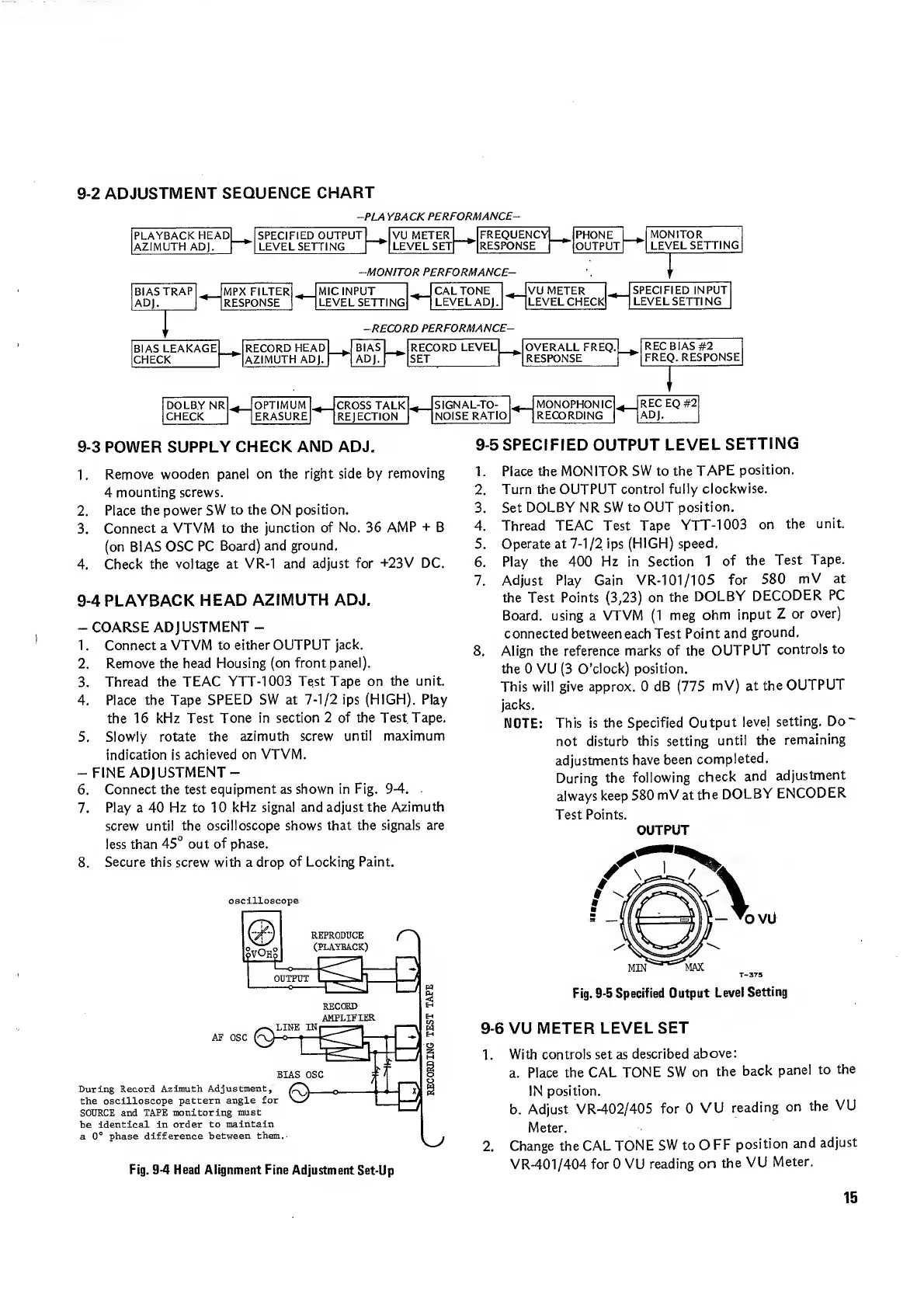
9-2
ADJUSTMENT
SEQUENCE
CHART
-PLA
YBACKPERFORMANCE-
9-3
POWER
SUPPLY
CHECK
AND
ADJ.
1.
Remove
wooden
panel
on
the
right
side
by
removing
4
mounting
screws.
2.
Place
the
power
SW
to
the
ON
position.
3.
Connect
a
VTVM
to
the
junction
of
No.
36
AMP
+
B
(on
BIAS
OSC
PC
Board)
and
ground.
4.
Check
the
voltage
at
VR-1
and
adjust
for
+23V
DC.
9-4
PLAYBACK
HEAD
AZIMUTH
ADJ.
-
COARSE
ADJUSTMENT
-
1.
Connect
a
VTVM
to
either
OUTPUT
jack.
2.
Remove
the
head
Housing
(on
front
panel).
3.
Thread
the
TEAC
YTT-1003
Test
Tape
on
the
unit.
4.
Place
the
Tape
SPEED
SW
at
7-1/2
ips
(HIGH).
Play
the
16
kHz
Test
Tone
in
section
2
of
the
TestTape.
5.
Slowly
rotate
the
azimuth
screw
until
maximum
indication
is
achieved
on
VTVM.
-
FINE
ADJUSTMENT-
6.
Connect
the
test
equipment
as
shown
in
Fig.
9-4.
7.
Play
a
40
Hz
to
10
kHz
signal
and
adjust
the
Azimuth
screw
until
the
oscilloscope
shows
that
the
signals
are
less
than
45°
out
of
phase.
8.
Secure
this
screw
with
a
drop
of
Locking
Paint.
oscilloscope
9-5
SPECIFIED
OUTPUT
LEVEL
SETTING
1.
Place
the
MONITOR
SW
to
the
TAPE
position.
2.
Turn
the
OUTPUT
control
fully
clockwise.
3.
Set
DOLBY
NR
SW
to
OUT
position.
4.
Thread
TEAC
Test
Tape
YTT-1003
on
the
unit.
5.
Operate
at
7-1/2
ips
(HIGH)
speed.
6.
Play
the
400
Hz
in
Section
1
of
the
Test
Tape.
7.
Adjust
Play
Gain
VR-101/105
for
580
mV
at
the
Test
Points
(3,23)
on
the
DOLBY
DECODER
PC
Board,
using
a
VTVM
(1
meg
ohm
input
Z
or
over)
connected
between
each
Test
Point
and
ground.
8.
Align
the
reference
marks
of
the
OUTPUT
controls
to
the
0
VU
(3
O’clock)
position.
This
will
give
approx.
0
dB
(775
mV)
at
the
OUTPUT
jacks.
NOTE:
This
is
the
Specified
Output
level
setting.
Do"
not
disturb
this
setting
until
the
remaining
adjustments
have
been
completed.
During
the
following
check
and
adjustment
always
keep
580
mV
at
the
DOLBY
ENCODER
Test
Points.
OUTPUT
Fig.
9-5
Specified
Output
Level
Setting
9-6
VU
METER
LEVEL
SET
1.
With
controls
set
as
described
above:
a.
Place
the
CAL
TONE
SW
on
the
back
panel
to
the
IN
position.
b.
Adjust
VR-402/405
for
0
VU
reading
on
the
VU
Meter.
2.
Change
the
CAL
TONE
SW
to
O
FF
position
and
adjust
VR-401/404
for
0
VU
reading
on
the
VU
Meter.
15

Related product manuals