EasyManua.ls Logo

Teac A-2300SR - Tape Speed, Wow, Flutter, and Voltage Adjustments; Tape Speed Check Procedure; Wow and Flutter Check; Voltage and Frequency Conversion

Teac A-2300SR
58 pages
Print Icon
To Next Page IconTo Next Page
To Previous Page IconTo Previous Page
Loading...
7-5
TAPE
SPEED
CHECK
The
tape
speed
should
be
measured
using
TEAC
flutter
free
tape,
Model
YTT-2003
(7-1/2
ips)
and
YTT-2002
(3-3/4
ips).
These
tapes
contain
a
highly
accurate
3,000
Hz
tone.
Connect
a
digital
frequency
counter
to
either
line
OUTPUT
jack.
See
Fig.
7-5.
The
indicated
frequency
should
be
3,000
Hz
(+30
Hz)
for
all
speeds
during
playback
of
the
tape.
7-6
WOW
AND
FLUTTER
CHECK
NOTE:
Before
performing
this
measurement,
clean
the
heads
and
Tape
run
guides,
also
check
pinch
roller
pressure,
etc.
Use
new
Test
Tape
if
possible
for
following
checks.
Values
obtained
with
different
standards
of
equip-
ment
cannot
be
compared.
PLAYBACK
1.
Connect
Test
equipment
to
the
deck
as
shown
Fig.
7-5.
(Except
oscillator).
2.
Load
TEAC
YTT-2003
(for
7-1/2
ips)
or
YTT-2002
(for
3-3/4
ips)
and
playback
tape.
3.
Read
the
indication
on
the
Wow
and
Flutter
meter.
4.
The
Wow
and
Flutter
should
be:
0.18%
(RMS)
or
less
for
7-1/2
ips
0.20%
(RMS)
or
less
for
3-3/4
ips
OVERALL
1.
Connect
Test
equipment
to
the
deck
as
shown
Fig.
7-5.
2.
Load
TEAC
YTT-8013
(blank
tape)
Test
Tape
on
the
deck
and
Record
a
3,000
Hz
input
signal.
3.
Rewind
and
playback
the
recorded
signal.
4.
The
reading
on
the
Meter
should
be
0.20%
(RMS)
or
less
for
7-1/2
ips
0.25%
(RMS)
or
less
for
3-3/4
ips
NOTE:
These
figures
apply
to
any
tape
position
(such
as
full
take-up
reel,
full
supply
reel
or
about
mid-
point).
Also
examine
the
tape
counter
ass’y
for
evenness
of
operation.
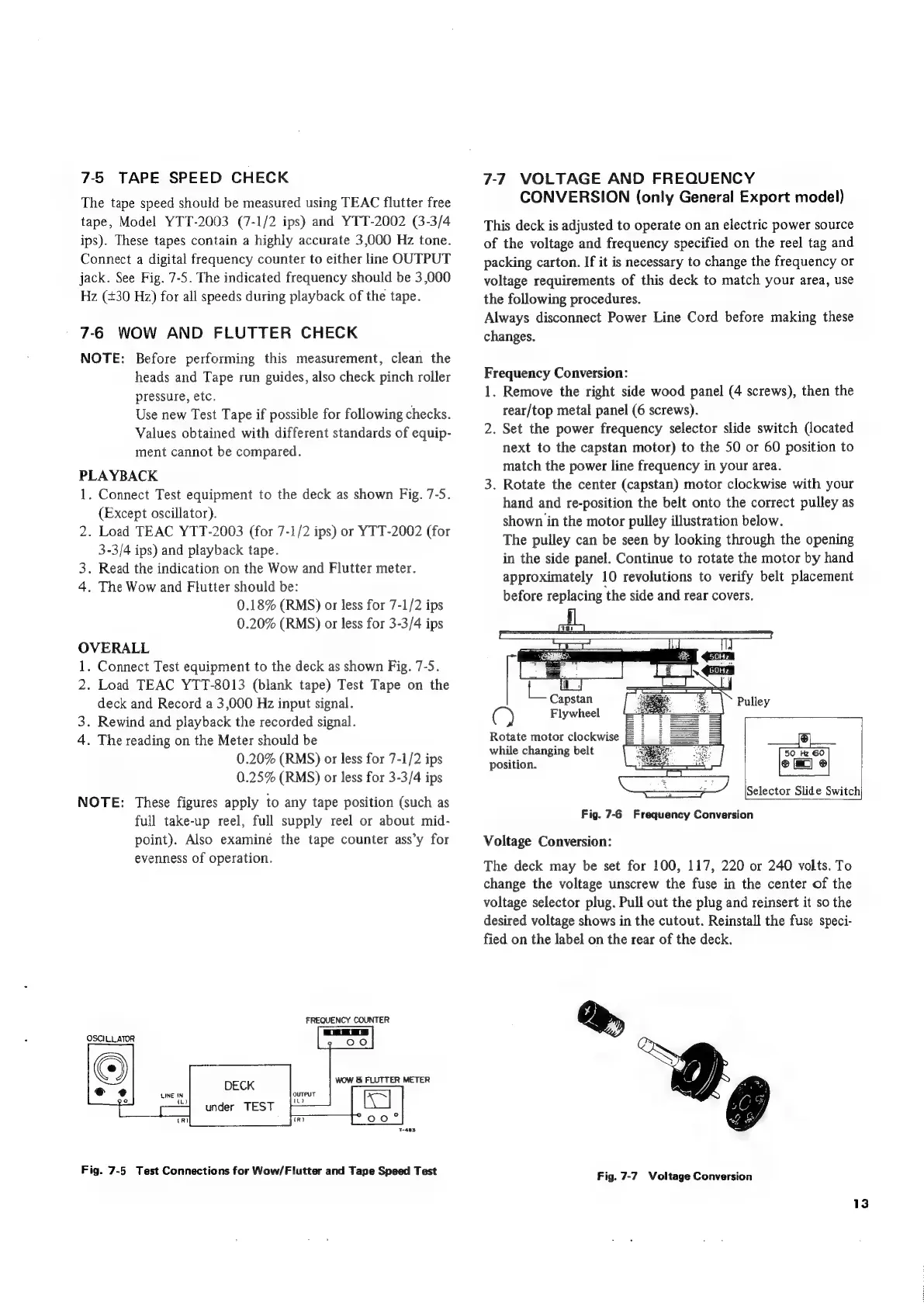
FREQUENCY
COUNTER
OSCILLATOR
WOW
&
FLUTTER
METER
DECK
under
TEST
LINE
IN
wm
Fig.
7-5
Test
Connections
for
Wow/Flutter
and
Tape
Speed
Test
7-7
VOLTAGE
AND
FREQUENCY
CONVERSION
(only
General
Export
model)
This
deck
is
adjusted
to
operate
on
an
electric
power
source
of
the
voltage
and
frequency
specified
on
the
reel
tag
and
packing
carton.
If
it
is
necessary
to
change
the
frequency
or
voltage
requirements
of
this
deck
to
match
your
area,
use
the
following
procedures.
Always
disconnect
Power
Line
Cord
before
making
these
changes.
Frequency
Conversion:
1.
Remove
the
right
side
wood
panel
(4
screws),
then
the
rear/top
metal
panel
(6
screws).
2.
Set
the
power
frequency
selector
slide
switch
(located
next
to
the
capstan
motor)
to
the
50
or
60
position
to
match
the
power
line
frequency
in
your
area.
3.
Rotate
the
center
(capstan)
motor
clockwise
with
your
hand
and
re-position
the
belt
onto
the
correct
pulley
as
shown
in
the
motor
pulley
illustration
below.
The
pulley
can
be
seen
by
looking
through
the
opening
in
the
side
panel.
Continue
to
rotate
the
motor
by
hand
approximately
10
revolutions
to
verify
belt
placement
before
replacing
‘the
side
and
rear
covers.
Capstan
Flywheel
Pulley
Rotate
motor
clockwise
ey
while
changing
belt
50_Hz
60
position.
Selector
Slide
Switch
Fig.
7-6
Frequency
Conversion
Voltage
Conversion:
The
deck
may
be
set
for
100,
117,
220
or
240
volts.
To
change
the
voltage
unscrew
the
fuse
in
the
center
of
the
voltage
selector
plug.
Pull
out
the
plug
and
reinsert
it
so
the
desired
voltage
shows
in
the
cutout.
Reinstall
the
fuse
speci-
fied
on
the
label
on
the
rear
of
the
deck.
Fig.
7-7
Voltage
Conversion

Related product manuals