EasyManua.ls Logo

Teac A-2300SR - Electrical Adjustment Sequence and Power Checks; Electrical Adjustment Sequence Chart; Power Supply Check and Adjustment; Playback Head Azimuth Adjustment

Teac A-2300SR
58 pages
Print Icon
To Next Page IconTo Next Page
To Previous Page IconTo Previous Page
Loading...
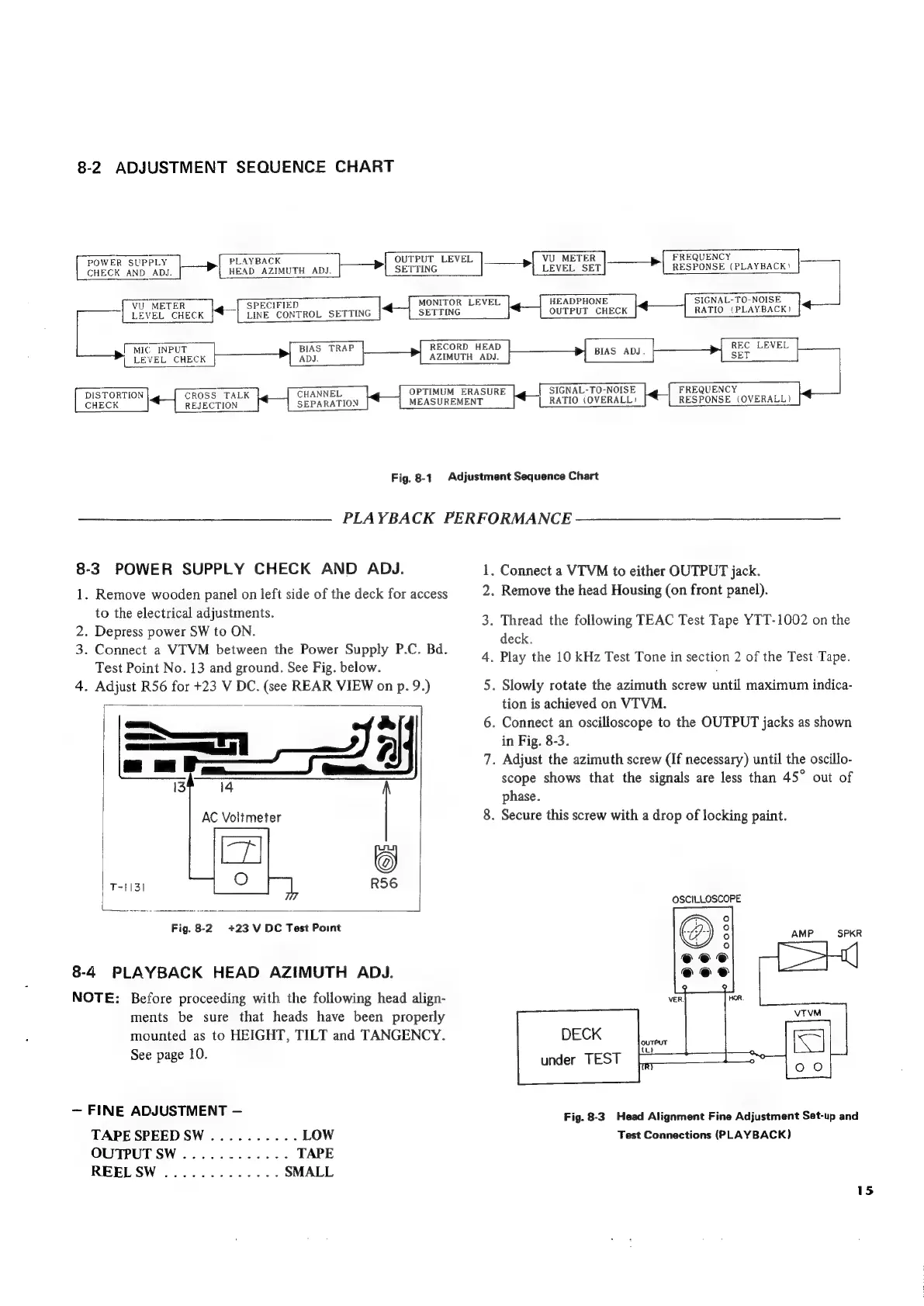
8-2.
ADJUSTMENT
SEQUENCE
CHART
y
>
PLAYBACK
>
OUTPUT
LEVEL
eons
NRE
AD
z
HEAD
AZIMUTH
ADJ.
SETTING
CHECK
AND
ADJ
VU
METER
SPECIFIED
LEVEL
CHECK
LINE
CONTROL
SETTING
MONITOR
LEVEL
SETTING
>
VU
METER
>
FREQUENCY
LEVEL
SET
RESPONSE
(PLAYBACK?!
HEADPHONE
OUTPUT
CHECK
RATIO
(PLAYBACK)
|
MIC
INPUT
LEVEL CHECK
BIAS
TRAP
ADJ.
RECORD
HEAD
AZIMUTH
ADJ.
OPTIMUM
ERAS
MEASUREMENT
URE
SIGNAL-TO-NOISE
FREQUENCY
[_RATIO
(OVERALL)
RESPONSE
(OVERALL)
SIGNAL-TO-NOISE
REC
LEVEL
DISTORTION
CROSS
TALK
CHANNEL
CHECK
REJECTION
SEPARATION
Fig.
8-1
Adjustment
Sequence
Chart
—_——
PLAYBACK
PERFORMANCE
8-3
POWER
SUPPLY
CHECK
AND
ADJ.
1.
Remove
wooden
panel
on
left
side
of
the
deck
for
access
to
the
electrical
adjustments.
2.
Depress
power
SW
to
ON.
3.
Connect
a
VITVM
between
the
Power
Supply
P.C.
Bd.
Test
Point
No.
13
and
ground.
See
Fig.
below.
4.
Adjust
R56
for
+23
V
DC.
(see
REAR
VIEW
on
p.
9.)
=—n_
7
AC
Voltmeter
:
R56
|
+23
V
DC
Test
Point
T~HISI
Fig.
8-2
8-4
PLAYBACK
HEAD
AZIMUTH
ADJ.
NOTE:
Before
proceeding
with
the
following
head
align-
ments
be
sure
that
heads
have
been
properly
mounted
as
to
HEIGHT,
TILT
and
TANGENCY.
See
page
10.
FINE
ADJUSTMENT
TAPE
SPEEDSW
..........
LOW
OUTPUT
SW
............
TAPE
REEL
SW
.............
SMALL
.
Connect
a
VTVM
to
either
OUTPUT
jack.
.
Remove
the
head
Housing
(on
front
panel).
.
Thread
the
following
TEAC
Test
Tape
YTT-1002
on
the
deck.
.
Play
the
10
kHz
Test
Tone
in
section
2
of
the
Test
Tape.
.
Slowly
rotate
the
azimuth
screw
until
maximum
indica-
tion
is
achieved
on
VITVM.
.
Connect
an
oscilloscope
to
the
OUTPUT
jacks
as
shown
in
Fig.
8-3.
.
Adjust
the
azimuth
screw
(If
necessary)
until
the
oscillo-
scope
shows
that
the
signals
are
less
than
45°
out
of
phase.
.
Secure
this
screw
with
a
drop
of
locking
paint.
OSCILLOSCOPE
under
TEST
Fig.
8-3
Head
Alignment
Fine
Adjustment
Set-up
and
Test
Connections
(PLAYBACK)
15

Related product manuals