EasyManua.ls Logo

Teac A-3300SR - Bias Trap Adjustment; Record Head Azimuth Adjustment; Bias Adjustment

Teac A-3300SR
58 pages
Print Icon
To Next Page IconTo Next Page
To Previous Page IconTo Previous Page
Loading...
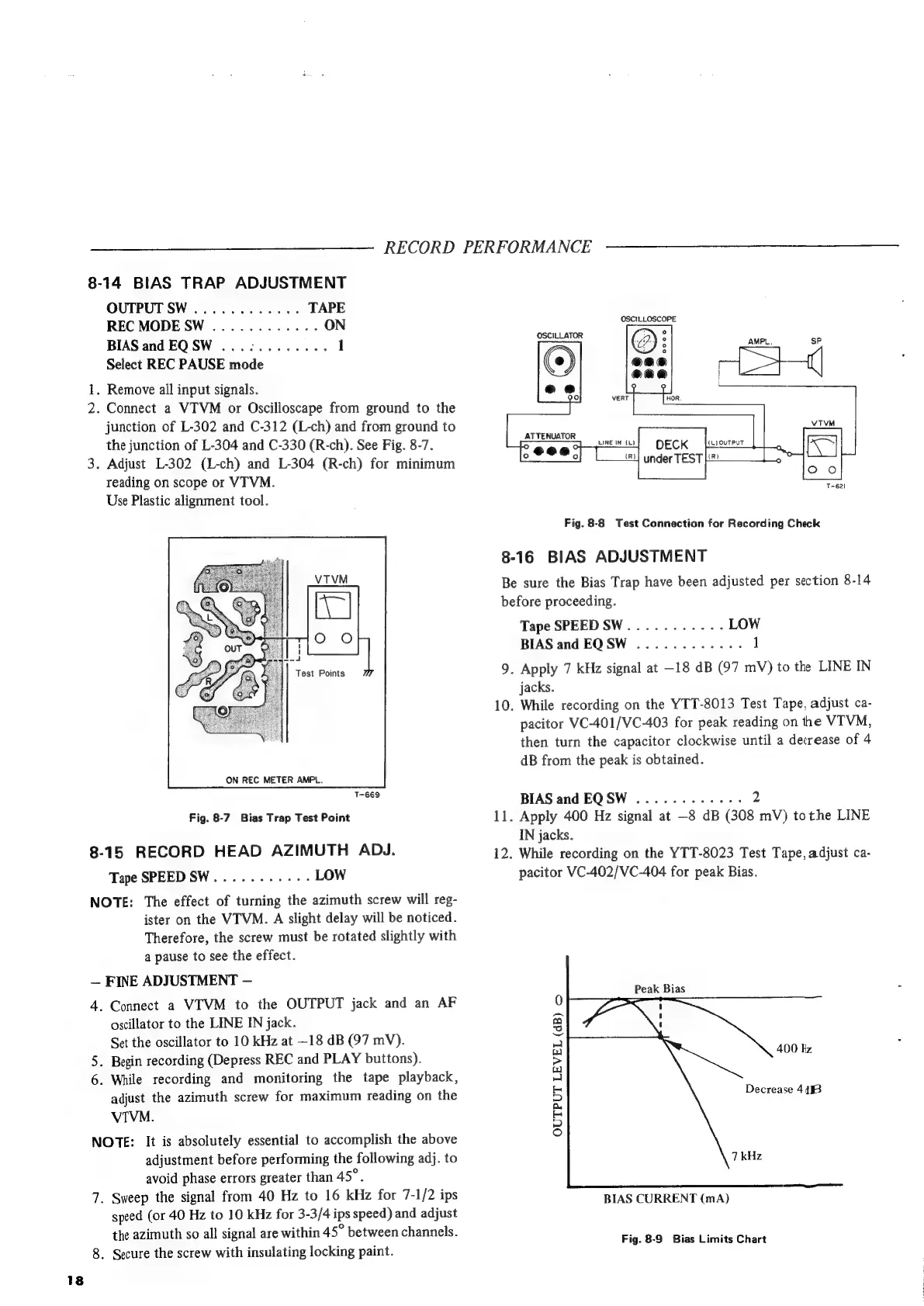
8-14
BIAS
TRAP
ADJUSTMENT
OUTPUT
SW
............
TAPE
REC
MODE
SW
............
ON
BIAS
and
EQSW
...:........
1
Select
REC
PAUSE
mode
iy
.
Remove
all
input
signals.
2.
Connect
a
VTVM
or
Oscilloscape
from
ground
to
the
junction
of
L-302
and
C-312
(L-ch)
and
from
ground
to
the
junction
of
L-304
and
C-330
(R-ch).
See
Fig.
8-7.
3.
Adjust
L-302
(L-ch)
and
L-304
(R-ch)
for
minimum
reading
on
scope
or
VITVM.
Use
Plastic
alignment
tool.
Test
Points
ON
REC
METER
AMPL.
T-669
Fig.
8-7
Bias
Trap
Test
Point
8-15
RECORD
HEAD
AZIMUTH
ADJ.
Tape
SPEED
SW.........-.-
LOW
NOTE:
The
effect
of
turning
the
azimuth
screw
will
reg-
ister
on
the
VTVM.
A
slight
delay
will
be
noticed.
Therefore,
the
screw
must
be
rotated
slightly
with
a
pause
to
see
the
effect.
FINE
ADJUSTMENT
4.
Connect
a
VTVM
to
the
OUTPUT
jack
and
an
AF
oscillator
to
the
LINE
IN
jack.
Set
the
oscillator
to
10
kHz
at
—18
dB
(97
mV).
.
Begin
recording
(Depress
REC
and
PLAY
buttons).
6.
While
recording
and
monitoring
the
tape
playback,
adjust
the
azimuth
screw
for
maximum
reading
on
the
VIVM.
NOTE:
It
is
absolutely
essential
to
accomplish
the
above
adjustment
before
performing
the
following
adj.
to
avoid
phase
errors
greater
than
45°.
7.
Sweep
the
signal
from
40
Hz
to
16
kHz
for
7-1/2
ips
speed
(or
40
Hz
to
10
kHz
for
3-3/4
ips
speed)
and
adjust
the
azimuth
so
all
signal
are
within
45°
between
channels.
8.
Secure
the
screw
with
insulating
locking
paint.
ws
RECORD
PERFORMANCE
OSCILLOSCOPE
OSCILLATOR
ATTENUATOR
(L}
OUTPUT
under
TEST
[2
T-621
Fig.
8-8
Test
Connection
for
Recording
Check
8-16
BIAS
ADJUSTMENT
Be
sure
the
Bias
Trap
have
been
adjusted
per
section
8-14
before
proceeding.
Tape
SPEEDSW...........
LOW
BIAS
and
EQSW
............
1
9.
Apply
7
kHz
signal
at
—18
dB
(97
mV)
to
the
LINE
IN
jacks.
10.
While
recording
on
the
YTT-8013
Test
Tape,
adjust
ca-
pacitor
VC-401/VC-403
for
peak
reading
on
the
VTVM,
then
turn
the
capacitor
clockwise
until
a
decrease
of
4
dB
from
the
peak
is
obtained.
BIAS
and
EQSW
............
2
11.
Apply
400
Hz
signal
at
—8
dB
(308
mV)
tothe
LINE
IN
jacks.
12.
While
recording
on
the
YTT-8023
Test
Tape,
adjust
ca-
pacitor
VC-402/VC-404
for
peak
Bias.
Peak
Bias
400
kz
Decrease
4458
OUTPUT
LEVEL
(dB)
o
BIAS
CURRENT
(mA)
Fig.
8-9
Bias
Limits
Chart
ne

Related product manuals