EasyManua.ls Logo

Teac A-3300SR - Capstan Assembly Removal; Reel Motor Removal; Tension Arms Removal

Teac A-3300SR
58 pages
Print Icon
To Next Page IconTo Next Page
To Previous Page IconTo Previous Page
Loading...
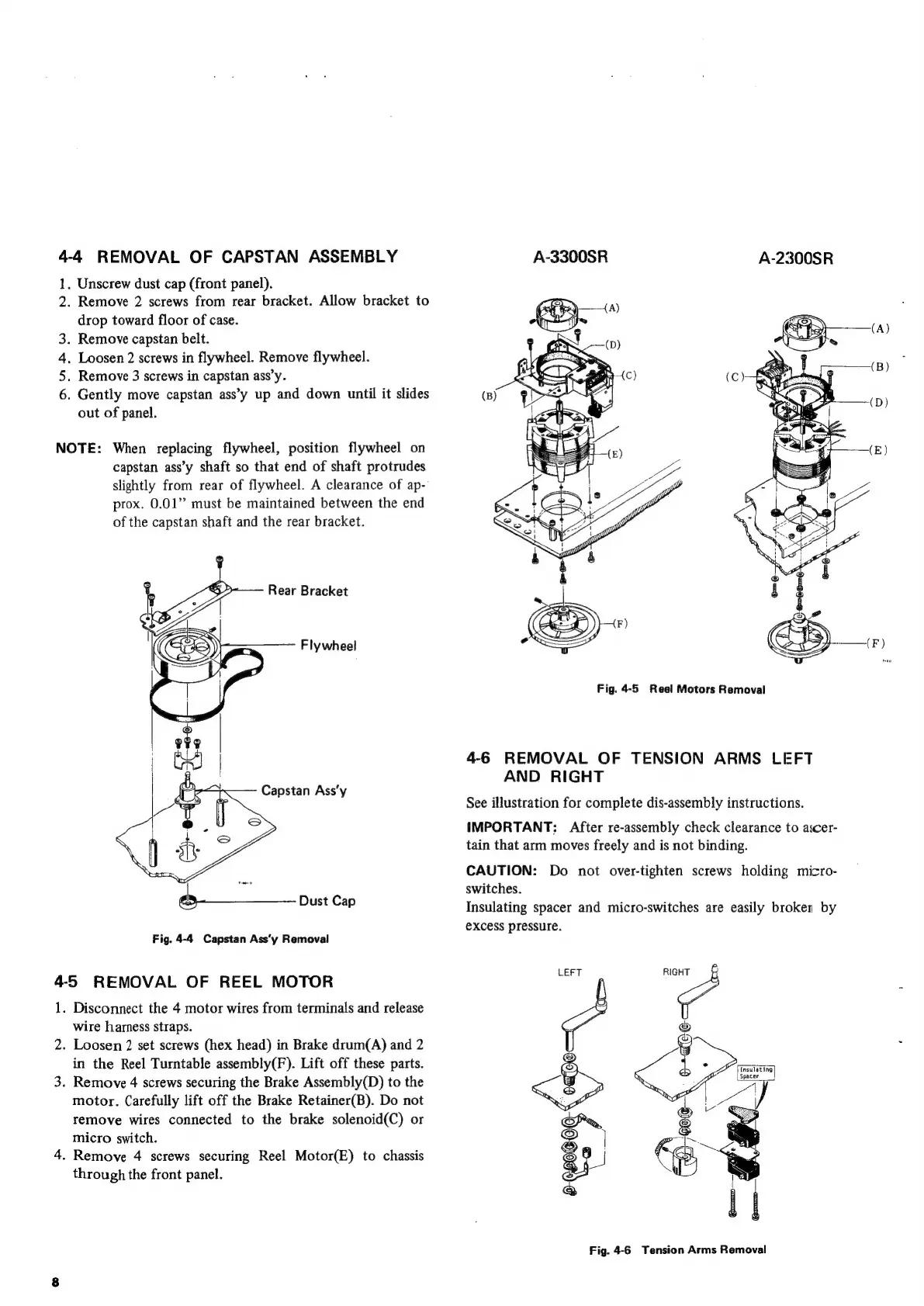
4-4
REMOVAL
OF
CAPSTAN
ASSEMBLY
A-3300SR
A-2300SR
1.
Unscrew
dust
cap
(front
panel).
2.
Remove
2
screws
from
rear
bracket.
Allow
bracket
to
drop
toward
floor
of
case.
.
Remove
capstan
belt.
.
Loosen
2
screws
in
flywheel.
Remove
flywheel.
.
Remove
3
screws
in
capstan
ass’y.
.
Gently
move
capstan
ass’y
up
and
down
until
it
slides
out
of
panel.
Nm
W
NOTE:
When
replacing
flywheel,
position
flywheel
on
capstan
ass’y
shaft
so
that
end
of
shaft
protrudes
slightly
from
rear
of
flywheel.
A
clearance
of
ap-
prox.
0.01”
must
be
maintained
between
the
end
of
the
capstan
shaft
and
the
rear
bracket.
Rear
Bracket
Flywheel
Fig.
4-5
Reel
Motors
Removal
ii
4-6
REMOVAL
OF
TENSION
ARMS
LEFT
AND
RIGHT
See
illustration
for
complete
dis-assembly
instructions.
IMPORTANT:
After
re-assembly
check
clearance
to
ascer-
tain
that
arm
moves
freely
and
is
not
binding.
Capstan
Ass’y
CAUTION:
Do
not
over-tighten
screws
holding
micro-
=
switches.
Dust
Cap
Insulating
spacer
and
micro-switches
are
easily
broken
by
€Xcess
pressure.
Fig.
4-4
Capstan
Ass‘y
Removal
4-5
REMOVAL
OF
REEL
MOTOR
mae
vo
1.
Disconnect
the
4
motor
wires
from
terminals
and
release
wire
harness
straps.
2.
Loosen
2
set
screws
(hex
head)
in
Brake
drum(A)
and
2
in
the
Reel
Turntable
assembly(F).
Lift
off
these
parts.
<>
Tnsulating
3.
Remove
4
screws
securing
the
Brake
Assembly(D)
to
the
motor.
Carefully
lift
off
the
Brake
Retainer(B).
Do
not
remove
wires
connected
to
the
brake
solenoid(C)
or
as
micro
switch.
2
|
4.
Remove
4
screws
securing
Reel
Motor(E)
to
chassis
83
&
through
the
front
panel.
=
Fig.
4-6
Tension
Arms
Removal

Related product manuals