EasyManua.ls Logo

Teac A-4010GSL - Monitor;Record Performance; Minimum Input Level Adjustment; Specified Input Level Set; VU Meter Calibration -Monitor-

Teac A-4010GSL
72 pages
Print Icon
To Next Page IconTo Next Page
To Previous Page IconTo Previous Page
Loading...
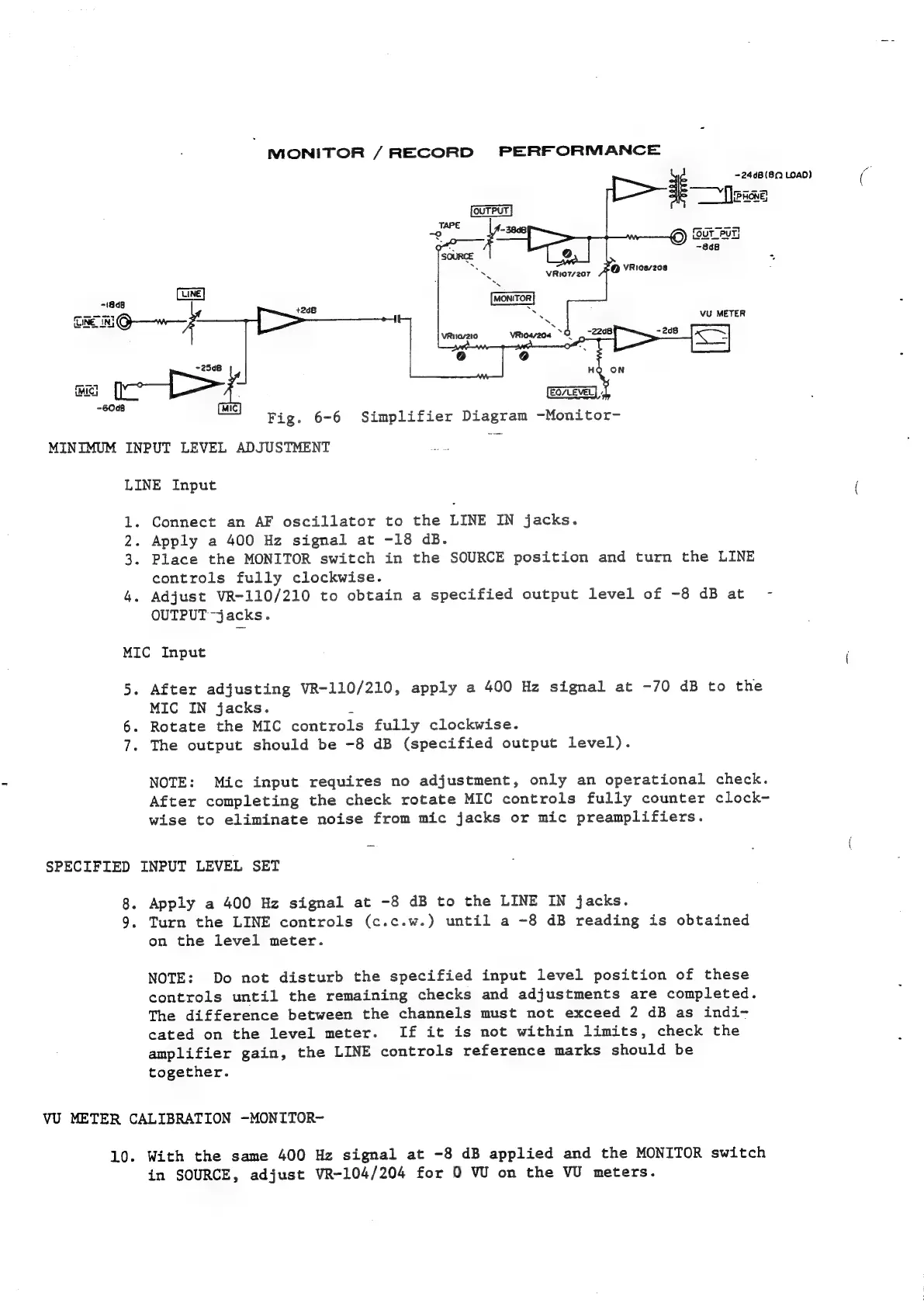
MONITOR
/RECORD
PERFORMANCE
~24d8(8Q
LOAD)
71848
+268
VU
METER
EQ/LEVEL|
Fig.
6-6
Simplifier
Diagram
-Monitor-
MINIMUM
INPUT
LEVEL
ADJUSTMENT
LINE
Input
1.
Connect
an
AF
oscillator
to
the
LINE
IN
jacks.
2.
Apply
a
400
Hz
signal
at
-18
dB.
3.
Place
the
MONITOR
switch
in
the
SOURCE
position
and
turn
the
LINE
controls
fully
clockwise.
4.
Adjust
VR-110/210
to
obtain
a
specified
output
level
of
-8
dB
at
OUTPUT
-jacks.
MIC
Input
5.
After
adjusting
VR-110/210,
apply
a
400
Hz
signal
at
-70
dB
to
the
MIC
IN
jacks.
2
6.
Rotate
the
MIC
controls
fully
clockwise.
7.
The
output
should
be
-8
dB
(specified
output
level).
NOTE:
Mic
input
requires
no
adjustment,
only
an
operational
check.
After
completing
the
check
rotate
MIC
controls
fully
counter
clock-
wise
to
eliminate
noise
from
mic
jacks
or
mic
preamplifiers.
SPECIFIED
INPUT
LEVEL
SET
8.
Apply
a
400
Hz
signal
at
-8
dB
to
the
LINE
IN
jacks.
9.
Turn
the
LINE
controls
(c.c.w.)
until
a
-8
dB
reading
is
obtained
on
the
level
meter.
NOTE:
Do
not
disturb
the
specified
input
level
position
of
these
controls
until
the
remaining
checks
and
adjustments
are
completed.
The
difference
between
the
channels
must
not
exceed
2
dB
as
indi-
cated
on
the
level
meter.
If
it
is
not
within
limits,
check
the
amplifier
gain,
the
LINE
controls
reference
marks
should
be
together.
VU
METER
CALIBRATION
-MONITOR-
10.
With
the
same
400
Hz
signal
at
-8
dB
applied
and
the
MONITOR
switch
in
SOURCE,
adjust
VR-104/204
for
0
W
on
the
VU
meters.

Related product manuals