EasyManua.ls Logo

Teac A-4010GSL - Bias Adjustment; Record Level Set

Teac A-4010GSL
72 pages
Print Icon
To Next Page IconTo Next Page
To Previous Page IconTo Previous Page
Loading...
BIAS
ADJUSTMENT
NOTE:
These
adjustments
are
only
made
at
7-1/2ips
tape
speed,
the
bias
oscillator
frequency
is
100
kHz
+5
kHz.
-HIGH
position-
us
1.
Thread
record
test
tape
Scotch
#203
on
the
unit
and
apply
400
Hz
-
/-8
dB
to
LINE
IN
jacks.
2.
Place
the
BIAS,
EQ/LEVEL
switch
to
HIGH
and
place
the
unit
in
the
record
mode.
Place-the
MONITOR
switch
in
the
TAPE
position.
3.
Adjust
capacitor
VC-102/202
for
a
peak
on
the
level
meter.
Turn
the
capacitors
clockwise
until
a
decrease
of
0.5
dB
is
obtained.
~NORMAL
position-
4.
Thread
record
test
tape
Scotch
#150
on
the
unit.
5.
Place
the
BIAS,
EQ/LEVEL
switch
to
NORMAL
and
place
the-unit
in
the
record
mode.
6.
Adjust
capacitor
VC-101/201
for
a
peak
on
the
level
meter.
Turn
the
capacitors
clockwise
until
7.
After
completing
this
adjustment,
return
BIAS,
EQ/LEVEL
switch
to
HIGH
position.
2
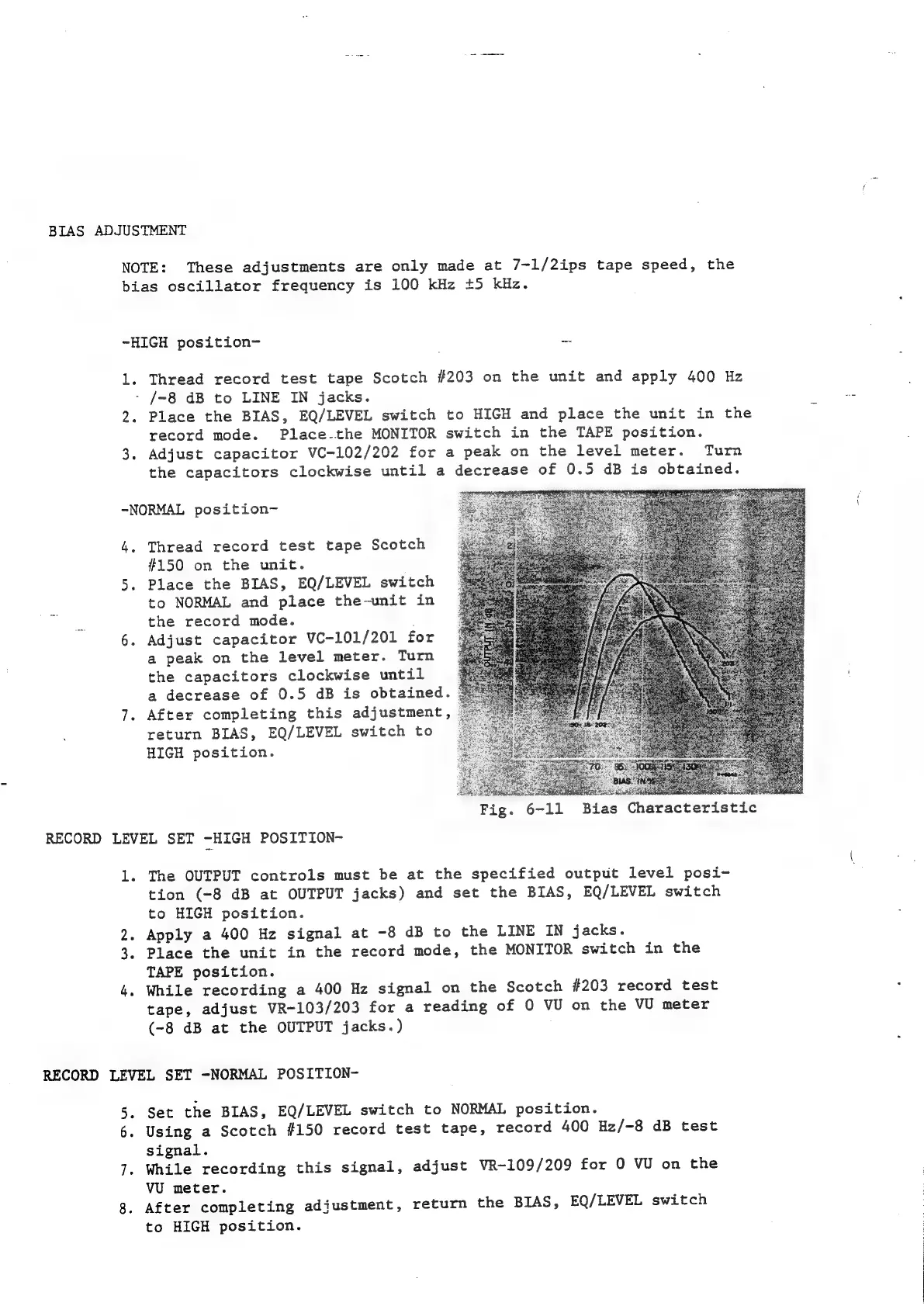
Fig.
6-11
Bias
Characteristic
RECORD
LEVEL
SET
-HIGH
POSITION-
1.
The
OUTPUT
controls
must
be
at
the
specified
output
level
posi-
tion
(-8
dB
at
OUTPUT
jacks)
and
set
the
BIAS,
EQ/LEVEL
switch
to
HIGH
position.
2.
Apply
a
400
Hz
signal
at
-8
dB
to
the
LINE
IN
jacks.
3.
Place
the
unit
in
the
record
mode,
the
MONITOR
switch
in
the
TAPE
position.
4.
While
recording
a
400
Hz
signal
on
the
Scotch
#203
record
test
tape,
adjust
VR-103/203
for
a
reading
of
0
VU
on
the
VU
meter
(-8
dB
at
the
OUTPUT
jacks.)
RECORD
LEVEL
SET
-NORMAL
POSITION-
5.
Set
the
BIAS,
EQ/LEVEL
switch
to
NORMAL
position.
6.
Using
a
Scotch
#150
record
test
tape,
record
400
Hz/-8
dB
test
signal.
7.
While
recording
this
signal,
adjust
VR-109/209
for
0
VU
on
the
vU
meter.
After
completing
adjustment,
return
the
BIAS,
EQ/LEVEL
switch
to
HIGH
position.

Related product manuals