EasyManua.ls Logo

Teac A-4300SX - Page 15

Teac A-4300SX
47 pages
Print Icon
To Next Page IconTo Next Page
To Previous Page IconTo Previous Page
Loading...
MONITOR
PERFORMANCE
8-10
MONITOR
LEVEL
SETTING
OUTPUT
SW
SOURCE
1.
Turn
LINE
controls
fully
clockwise.
2.
Apply
a
400
Hz
—18
dB
(97
mV)
signal
from
AF
oscil-
lator
to
LINE
IN
jacks.
3.
Adjust
VR-301/VR-304
for
—8
dB
(308
mV)
at
the
OUTPUT
jacks.
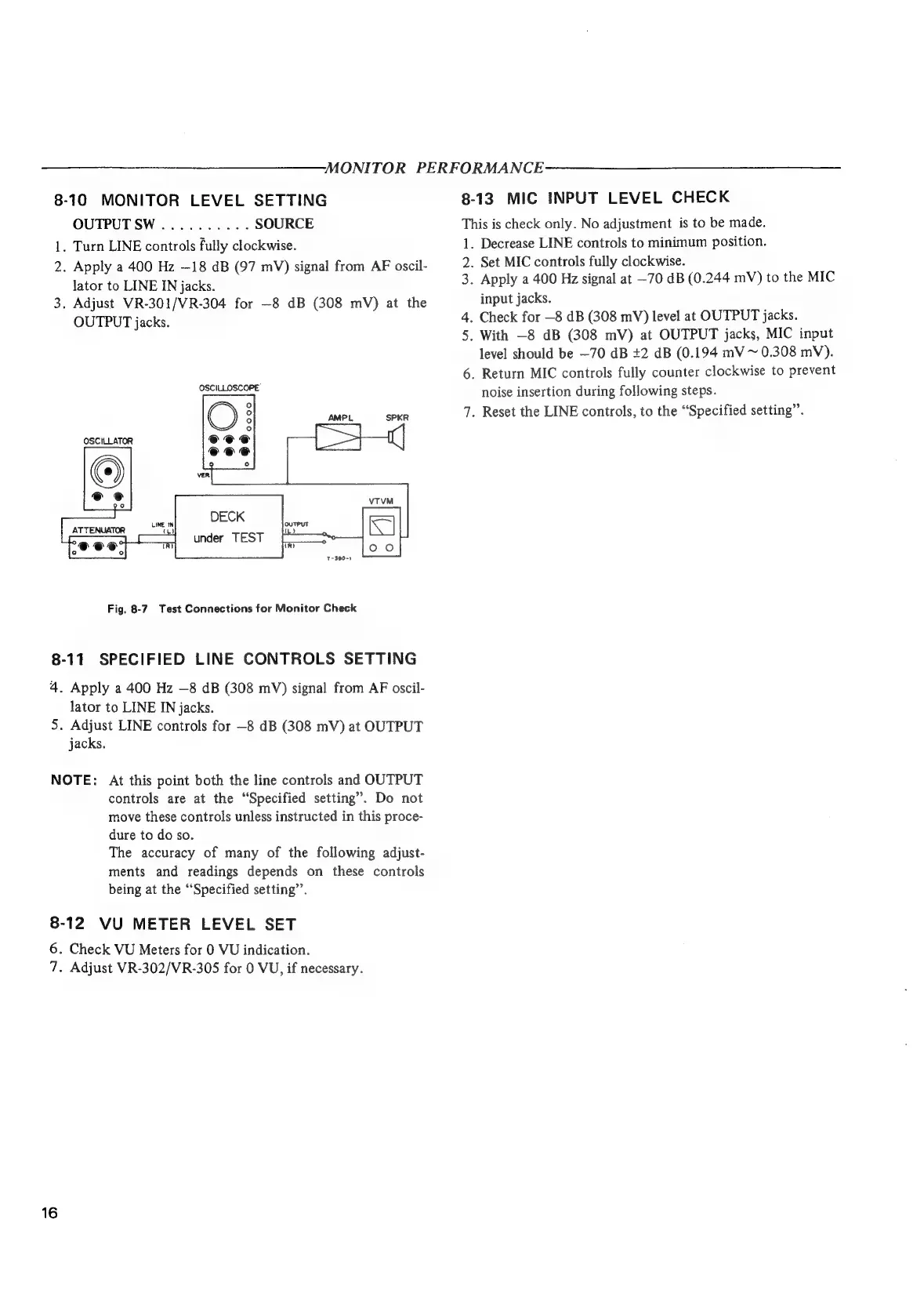
OSCILLOSCOPE
DECK
under
TEST
1-390-1
Fig,
8-7
Test
Connections
for
Monitor
Check
8-11
SPECIFIED
LINE
CONTROLS
SETTING
4
.
Apply
a
400
Hz
—8
dB
(308
mV)
signal
from
AF
oscil-
lator
to
LINE
IN
jacks.
5.
Adjust
LINE
controls
for
—8
dB
(308
mV)
at
OUTPUT
jacks.
NOTE:
At
this
point
both
the
line
controls
and
OUTPUT
controls
are
at
the
“Specified
setting”.
Do
not
move
these
controls
unless
instructed
in
this
proce-
dure
to
do
so.
The
accuracy
of
many
of
the
following
adjust-
ments
and
readings
depends
on
these
controls
being
at
the
“Specified
setting”’.
8-12
VU
METER
LEVEL
SET
6
7
.
Check
VU
Meters
for
0
VU
indication.
.
Adjust
VR-302/VR-305
for
0
VU,
if
necessary.
8
-13.
MIC
INPUT
LEVEL
CHECK
This
is
check
only.
No
adjustment
is
to
be
made.
i,
2.
3.
7
Decrease
LINE
controls
to
minimum
position.
Set
MIC
controls
fully
clockwise.
Apply
a
400
Hz
signal
at
—70
dB
(0.244
mV)
to
the
MIC
input
jacks.
.
Check
for
—8
dB
(308
mV)
level
at
OUTPUT
jacks.
.
With
—8
dB
(308
mV)
at
OUTPUT
jacks,
MIC
input
level
should
be
—70
dB
+2
dB
(0.194
mV
~
0.308
mV).
.
Return
MIC
controls
fully
counter
clockwise
to
prevent
noise
insertion
during
following
steps.
.
Reset
the
LINE
controls,
to
the
“Specified
setting”.

Other manuals for Teac A-4300SX

Related product manuals