EasyManua.ls Logo

Teac A-4300SX - Bias Adjustment

Teac A-4300SX
47 pages
Print Icon
To Next Page IconTo Next Page
To Previous Page IconTo Previous Page
Loading...
RECORD
PERFORMANCE
8-14
BIAS
TRAP
ADJUSTMENT
OUTPUTSW
...........-
TAPE
RECORD
MODE
(L,
R)
SW
....
ON
BIAS
and
EQSW
.......-----
1
Select
REC
PAUSE
mode
1.
Remove
all
input
signals.
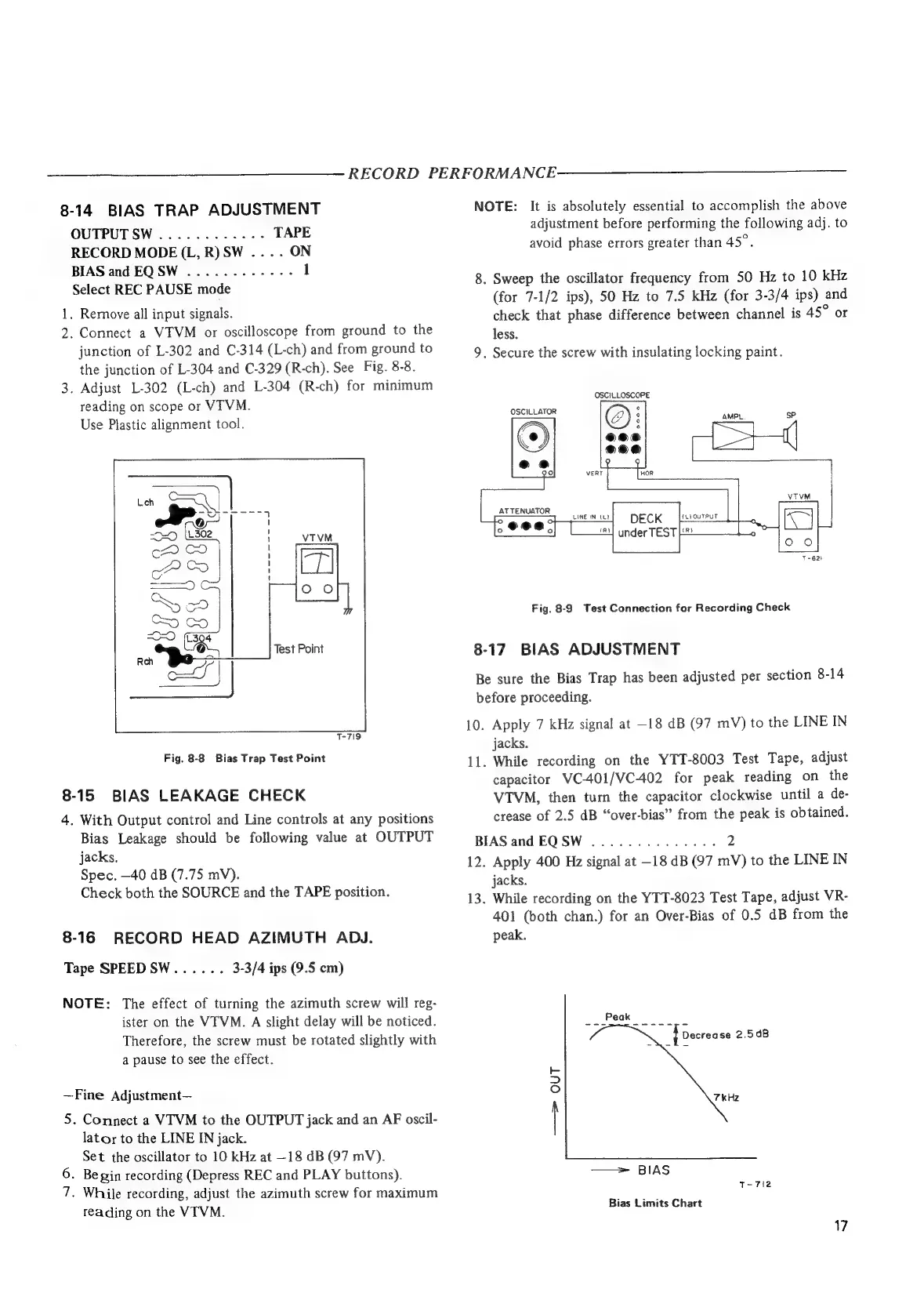
2.
Connect
a
VTVM
or
oscilloscope
from
ground
to
the
junction
of
L-302
and
C-314
(L-ch)
and
from
ground
to
the
junction
of
L-304
and
C-329
(R-ch).
See
Fig.
8-8.
3.
Adjust
L-302
(L-ch)
and
L-304
(R-ch)
for
minimum
reading
on
scope
or
VTVM.
Use
Plastic
alignment
tool.
Test
Point
T-719
Fig.
8-8
Bias
Trap
Test
Point
8-15
BIAS
LEAKAGE
CHECK
4.
With
Output
control
and
Line
controls
at
any
positions
Bias
Leakage
should
be
following
value
at
OUTPUT
jacks,
Spec.
—40
dB
(7.75
mV).
Check
both
the
SOURCE
and
the
TAPE
position.
8-16
RECORD
HEAD
AZIMUTH
ADJ.
Tape
SPEEDSW......
3-3/4
ips
(9.5
cm)
NOTE:
The
effect
of
turning
the
azimuth
screw
will
reg-
ister
on
the
VTVM.
A
slight
delay
will
be
noticed.
Therefore,
the
screw
must
be
rotated
slightly
with
a
pause
to
see
the
effect.
~Fine
Adjustment—
5.
Connect
a
VTVM
to
the
OUTPUT
jack
and
an
AF
oscil-
lator
to
the
LINE
IN
jack.
Set
the
oscillator
to
10
kHz
at
—18
dB
(97
mV).
6.
Begin
recording
(Depress
REC
and
PLAY
buttons).
7.
While
recording,
adjust
the
azimuth
screw
for
maximum
reading
on
the
VTVM.
NOTE:
It
is
absolutely
essential
to
accomplish
the
above
adjustment
before
performing
the
following
adj.
to
avoid
phase
errors
greater
than
45°.
8.
Sweep
the
oscillator
frequency
from
50
Hz
to
10
kHz
(for
7-1/2
ips),
50
Hz
to
7.5
kHz
(for
3-3/4
ips)
and
check
that
phase
difference
between
channel
is
45°
or
less.
9.
Secure
the
screw
with
insulating
locking
paint.
OSCILLOSCOPE
OSCILLATOR
Ee
AMPL
sP
LINE
INL?
(L)OUTPUT
DECK
Lins]
under
TEST
im
Fig.
8-9
Test
Connection
for
Recording
Check
8-17
BIAS
ADJUSTMENT
Be
sure
the
Bias
Trap
has
been
adjusted
per
section
8-14
before
proceeding.
10.
Apply
7
kHz
signal
at
—18
dB
(97
mV)
to
the
LINE
IN
jacks.
11.
While
recording
on
the
YTT-8003
Test
Tape,
adjust
capacitor
VC-401/VC-402
for
peak
reading
on
the
VTVM,
then
turn
the
capacitor
clockwise
until
a
de-
crease
of
2.5
dB
“over-bias”
from
the
peak
is
obtained.
BIAS
and
EQSW
..............
2
12.
Apply
400
Hz
signal
at
—18
dB
(97
mV)
to
the
LINE
IN
jacks.
13.
While
recording
on
the
YTT-8023
Test
Tape,
adjust
VR-
401
(both
chan.)
for
an
Over-Bias
of
0.5
dB
from
the
peak.
—>
OUT
=>
BIAS
T-
712
Bias
Limits
Chart
17

Other manuals for Teac A-4300SX

Related product manuals