EasyManua.ls Logo

Teac A-550RX - Micro Switch (B) Assembly Clearance; Tape Speed

Teac A-550RX
40 pages
Print Icon
To Next Page IconTo Next Page
To Previous Page IconTo Previous Page
Loading...
A-SSORX
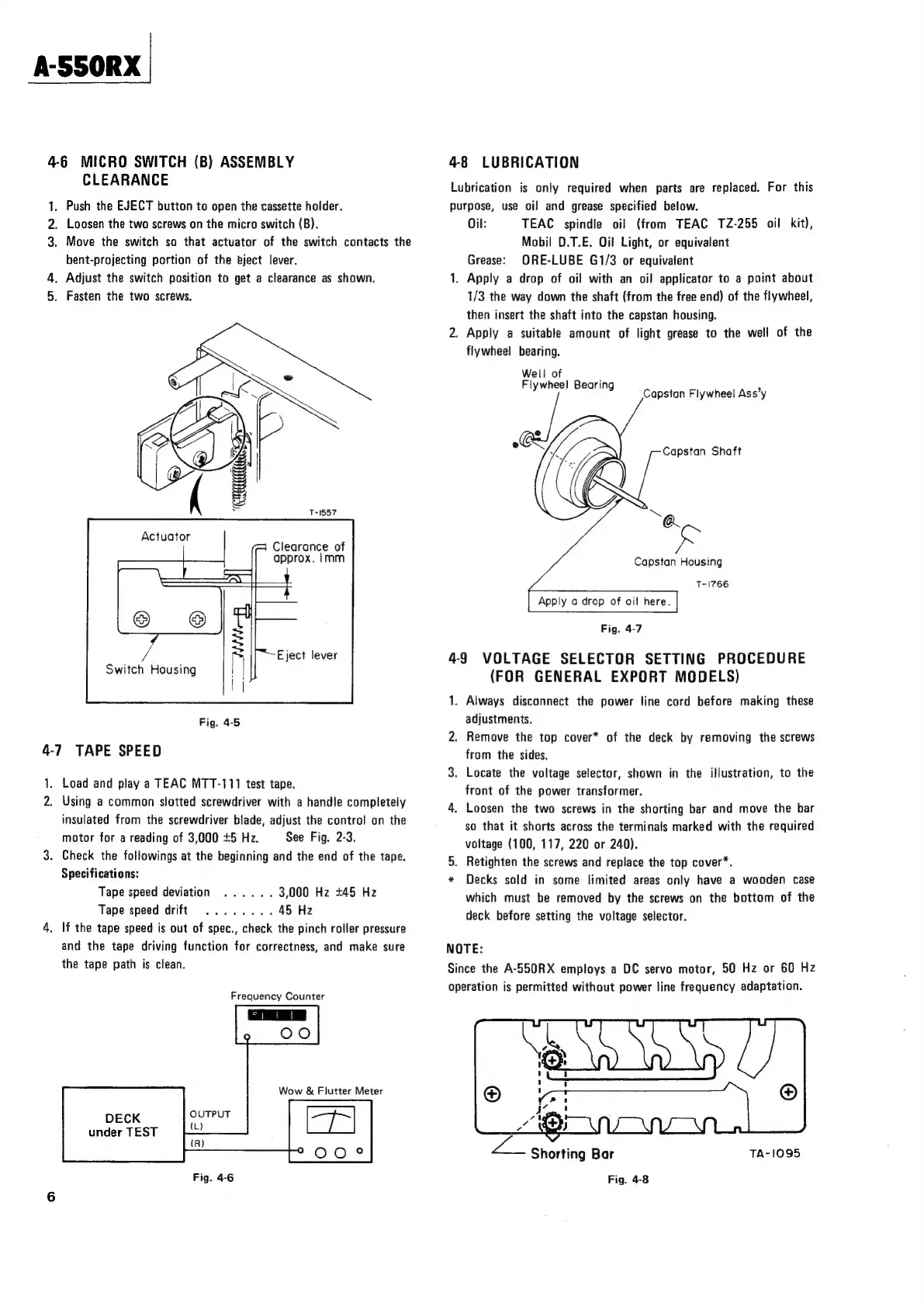
4-6
MICRO
SWITCH
(B)
ASSEMBLY
CLEARANCE
1.
Push
the
EJECT
button
to
open
the
cassette
holder.
2,
Loosen
the
two
screws
on
the
micro
switch
(B).
3.
Move
the
switch
so
that
actuator
of
the
switch
contacts
the
bent-projecting
portion
of
the
bject
lever.
4.
Adjust
the
switch
position
to
get
a
clearance
as
shown.
5.
Fasten
the
two
screws.
Clearance
of
approx.
Imm
4-7
TAPE
SPEED
1.
Load
and
play
a
TEAC
MTT-111
test
tape.
2.
Using
a
common
slotted
screwdriver
with
a
handle
completely
insulated
from
the
screwdriver
blade,
adjust
the
contro!
on
the
motor
for
a
reading
of
3,000
+5
Hz.
See
Fig.
2-3.
3.
Check
the
followings
at
the
beginning
and
the
end
of
the
tape.
Specifications:
Tape
speed
deviation
......
3,000
Hz
+45
Hz
Tape
speed
drift
4,
If
the
tape
speed
is
out
of
spec.,
check
the
pinch
roller
pressure
and
the
tape
driving
function
for
correctness,
and
make
sure
the
tape
path
is
clean.
Frequency
Counter
DECK
OUTPUT
under
TEST
ae
Fig.
4-6
4-8
LUBRICATION
Lubrication
is
only
required
when
parts
are
replaced.
For
this
purpose,
use
oil
and
grease
specified
below.
Oil:
TEAC
spindle
oil
(from
TEAC
TZ-255
oil
kit),
Mobil
D.T.E.
Oif
Light,
or
equivalent
Grease:
ORE-LUBE
G1/3
or
equivalent
1.
Apply
a
drop
of
oil
with
an
oil
applicator
to
a
point
about
1/3
the
way
down
the
shaft
(from
the
free
end)
of
the
flywheel,
then
insert
the
shaft
into
the
capstan
housing.
2.
Apply
a
suitable
amount
of
light
grease
to
the
well
of
the
flywheel
bearing.
Well
of
Flywheel
Bearin
y
9
Capstan
Flywheel
Ass’y
Capstan
Shaft
Capstan
Housing
Apply
a
drop
of
oil
here.
T-1766
Fig.
4-7
4-9
VOLTAGE
SELECTOR
SETTING
PROCEDURE
(FOR
GENERAL
EXPORT
MODELS)
1.
Always
disconnect
the
power
line
cord
before
making
these
adjustments.
2.
Remove
the
top
cover*
of
the
deck
by
removing
the
screws
from
the
sides.
3.
Locate
the
voltage
selector,
shown
in
the
illustration,
to
the
front
of
the
power
transformer.
4.
Loosen
the
two
screws
in
the
shorting
bar
and
move
the
bar
so
that
it
shorts
across
the
terminals
marked
with
the
required
voltage
(100,
117,
220
or
240).
5.
Retighten
the
screws
and
replace
the
top
cover*.
Decks
sold
in
some
limited
areas
only
have
a
wooden
case
which
must
be
removed
by
the
screws
on
the
bottom
of
the
deck
before
setting
the
voltage
selector.
NOTE:
Since
the
A-550RX
employs
a
DC
servo
motor,
50
Hz
or
60
Hz
operation
is
permitted
without
power
line
frequency
adaptation.
TA-1095

Related product manuals