EasyManua.ls Logo

Teac A-7300RX - Page 12

Teac A-7300RX
65 pages
Print Icon
To Next Page IconTo Next Page
To Previous Page IconTo Previous Page
Loading...
8.
MEASUREMENT
AND
ADJUSTMENT
—MECHANICAL—
These
adjustments
should
be
performed
by
experienced
technicians,
and
then
only
when
going
through
the
complete
test
and
check
procedures
on
the
unit
which
is
being
tested.
The
TEAC
A-7300RX
uses
highly
reliable
AC
Motors
for
both
reel
motors,
and
a
DC
direct-drive
capstan
system.
It
should
require
a
minimum
of
mechanical
maintenance
or
adjustment.
These
adjustments
are
made
at
the
factory.
Readjustments
should
only
be
required
after
long
periods
of
operation
or
component
replacement.
The
following
procedures
are
primarily
performance
checks.
Before
performing
these
checks
a
|
complete
cleaning,
demagnetization
and
lubrication
should
be
accomplished
as
outlined
in
the
preventive
maintenance
section
of
this
manual.
See
page
11.
8-1
CHANGING
THE
POWER
LINE
SETTING
Disconnect
the
deck
from
ELECTRICAL
Power.
Voltage
Selection:
1.
Remove
the
outer
case
of
the
Transport
Unit.
2.
Locate
the
voltage
selector
plug
shown
in
Fig.
8-1.
3.
Pull
out
the
plug
and
reinsert
it
so
that
the
desired
volt-
age
appears
in
the
cut-out
window
of
the
plug.
4.
Only
the
voltages
indicated
on
the
selector
plug
socket
can
be
selected
with
the
selector
plug.
If
you
desire
to
use
your
deck
connected
to
a
voltage
that
is
not
indi-
cated
on
the
plug
socket,
please
contact
your
TEAC
authorized
service
center
or
TEAC
dealer.
Frequency
Conversion:
To
change
the
selected
power
line
frequency,
just
set
the
slide
switch
pictured
in
Fig.
8-1
to
the
50
or
60
Hz
position
as
desired.
Remove
the
outer
case
of
the
trasport
Unit
for
access
to
the
slide
switch.
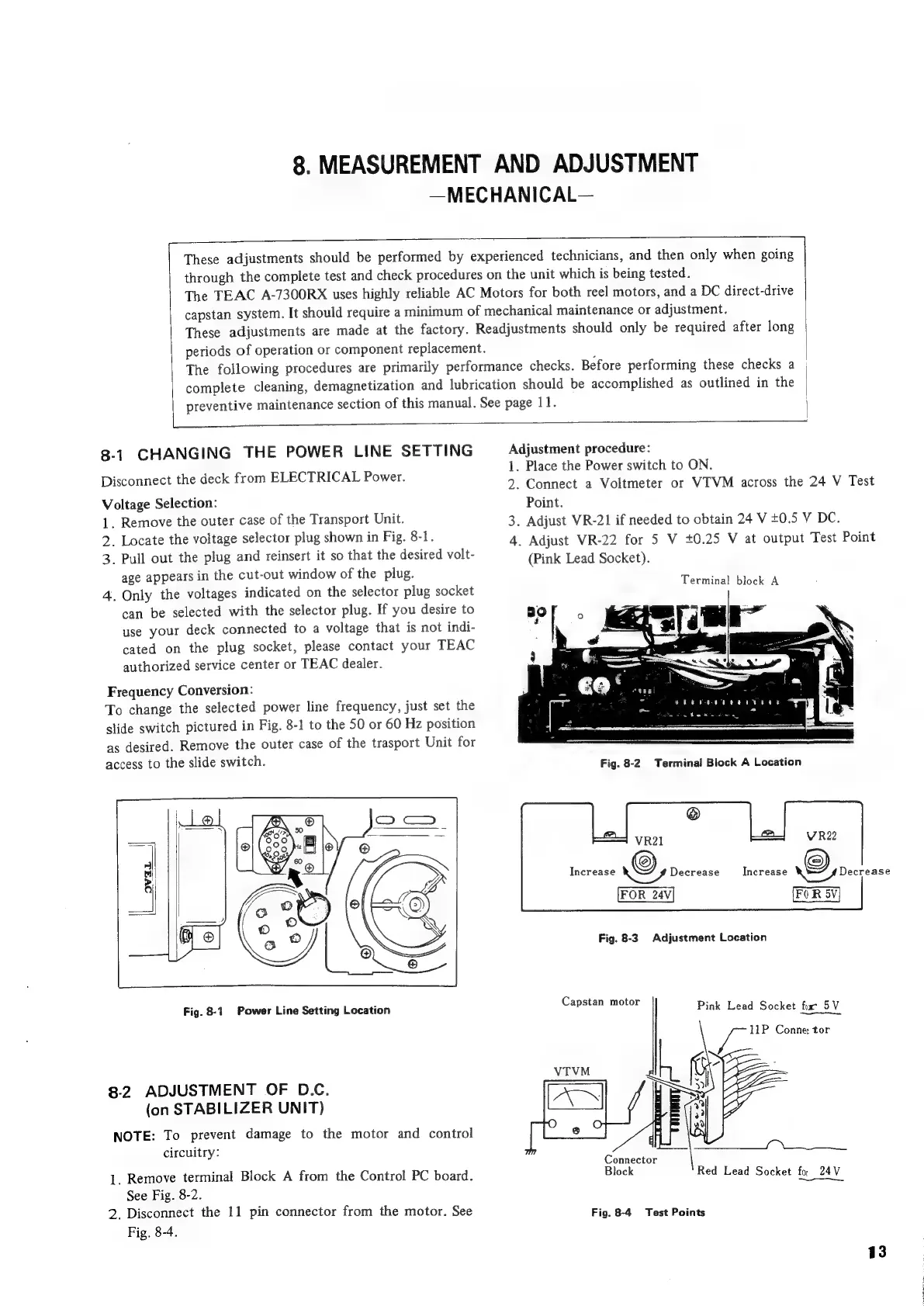
Fig.
8-1
Power
Line
Setting
Location
8-2
ADJUSTMENT
OF
D.C.
(on
STABILIZER
UNIT)
NOTE:
To
prevent
damage
to
the
motor
and
control
circuitry:
|.
Remove
terminal
Block
A
from
the
Control
PC
board.
See
Fig.
8-2.
2.
Disconnect
the
11
pin
connector
from
the
motor.
See
Fig.
8-4.
Adjustment
procedure:
1.
Place
the
Power
switch
to
ON.
2.
Connect
a
Voltmeter
or
VIVM
across
the
24
V
Test
Point.
3.
Adjust
VR-21
if
needed
to
obtain
24
V
+0.5
V
DC.
4.
Adjust
VR-22
for
5
V
+0.25
V
at
output
Test
Point
(Pink
Lead
Socket).
Terminal
block
A
eeevnnreeavenn
is
Fb
aibcaprant
le
yee
Fig.
8-2.
Terminal
Block
A
Location
Fig.
8-3.
Adjustment
Location
Capstan
motor
Pink
Lead
Socket
fur
5V
11P
Conne
tor
Connector
Block
Red
Lead
Socket
fo.
24V
Fig.
8-4
Test
Points
13

Related product manuals